Unstructure Note for LLM and AI agent
Solutions
- Unstructure Note for LLM and AI agent
- Tools
- LLM Model
- Terms
- Implementation
- Stages of an LLM in Production
- Prompt Engineering
- Prompting Frameworks
- Small Languange Models (SLMs)
- RAG (Retrieval-Augmented Generation)
- RAG Chunking
- RAG + Graph
- Vector Databases
- Models
- Fine Tuning
- RLHF and Human Value
- Reinforcement Learning from Human Feedback (RLHF)
- Workflow
- How is Reward Model training data created from Human Feedback
- Proximal Policy Optimisation (PPO)
- How to avoid Reward Hacking
- Scaling Human Feedback : Self Supervision with Constitutional AI
- Chain of Thought (for Reasoning)
- Program-aided Language Models (PAL)
- ReAct : Reasoning and Action
- Responsible AI
- Deployment
- Update
- AI Agent
Tools
- LangChain – the most widely used framework with a massive ecosystem. Provides abstractions for: Models, Tools, Memory, Chains, Agents, Retrivers, Vector stores.
- LangChain provides modular components for working with LLMs in applications. E.I. prompt templates for various use cases, memory to store LLM interactions, tools for working with external datasets and APIs, Pre-built chains optimised, and Agents (PAL, ReAct).
- is a framework for developing applications powered by large language models (LLMs).
- LangGraph – the next evolution for production-grade agent control. solving the limitation of LangChain; agent control flow, LangChain is linear, Graph-based.
- Ollama – Run powerful LLMs locally on our own hardware with a single command.
- Langflow – A drag-and-drop visual builder for designing and deploying AI agents and RAG workflows.
- CrewAI – role-based multi-agent collaboration. with 3 core abstractions: agents, tasks, crew.
- AutoGen – conversational multi-agent systems by Microsoft. for building conversation, collaborative, and autonomous multi-agent system.
- Agno – lightweight and performance-focused framework.
- LlamaIndex
- knowledge/data-centric agents framework, designed to connect LLM agents with structured and unstructured data. act as knowledge orchestration.
- is a simple, flexible data framework for connecting custom data sources to large language models (LLMs).
- vLLM – an open-source for LLM serving performance.
- using virtual memory for the KV cache, vLLM only allocates physical GPU memory as needed, eliminating memory fragmentation and avoiding pre-allocation.
- Flowise – visual agent orchestration framework using no-code
- n8n – agent orchastration that work as a node-based workflow automation system where each performs an operation
- Relevance AI – enterprise-focused agent with capabilities in knowledge integration, workflow automation, and operational decision-making with focuses specifically on business operation.
- OpenClaw – The always-on personal AI agent that lives on our device and talks to us through WhatsApp, Telegram, and 50+ other platforms.
- Open WebUI – A self-hosted, offline-capable ChatGPT alternative
- Docling - Document parser for LLM-ready
- FAISS ( Facebook AI Similarity Search) – a library that allows us to quickly search for multimedia documents that are similar to each other, and thus it acts like a Vector Database.
LLM Model
- Open-source LLMs
- LLaMA
- Mistral
- Qwen
- Gemma
- TinyLlama
- Phi
- Deepseek
- API-based models
- OpenAI
- Custom huggingface + FastAPI
- Model orchestration
- Ollama
- vLLM
- Custom huggingface + FastAPI
Terms
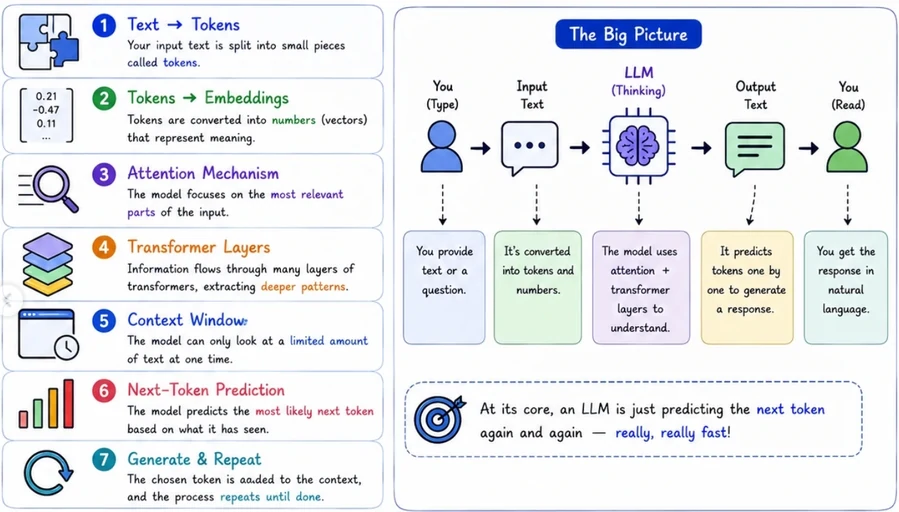
- LLMs: The transformer-based systems that learned to read, write, reason, and code by predicting one word at a time.
- Instruction Tuning (SFT): Fine-tune on curated instruction-response pairs. This teaches the model to follow instructions, answer questions, and behave as a helpful assistant rather than just completing text. Transforms a text predictor into an interactive system.
- Alignment (RLHF / Constitutional Al): Use human feedback or Al-generated preferences to align the model with human values. RLHF trains a reward model from human rankings, then optimizes the LLM to maximize that reward. Constitutional Al uses a set of principles to self-improve.
-
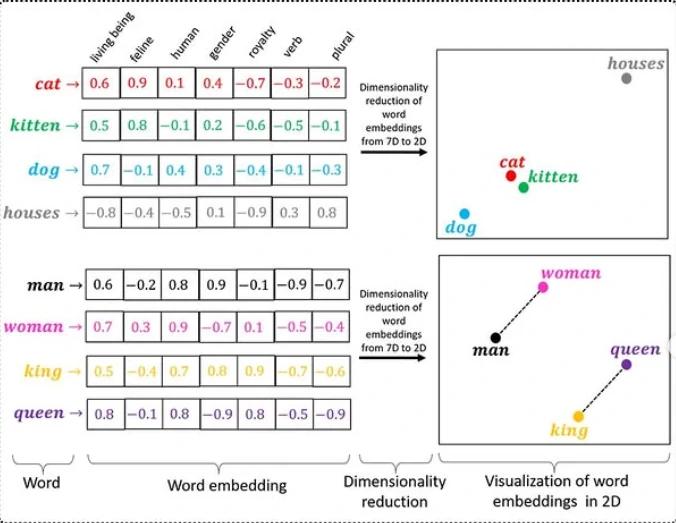
Vector Embedding: is a list of floating-point numbers that represents the meaning of a piece of data, not its characters or keywords. The numbers are produced by a machine learning model trained to place semantically similar content close together in a high-dimensional numeric space.
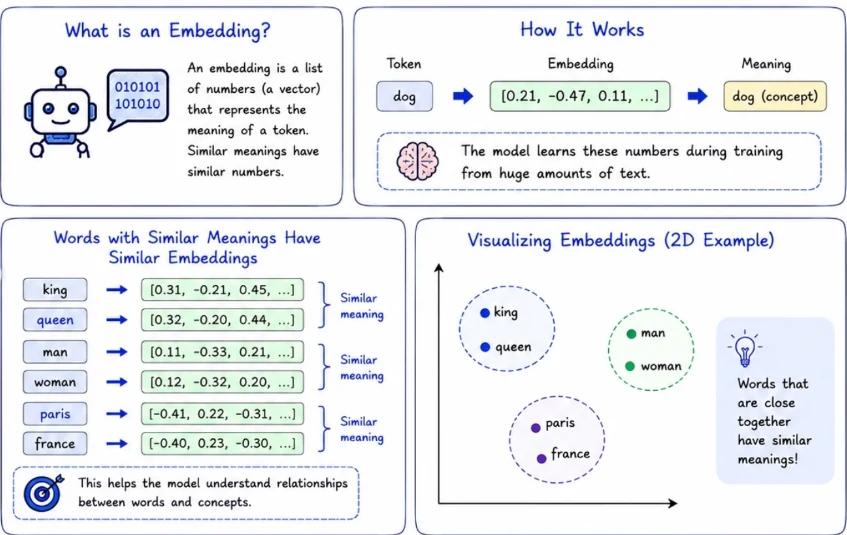
- Embedding model: would place their vectors near each other in that space. That proximity is what makes similarity search work: we embed the user’s query, find the stored vectors closest to it, and return those rows.
- Prompt: The natural language instruction in which we interact with an LLM
- Token: is a small piece of text, it can be a word, a part of a word, or a single character.
- Tokenization Techniques:
- Byte Pair Encoding (BPE): learns the most efficient vocabulary from billions of words of training data splits by frequency.
- WordPiece: Similar to BPE, WordPiece focuses on subword units and is often used in models like BERT.
- SentencePiece: A data-driven approach that tokenizes text into subwords or characters without a pre-defined vocabulary, particularly useful for morphologically rich languages.
- The tokenization method employed:
- word token: whole words as tokens.
- subword token: Parts of the words as tokens.
- character token: Single characters as tokens.
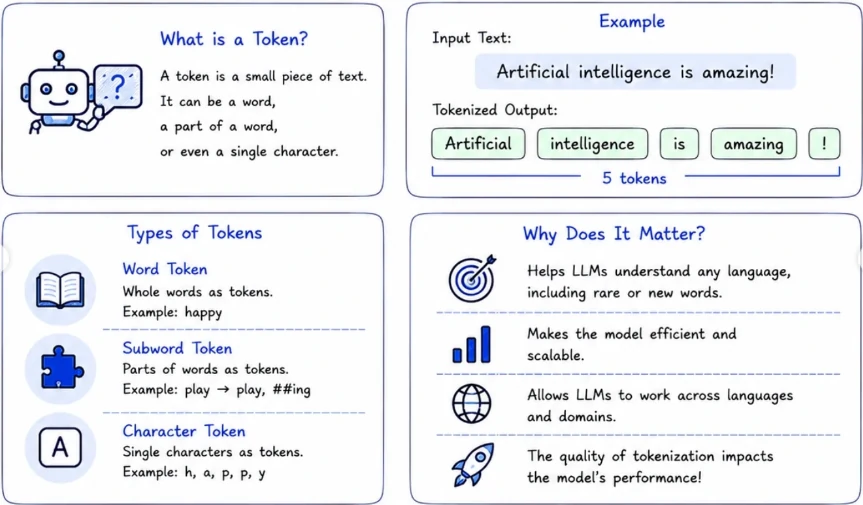
- Tokenization Techniques:
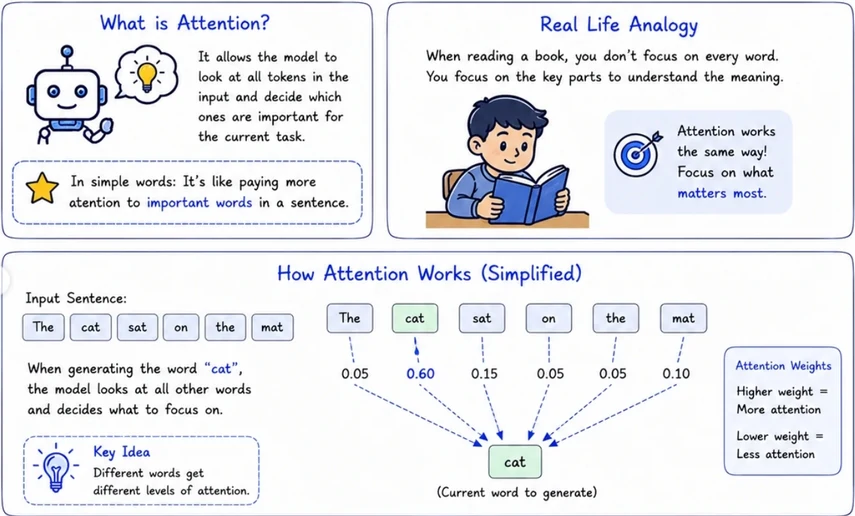
- Attention: It allows the model to look at all tokens in the input and decide which ones are important for the current task.
- Self-Attention: Each word in the sentence pays attention to all other words in the same sentence.
- Cross-Attention: Used in models like encoder-decoder. Decoder pays attention to the encoder output.
- Multi-Head Attention: The model learns multiple attention patterns in parallel to understand different types of relationships
-
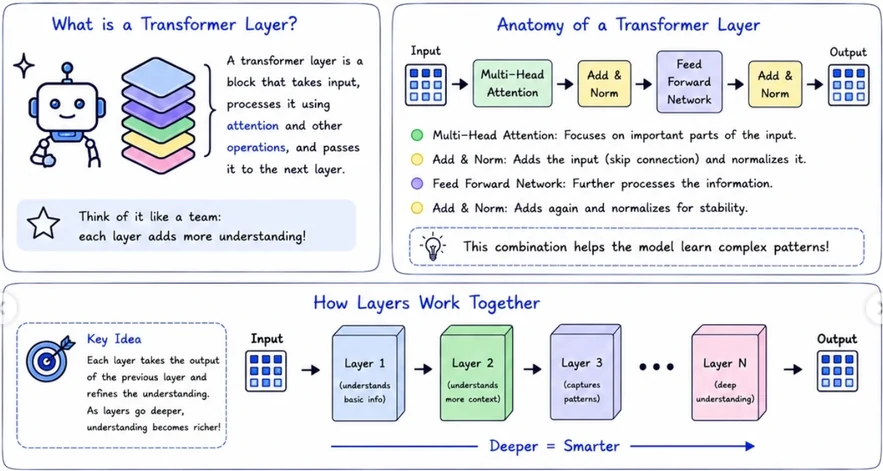
Transformer layer: is a block that takes input, processess it using attention and other operations, and pass it to the next layer.
- In context learning: The inferencing that an LLM does and completes the instruction given in the prompt.
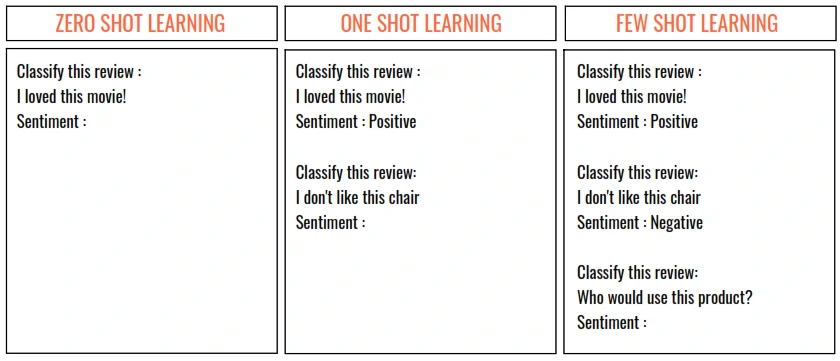
- Zero Shot Learning: The ability of the LLM to respond to the instruction in the prompt without any example.
- One Shot Learning: When a single example is provided
-
Few Shot Learning: If more than one examples in provided
- Context Window: The maximum number of tokens (“memory”) that an LLM can provide and inference on. This includes both the prompt and the response. THe model can only see what’s inside the window and drop the old one (sliding window). This will:
- Limits how much information the model can consider.
- Affects the model’s ability to understand long conversations.
- Improtant for tasks like summarization, code analysis, RAG, etc.
- Bigger context window = better performance on complex tasks.
- Next-Token Prediction: Model predics the most likely next token one step at a time. The model doesn’t know the “truth”. It just picks the most likely token based on patterns it learned.
- Max Tokens: A parameter to adjust the number of tokens to be used for a particular request. This is capped to the context window.
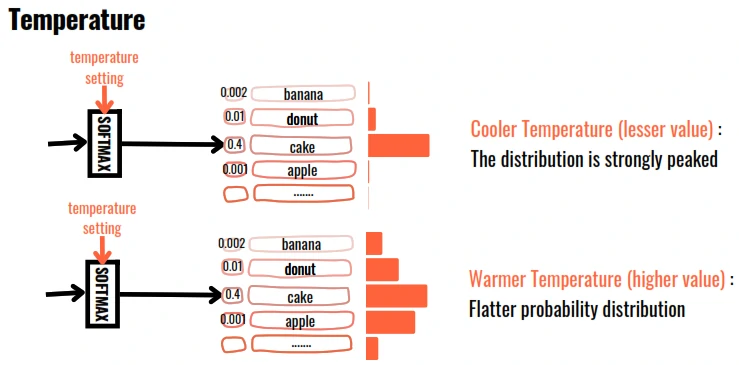
- Temperature: LLM outputs area based on the probability of the generated word. Temperature controls the ramdomness of generation. The higher the temperature, the more random is the generation. It means:
- low (0.0): More focused, deterministic and predictable.
- medium (0.7): Balanced creativity and accuracy.
- high (1.5): Mode creative, random and diverse.
- Hallucinate: LLMs are incredibly good at generating text, but they don’t actually “know” facts. They predict the most likely next words based on patterns in their training data. It happens when:
- Limited knowledge from what model trained on.
- No real-time awareness and real-time information.
- The Model predicts what sounds most likely, an pattern prediction, not truth.
- THe model can be very confident even when the information is completely wrong.Confidence is not accuracy.
- Top P / Top N: Since LLM outputs are based probability, setting a Top Parameter will restrict the selection of next word form the Top ‘N’ most probable words or Top words summing up to probability ‘P’.
- Top P: The word/token is selected using random-weighted strategy but only from amongst the top words totalling to probability <=P. (for P=0.33 => cake:0.2,donut:0.1)
- Top N: The word/token is selected using random-weighted strategy but only from amongst the Top ‘N’ words/tokens. (for N=3 => cake:0.2,donut:0.1,banana:0.02)
- Penalty: Adjust this factor to reduce the repetition of tokens in the generated output. Penalty adds a negative weight to tokens that have previously been generated.
- Frequency penalty: Penalizes token repetation based on frequency. positive value reduce repetition. value range = -2 to 2.
- Presence penalty: Encourages the model to use new tokens that haven’t been generated. value range = -2 to 2.
- Greedy: in output softmax layer, The word/token with the largest probability is selected.
- Random Sampling: in output softmax layer, The word/token is selected using random-weighted strategy.
Implementation
- Standardize the process – A standardized process helps align the team members and ensures a smooth new member onboarding process (especially in this chaos).
- Defines clear milestones – A straightforward way to track our work, measure it, and make sure we’re on the right path.
- Identify decision points – LLM-native development is full of unknowns and “small experimentation”. Clear decision points make it easy to mitigate our risk and always stay lean with our development effort.
- Define a “budget” or timeframe. – Cost tracking
- Experiment – Whether we choose a bottom-up or top-down approach for our experimentation phase, our goal is to maximize the result succession rate. By the end of the first experimentation iteration, we should have some PoC (that stakeholders can play with) and a baseline we achieved.
- The Bottom-Up approach – Start lean, very lean, embracing the “one prompt to rule them all” philosophy. It establishes a baseline for our system. From there, continuously iterate and refine our prompts, employing prompt engineering techniques to optimize outcomes. As we identify weaknesses in our lean solution, split the process by adding branches to address those shortcomings.
- The Top-Down Strategy – Starts by designing the LLM-native architecture from day one and implementing its different steps/chains from the beginning. This way, we can test our workflow architecture as a whole and squeeze the whole lemon instead of refining each leaf separately.
- Retrospective – By the end of our research phase, we can understand the feasibility, limitations, and cost of building such an app. This helps us decide whether to productionize it and how to design the final product and its UX.
- Productization – Develop a production-ready version of our project and integrate it with the rest of our solution by following standard SWE best practices and implementing a feedback and data collection mechanism.
- Optimizating the solution
- Prompt engineering techniques – Like Few Shots, Role assignment, or even Dynamic few-shot.
- Expanding the Context Window from simple variable information to complex RAG flows can help improve the results.
- Experimenting with different models – Different models perform differently on different tasks. Also, the large LLMs are often not very cost-effective, and it’s worth trying more task-specific models.
- Prompt dieting – I learned that putting the SOP¹ (specifically, the prompt and the requested output) through a “diet” usually improves latency. By reducing the prompt size and the steps the model needs to go through, we can reduce both the input and output the model needs to generate. Be aware that the diet might also cause quality degradation, so it’s important to set up a sanity test before doing so.
- Splitting the process into smaller steps can also be very beneficial and make optimizing a subprocess of our SOP¹ easier and feasible.
- Feedback loop – How do we measure success? Is it simply a “thumb up/down” mechanism or something more sophisticated that considers the adoption of our solution? It is also important to collect this data.
- Caching – Unlike traditional SWE, caching can be very challenging when we involve a generative aspect in our solution.
- Debuggability and tracing – Ensure we have set up the right tools to track a “buggy” input and track it throughout the process. – Ensure we have set up the right tools to track a “buggy” input and track it throughout the process.
Stages of an LLM in Production
- Pre-training – Train from scratch on trillions of tokens from web, books, code and curated datasets.
- fine-tuning – Teach domain-specific skills. Supervised fine-tuning on labeled (instruction -> response pairs). It best for domain language, adjusts behavior, brand tone, and custome skills.
- QLoRA, LoRA - fine-tune a 7B model on a single GPU in hours.
- Alignment – Train the model to prefer outputs human actually like, match human preferences. This is what makes a model “helpful” to reduce hallucinations, follow instructions. Approaches:
- RLHF – Classic, complex, needs a reward model.
- DPO – Simpler, skips the reward model entirely.
- GRPO – used by DeepSeek-R1.
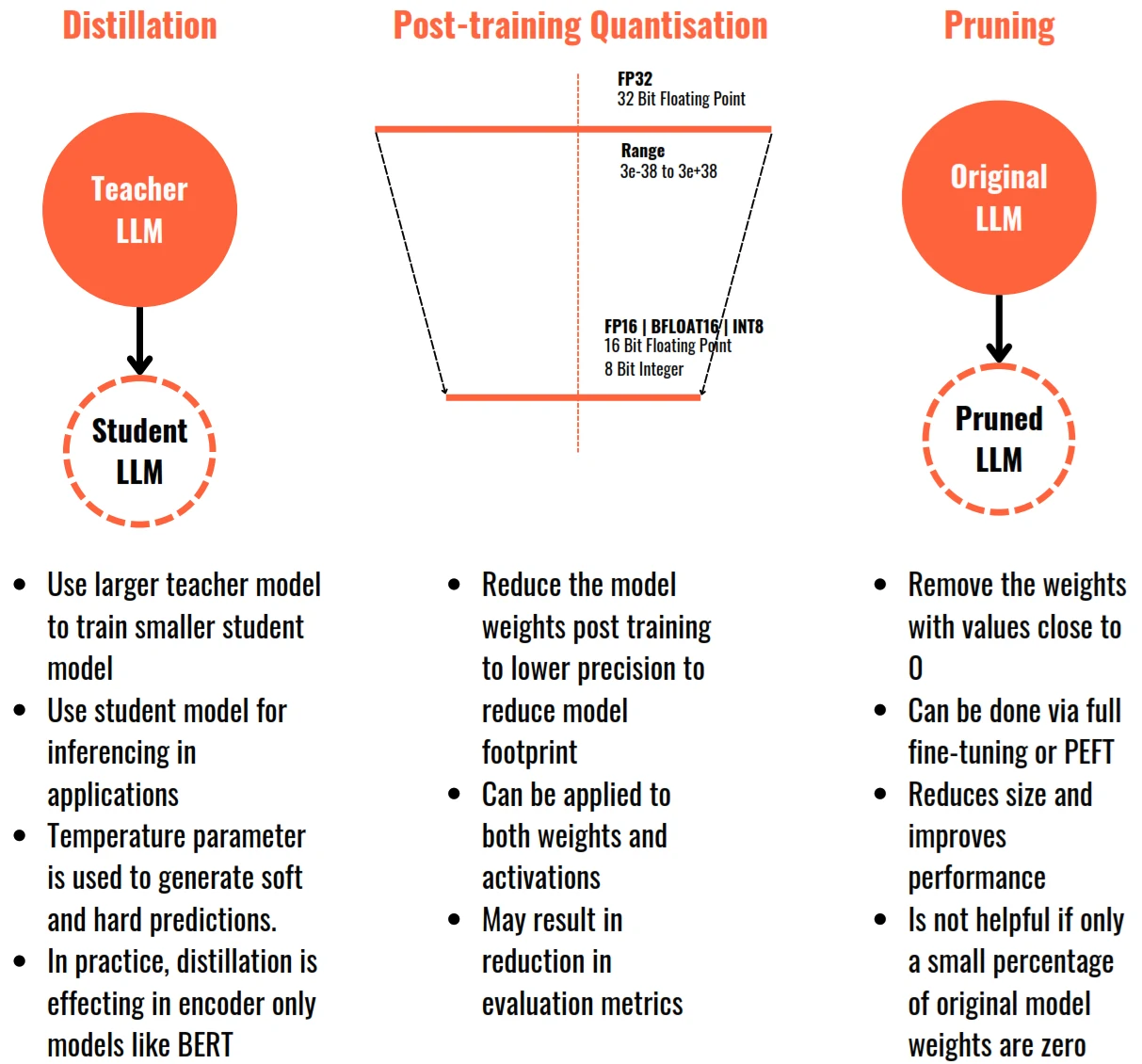
- Distillation – A large model as Teacher (GPT-4, Llama 70B), it trains a small model as student (near-equivalent quality). Student learns from teacher’s outputs + soft probabilities. Near-equivalent quality at a fraction of size. Make it permanently smaller. Change the model itself (unlike quantization), best for reducing inference cost long-term, but quality loss varies by domain.
- Quantization – Shrink memory with same model. I.e. FP16 with 140GB, 70B model in 16-bit -> quantize to 4-bit -> 4-BIT ~35GB same 70B model. Popular formats: GPTQ, AWQ, GGUF, BnB, FP8. That would ~75% size reduction with minimal quality loss. This enables for local deployment and edge inference with ~5% accuracy drop.
- Serving – All at once for GPU memory management, batching, KV cache, queue management. This would stripe cut inference costs by 73% with maximize token/sec at low latency.
- monitoring – catch failure before users do. stack with: prometheus -> grafana -> pagerduty.
- Token/sec
- p95/p99 latency
- KV cache utilization
- Queue depth
- GPU memory + error rate
- Optimization
- Designing prompt templates with structure.
- Advance the prompt instruction with examples.
- Adjust tradeoff between creativity vs accuracy. temperature = 0 mean facts, temperature = 1+ mean creative.
- Control length of prompt token to optimize cost and speed
Prompt Engineering
- Zero-shot Prompting: ask the model to perform a task without any examples.
- Fast, simple and works well for general tasks.
- Few-shot Prompting: provide a few examples to show the model the pattern you want.
- Improves accuracy by showing the desired pattern.
- give the examples at prompt.
- Chain-of-Thought (CoT): Encorage step-by-step reasoning for complex problems.
- Improves reasoning and reduces logical errors.
- Ask to think step by step at prompt
- Role Prompting: Assign a role or persona to get better, context-aware reponses.
- Sets context and improves tone, depth and relevance.
- Add You are a —- at prompt.
- Tree of Thought (ToT): Explore multiple reasoning paths and choose the best answer.
- Better for complex problems with multiple solution paths.
- model explores options and selects the best path.
- Self-Consistency: Generate multiple answers via CoT and pick the most consistent one.
- More reliable answers by reducing random errors.
- Ask to think step by step at prompt and lets model to chose the consistent answer one.
- Constraint-based Prompting: Add rules, limits, or formats to control the output.
- Ensures structured, consistent, and usable outputs.
- Add Rules: —-
- Retireval-Augmented prompting (RAG): provide external knowledge or context to the model to answer accurately.
- Reduces hallucinations, grounded answer and keeps answers factual.
- Reflection / Verification: ask the model to review and verify its own answer.
- Improves accuracy and builds trust in outputs.
- Ask to Review your answer. is it correct? if not fix it at prompt.
Prompting Frameworks
- T-A-G
- Define - [TASK]
- State - [ACTION]
- Clarity - [GOAL]
- Example:
- [TASK] Prepare me for tomorrow’s Tesco Scotch QBR.
- [ACTION] Summarize category trend, promo performance, key competitor moves, and account risks.
- [GOAL] Give me 3 talking points, 2 risks, and 1 commercial ask.
- C-A-R-E
- Give the - [CONTEXT]
- Describe - [ACTION]
- Clarify the - [RESULT]
- Give [EXAMPLE]
- Example:
- [CONTEXT] You are supporting a Tanqueray insights lead preparing for a leadership question on urban Indian gin drinkers.
- [ACTION] Summarize the top themes from recent consumer commentary.
- [RESULT] A one-page insight brief with tensions, occasions, and implications.
- [EXAMPLE] Use bullet points and include evidence snippets.
- R-A-C-E
- Specify - Define who the AI should be [ROLE]
- Describe - state exactly what you want AI to do [ACTION]
- Give the - Provide the background, inputs, and constraints [CONTEXT]
- Describe - Specify the output format and quality bar [EXPECTATION]
- Example:
- [ROLE] Act as a UK KAM.
- [ACTION] Draft a customer-ready brief.
- [CONTEXT] Johnnie Walker performance at Tesco over the last quarter.
- [EXPECTATION] Keep it concise, commercial, and action-oriented.
- R-I-S-E
- Specify - [ROLE]
- Describe - [INPUT]
- Ask for - [STEPS]
- Describe - [EXPECTATION]
- Example:
- [ROLE] Act as a brand manager.
- [INPUT] Baileys winter campaign brief.
- [STEPS] Stress-test the brief, identify ambiguities, suggest 3 creative territories.
- [EXPECTATION] Present output in a review-ready table.
Small Languange Models (SLMs)
- Small Language Models are compact LLMs typically ranging from hundreds of millions to ~10B parameters.
- What defines SLMs isn’t just size, but intent:
- Built for efficiency, not brute force
- Optimized for specific tasks or environments
- Designed to run closer to the user (edge, local, private infra)
- SLMs trade raw scale for focus, speed, and deployability.
RAG (Retrieval-Augmented Generation)
- Combines information retrieval with a language model to generate accurate, relevant, less hallucination, private-secure and up-to-date answers.
RAG = Retrieval + Augmented + Generation- Instead of relying only on what the model was trained on, RAG lets the model look up information from trusted sources before generating a response.
- Retrieves more accurate, contextually appropriate, relevant data from a knowledge base
- Uses an LLM to generate a response based on that context
- RAG systems augment LLM model’s generative capabilities with real-time retrieval of information, ensuring responses are fluent, factually grounded, and relevant.
- Implementing RAG involves considerations such as the size of the context window and the need for data retrieval and storage in appropriate formats
- Core components:
- Embedding generator
- Retriever module
- Prompt Constructor
- Generator (LLM model)
Schema
RAG Pipeline
- Tech side
- Raw docs
- Document Processing
- Chunking
- add metadata
- Embedding generation each chunk
- Vectors and original text stored at each DB
- User side
- Query Processing
- Query Embedding
- Retrieval module
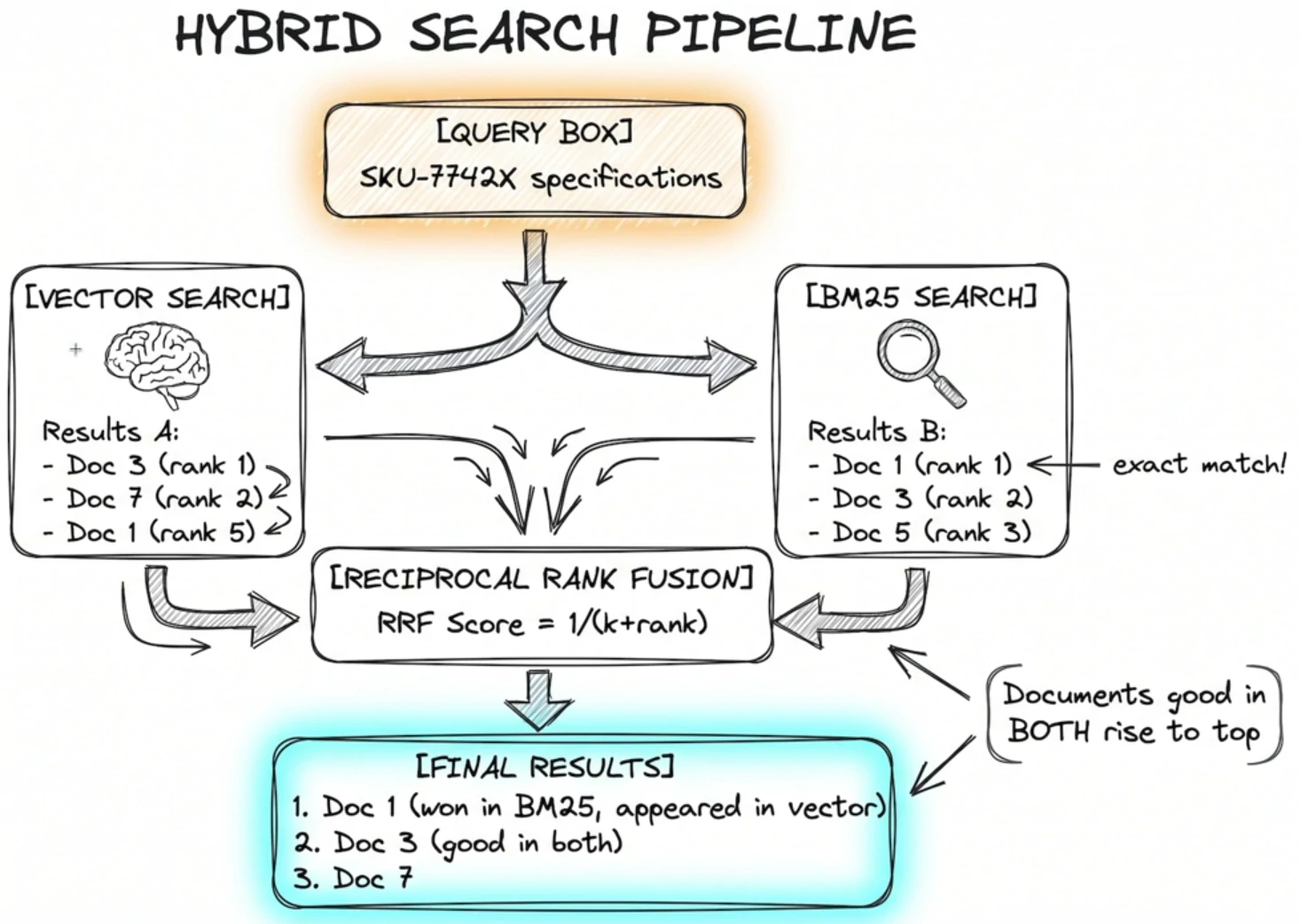
- Hybrid search (Similarity)
- Maximum Marginal Relevance (MMR)
- Top-k chunks
- BM25 Search (Top-30)
- Vector Search (Top-10)
- RRF Fusion (up to Top-40)
- Reranker
- Jina Cross-Encoder Scoring and top-10 Results
- Most Diverse
- Top-k chunks
- Context Formatting
- Organize with Metadata
- Apply instructions (format, tone, constraints)
- LLM model
What RAG system do:
- Chunk documents
- Turns documents into searchable vectors (embed chunks)
- Finds information using semantic search (retrive top-k chunks)
- Sends relevant context to the LLM
- Generates accurate answeres from the data
RAG type
| Type | Details | Examples |
|---|---|---|
| Standard | Basic retrieval + context for Q&A | answering questions from documents (fact-based Q&A, knowledge base assistants) |
| Fusion | multiple queries → better retrieval results | combining multiple retrieval strategies for better coverage (large-scale enterprise search) |
| Corrective | verifies queries or fixes responses | reducing hallucinations and fixing incorrect outputs (high-stakes domains like legal or healthcare) |
| Agentic | step-by-step reasoning loop with tools | automating workflows (research assistants, task automation, multi-step reasoning) |
| Modular | flexible pipeline (swap components) | building flexible systems that can be customized per use case (AI platforms, SaaS tools) |
| Multimodal | works with text, images, etc. | working with images, audio, and text together (medical reports, visual QA systems) |
| Graph | knowledge graph | understanding relationships in structured data (fraud detection, knowledge graphs), cross-document reasoning and multi-hop queries |
| Hybrid | combine between dense + sparse search and reranker | improving search accuracy in enterprise systems (BM/25 keyword - lexical search + semantic search) |
| Multi-query | handling vague or ambiguous user queries (customer support bots) | |
| Re-ranking | improving result quality in search engines and recommendation systems | |
| Adaptive | The system adaptively decides whether retrieval is needed based on the query type, and proceeds accordingly |
Techical
| Name | Details | Examples |
|---|---|---|
| Document crawler | - Scrapy ✅ - BeautifulSoup ✅ | |
| Document parsing | - PDF corpus | - pdfplumber ✅ - Docling ✅ - Crawler logic ✅ - Camelot - Tabula |
| Tokenization | Convert text into numerical or basic text as tokens | - SentencePiece - GPT’s BPE tokenizer |
| Embedding | - Convert the text into vectors - Converting text into vector representations - Captures the semantic meaning of the data - Make documents searchable using similiarity | - OpenAI - text-embedding-3-* - Azure OpenAI - DashScope - text-embedding-v3 - Bedrock - amazon.titan-embed-text-v2 - Vertex AI - text-embedding-005 - Voyage AI - voyage-3 - Cohere - embed-english-v3.0 - SiliconFlow - BAAI/bge-large-zh-v1.5 - Hugging Face - Any TEI-served model ✅ |
| VectorDB | - Pecific database to store vectors - Allows fast semantic search | - ChromaDB - Milvus ✅ - DynamoDB - OpenSearch - Qdrant - pgvector ✅ - Pinecone - Weaviate |
| Sematic Search | - FAISS ✅ | |
| Reranking Function | - Weighted Ranker ✅ - RRF Ranker ✅ - Boost Ranker ✅ - Decay Ranker ✅ - Model Ranker ✅ | |
| Reranking Model | - TEI ✅ - Cohere - Voyage AI - SiliconFlow | |
| LLM Model | - GPT - T5 ✅ - LLaMA ✅ - Falcon - Mistral ✅ - Phi ✅ - Gemini | |
| Model Alignment | - Supervised Fine-Tuning (SFT) - Reinforcement Learning from Human Feedback (RLHF) - Safety & Constitutional AI | - Train on high-quality human-annotated datasets (InstructGPT, Alpaca, Dolly) - Generate responses, rank outputs, train a Reward Model (PPO), and refine using Proximal Policy Optimization (PPO) - Apply RLAIF, adversarial training, and bias filtering |
| Model Optimization | - Compression & Quantization - API Serving & Scaling - Reduce model size with GPTQ, AWQ, LLM.int8(), and Knowledge Distillation - Deploy with vLLM, Triton Inference Server, TensorRT, ONNX, and Ray Serve for efficient inference | - FastAPI ✅ - vLLM ✅ |
| Model collection | - Hugging Face ✅ | |
| Pretraining | - Causal Language Modeling (CLM) with Cross-Entropy Loss - Gradient Checkpointing - Parallelization (FSDP, ZeRO) | |
| Optimizations | - Apply Mixed Precision (FP16/BF16) - Gradient Clipping - Adaptive Learning Rate Schedulers for efficiency | |
| Evaluation & Benchmarking | - Benchmarking performance - Red-Teaming - Adversarial Testing | - HumanEval - HELM - OpenAI Eval - MMLU - ARC - MT-Bench |
| Orchestrator | - Orchestrated conversation flow & intent detection | - LangChain ✅ - LangGraph ✅ - LangSmith - LlamaIndex ✅ - Ollama ✅ - vLLM ✅ - Azure AI Foundry |
| AI Agents | - Microsoft Autogen - Agno - OpenAI Agent Kit - CrewAI |
LLM Aided Retrieval - Optimizing RAG
- Chunking Strategy
- Hybrid Search: (combination of traditional keyword retrieval (BM25) + dense (vector-based) retrieval)
- Metadata Filtering: use tag, source, type, date, etc.
- Prompt Engineering
- Caching Results: speeds up repeated queries
- Multi-hop RAG: breaks complex queries into sub-questions and retrieves and reasons across RAG.
- Query rewriting: Improve vague user queries
- Self-RAG: Model checks its own output
- SelfQuery: where we use an LLM to convert the user question into a query.
- Core component: information » Query Parser » Search term + Filter
- Compression: Using LLM we could increase the number of results we can put in the context by shrinking the responses to only the relevant information.
RAG Optimization
- Everything starts with data quality.
- Poor chunking leads to:
- Too large → noisy, low precision
- Too small → missing context
- Hybrid search (semantic + keyword) becomes essential
- Re-ranking is critical to prioritize true relevance—not just similarity
- Enforce context. Too much information leads to the “lost in the middle” effect.
- LLMs may ignore retrieved context unless prompts enforce:
- Grounding
- Citations
- Context adherence
- Continuous feedback loops
- Performance monitoring
- Adaptive tuning to evolving data
RAG Chunking
- Chunking is the pre-processing step of splitting texts into smaller pieces, or “chunks.” Each chunk is the unit of information that is vectorized and stored in a vector database.
- Chunking decides what knowledge our system is allowed to see.
- Chunking affects both the information retrieval and the amount of contextual information provided. Get it wrong, and we’re either missing crucial context or drowning in irrelevant noise.
- If we split text by token count, we’re not building retrieval. You’re breaking meaning.
-
When chunking is wrong, no vector daetabase or reranker can save us.
- Real RAG chunking is about:
- Preserving ideas, not lines
- Respecting document structure
- Using semantic boundaries instead of arbitrary cuts
- Adding overlap so context doesn’t vanish
- Treating every chunk as a standalone knowledge unit
- When chunking is right:
- Retrieval improves
- Hallucinations drop
- Answers become precise
- Costs go down
- When chunking is wrong:
- Retrieval fails
- Hallucinations increase
- Context gets fragmented
- Token costs explode
RAG Chunking Parameter
-
Chunk Size - Measured in token or characters.
Use Case Recommended Size FAQs 200-400 tokens Documentation 400-800 tokens Legal / Contracts 800-1200 tokens Code 200-500 tokens - Embedding lose precision after ~800 token
- Model gets polluted with noise
- Overlap - Chunks must overlap so knowledge isn’t cut.
- Overlap preserves:
- Definitions
- Cross-sentence logic
- References
- Typical overlap: 10-25%
- Overlap preserves:
- Chunk metadata
- it’s store:
- id
- document name
- section
- page
- token
- etc
- metadata enable:
- Filtering
- Source citation
- Page-level grounding
- Reranking
- it’s store:
Chunking Strategies
- Fixed-Size Chunking
- This technique splits the text into chunks of a fixed size, without considering natural breaks or the structure of the content.
- It’s simple and cost-effective, but lacks contextual awareness.
- Overlapping chunks can be used, allowing adjacent chunks to share some content.
- When fixed-size works: Short, uniform documents where every section is self-contained like product FAQs, news summaries, support ticket descriptions. If your corpus looks like a list of independent entries, fixed-size will serve you well and the simplicity is a genuine advantage.
- Recursive Chunking
- Text is initially split using a primary separator, like paragraphs.
- If the resulting chunks are too large, secondary separators, like sentences, are applied recursively until the desired chunk size is achieved.
- This technique respects the document’s structure and is flexible for various use cases.
- Sentence-Size Chunking
- Semantic Chunking
- In this technique, the text is divided into meaningful units, such as sentences, paragraphs or topic changes, which are then vectorized.
- These units are then combined into chunks based on the cosine distance between their embeddings, with a new chunk formed whenever a significant context shift is detected.
- using sentence embeddings, cosine similarity, break where similarity drops.
- This produces; concept-aligned chunks, self-contained knowledge blocks.
- This strategic will give advantage to give higher retrieval precision and less context pollution.
- Workflow: Text -> Sentence Embeddings -> Similarity Scoring -> Meaning Boundary Detection -> Semantic Chunks
- Document-structure Chunking / Hierarchical Chunking
- This technique creates chunks based on the natural divisions within the document, such as headings or sections, subsection and paragraph.
- It’s very effective for structured data like HTML, Markdown, or code files but it’s less useful when the data lacks clear structural elements.
- This give advantage to maintains parent-child relationships and better navigation.
- Split by:
- Headers
- Sections
- Paragraphs
- Bullet groups
- use case for: Docs, Wikis, Policies, Research papers
- Hybrid Chunking
- Best practice:
- Split by document structure
- Inside each section, apply semantic chunking
- Apply size limits + overlap
- This creates:
- Logically coherent chunks
- Embedding-friendly size
- Retrieval-optimized knowledge blocks
- Best practice:
- LLM-Based Chunking
- This advanced technique uses a Language Model (LLM) to generate chunks.
- The LLM processes the text and generates semantically isolated sentences or propositions that can stand alone.
- While this method is highly accurate, it is also the most computationally demanding.
- Late Chunking (ColBERT)
- Inverting order of embedding:
Embed the entire document first, then chunk the embeddings. - This method utilizes a long context embedding model to create token embeddings for every token in a document. These token-level embeddings are then broken up and pooled into multiple embeddings representing each chunk in the text.
- maintaining the contextual relationships between tokens across the entire document during the embedding process, and only afterwards dividing these contextually-rich embeddings into chunks.
- This method can help mitigate issues associated with very long documents, such as expensive LLM calls, increased latency, and a higher chance of hallucination.
- Inverting order of embedding:
- Agentic Chunking
- Adaptive chunking, agent decides strategy dynamically and no single splitter.
- E.I. a mixed doc will be analyze with agent reasoning (LLM analysis), each part will be execute with difference action (finance data -> needs precision -> table chunker, health data -> needs semantic context -> semantic splitter).
- Workflow: input doc -> classifier / agent, choose strategy, optimized chunks.
RAG Chunking Failure Root Cause
| Failure | Root Cause |
|---|---|
| Model makes things up | Missing chunk |
| Wrong answer | Chunk too small |
| Vague answer | Chunk too large |
| High cost | Over-long chunks |
| Wrong answer | Chunk too small |
| Low recall | Chunk boundaries break meaning |
Chuncking is bad when:
- ask about X, where X defined, who does X work?
- answers are: vague, half-correct
- missing details
Chunks size vs Retrieval Accuracy
| Chunk size | Retrieval | LLM Quality |
|---|---|---|
| Too small | High recall, low precision | Fragmented answers |
| Too large | Low recall | Irrelevent context |
| Just right | High recall + precision | Clean answers |
RAG Chunking for Specific data
- Tables
- stored as: CSV-like text or one chunk per table
- Code
- chunk by: Function, Class, file
- PDFs
- Page -> Section -> Paragraph
RAG + Graph
- Graph RAG treats the knowledge base as a network of entities.
- During indexing, an LLM (or NER pipeline) extracts triples (subject, predicate, object) from every document. Entities become nodes, relationships become edges, and the resulting knowledge graph is stored in Graph database. (Neo4j, Kuzu, TigerGraph).
- At query time, the system does hybrid retrieval: it identifies anchor entities from the query, traverses the graph 1-3 hops to collect connected context, and pulls relevant text chunks then merges both into the LLM prompt.
- “Find me facts that are connected to the question.”
- Retrieval: deterministic graph traversal + vector search
- Entities carry explicit relationships
- Multi-hop paths preserved across documents
- Answers can cite a traceable chain of evidence
RAG + Graph Comparison
| Dimension | Traditional RAG | Graph RAG |
|---|---|---|
| Retrieval mechanism | Cosine similarity over dense vector embeddings (ANN search) | Graph traversal (Cypher / SPARQL) + vector search as a hybrid step |
| Data representation | Flat text chunks embedded as n-dimensional vectors | Typed entities (nodes) + typed relationships (edges) with properties |
| Multi-hop reasoning | Weak — chunks retrieved independently, no logical chaining | Strong — k-hop traversal explicitly follows A→B→C paths |
| Cross-document linking | Only if the same entity appears semantically in both chunks | Native — shared entities create explicit edges across sources |
| Explainability | Low — retrieval is a black-box similarity score | High — retrieval path is a traceable subgraph with named edges |
| Indexing cost | 1× baseline (one embedding pass per chunk) | 10–100× baseline (LLM extraction + dedup + graph build) |
| Update latency | Seconds — embed new chunk, upsert to vector store | Minutes to hours — re-extract entities, merge into graph, re-embed |
| Query latency | ~20–100 ms typical ANN lookup | ~100–500 ms; grows with traversal depth and fan-out |
| Scalability | Horizontal scaling is straightforward; vectors shard well | Sharding graphs while preserving edges is architecturally harder |
| Best data type | Unstructured text: docs, wikis, FAQs, support tickets | Entity-rich domains: legal, healthcare, finance, supply chain |
Advantages
- Multi-hop questions: answer the question that requires chaining two and three facts together.
- Disambiguation across documents: the same entity appears with different surface forms across sources. (similiar word with same meaning but difference letters)
- Temporal / versioned fact: Policies, org charts, product specs change over time. Similarity search retrieves whatever is most similar regardless of version Graph RAG can attach [valid_from, valid_to] intervals to edges and query point-in-time.
Disadvantages
- Create and extract weak edges will give noisy / ambiguous result.
- Questions without entity anchors will falls back the graph RAG to vector search adding latency without value.
- High-velocity corpora (such as realtime data, fast update data) will be difficult cases for graph re-extraction that is typically batch-scheduled.
Agentic RAG
-
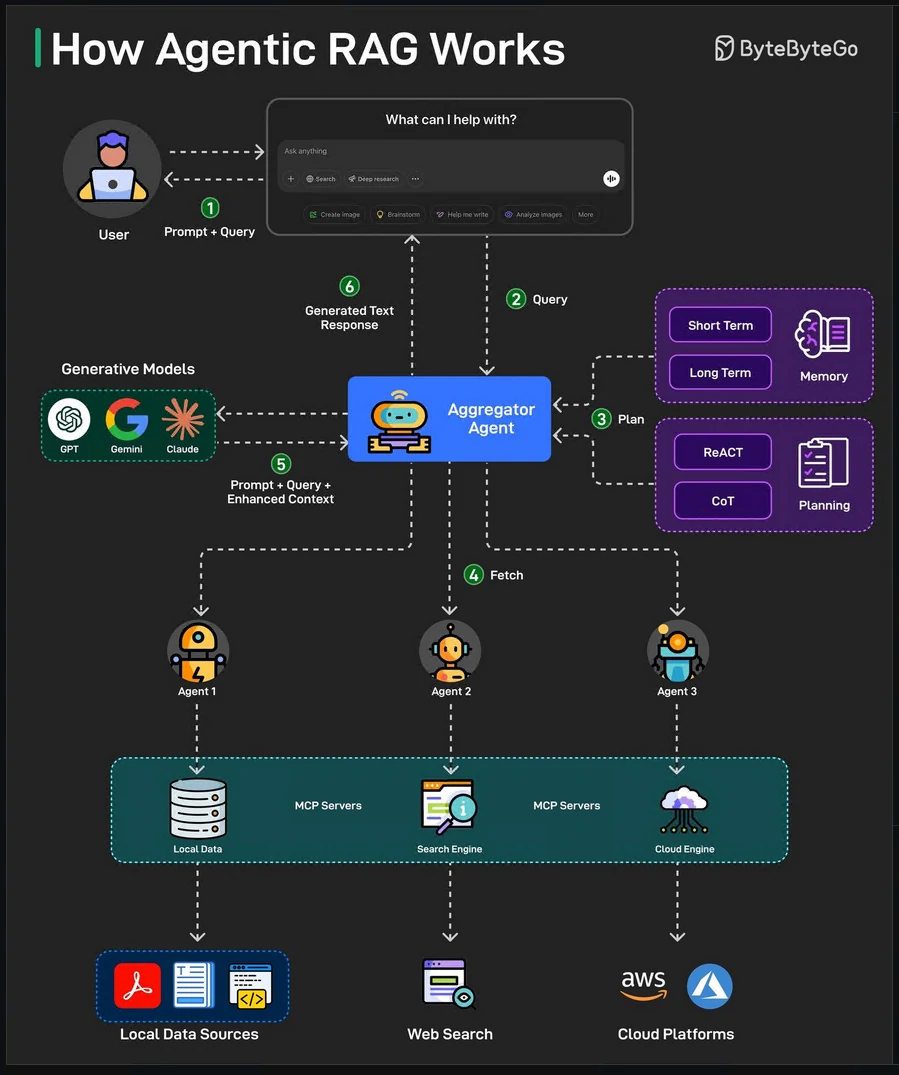
Introducing AI agents that can make decisions, select tools, and even refine queries for more accurate and flexible responses.
-
Here’s how Agentic RAG works on a high level:
- The user query is directed to an AI Agent for processing.
- The agent uses short-term and long-term memory to track query context. It also formulates a retrieval strategy and selects appropriate tools for the job.
- The data fetching process can use tools such as vector search, multiple agents, and MCP servers to gather relevant data from the knowledge base.
- The agent then combines retrieved data with a query and system prompt. It passes this data to the LLM.
- LLM processes the optimized input to answer the user’s query.
Example Use Cases
- Enterprise Knowledge Bases
- Customer Support Bots
- Ask-the-docs chatbot
- Research and Summarization
- Legal and Compliance Assistant
- Healthcare Information Retrieval
- Sales and Marketing Intelligence (Product comparisons)
- E-commerce Product Assistant
- Personal AI with our Data
- Support agent assistant
Vector Databases
- a Storage to stores the Embedding data (which are mathematical representations of meaning) in vector data type.
- Powerful to solving semantic queries, ask about similarity and relation.
- This DB acts as memory to get the data for LLM Model.
Embedding Flow
ELI5: Sparse Vector vs Dense Vector
- e.g. we have a huge sentence with 100000 words
- Sparse Vector
-
We create a list with 100,000 slots.
Slot #523 = "love" → 1 Slot #1829 = "pizza" → 1 Slot #7321 = "I" → 1 Everything else = 0 - Result: [0,0,0,0,1,0,0,0,0,0,…,1,…,1,…]
- Most values are zero. That’s why it’s called sparse (mostly empty) and only exact overlapping terms contribute.
- Sparse vectors are usually generated by algorithms like:
- TF-IDF
- BM25
-
- Dense Vector
- Instead of storing every word position, an AI model converts the sentence into something like:
[0.24, -0.87, 0.56, 0.13, ...]- Maybe only 768 numbers long. These numbers don’t correspond to specific words. Instead they capture the meaning of the sentence.
- Sentence with similar sentence will produce vectors that are close together. That’s why it’s called dense (almost every dimension contains information).
| Feature | Sparse Vector | Dense Vector |
|---|---|---|
| Representation | Mostly zeros | Mostly non-zero |
| Dimensions | Very high (100k+) | Lower (384–4096) |
| Captures meaning | No/limited | Yes |
| Exact keyword matching | Excellent | Moderate |
| Synonym handling | Poor | Excellent |
| Explainability | High | Low |
| Storage efficiency | Sparse compression | Fixed-size vectors |
| Best for | Search engines, IDs, codes | Semantic search, RAG |
| Typical algorithm | BM25, TF-IDF, SPLADE | Embeddings from transformers |
| Modern usage | Hybrid search | Hybrid search |
BM25 or Best Match 25
- Technic to search by frequency methods. Thus not good at synonyms and semantic meaning.
- This method uses:
- Exact matches
- Frequence and rare terms
- BM25 scores a document against a query by looking at it from multiple directions. Its main components are:
- TF term frequency component: asks how often the term appears in this specific document. BM25 applies a saturation function rather than just using the raw frequency. Because of this saturation function the score grows rapidly in the starting and then flattens.
- IDF component: how difficult it is to find a term anywhere in the corpus. IDF gives rare terms more weightage.
- The length normalisation component penalises longer documents. A longer document naturally contains more term occurrences.
- It is a bag-of-words model and word order and semantics do not matter to it.
Techical
- Stores
- Vectors
- Metadata
- Original content
- Supports
- Fast similarity search
- Filtering
- Scalable retrieval
- Indexing
- Local Sensitive Hashing (LSH): Similar vectors have higher chances of sharing similar hash codes.
- Hierarchical Navigable Small World (HNSW): Organize vectors into difference layers with varying probabilities into a hierarchical graph structure.
- Approximate Nearest Neighbor Oh Yeah (ANNOY): Organize high-dimensional data using binary tree.
- Measure similarity with distance function
- Cosine similarity
- Euclidean distance
- Dot product
- Scoring hybrid system
- vector_score * 0.7 + keyword_score * 0.3
Cost of Vector DB
- Large storage for storing vectors
- RAM heavy
- Indexing is complex
Core Architecture of a Vector Database
- Ingestion Layer - Consume the data
- Raw data
- Vectors
- Metadata
- Indexing Layer - Build Appoximate Nearest Neighbor (ANN) indexes. Using Graph and clustering to indexing.
- HNSW
- IVF
- PQ
- Storage Layer
- Vectors
- Metadata
- IDs
- Query Engine
- A vector
- Filters
- Top K
- return most similar items
Vector DB Usage
- Semantic Search
- Recommendataion engines
- AI agents with memory
- Document QA
- Similarity matching
- Fraud detection
- Image and audio search
Vector DB tools
- Dedicated DB Examples:
- Chroma
- LanceDB
- Milvus
- Weaviate
- Pinecone
- DS Support vector search:
- PostgreSQL (pgvector)
- Cassandra
- ClickHouse
- OpenSearch
- elasticsearch
- Redis
Hybrid search
Vector seach could fail when:
- Searching specific code name that leads to no semantic meaning.
- Searching acronyms, exact names, or uncommon words - model does’s know abbreviations.
Lost in the middle
- The Problem that Hybrid Search Does Not Solve is how the model give attention to the chunks of information. althought LLM model reads all of them, its attention is not uniform across the context window.
- lost in the middle problem have shown that models pay more attention to context near the beginning and end of their input and are less reliable about information buried in the middle.
Models
Workflow LLM
The Transformer Model
- The strength of the transformer model is in its ability to understand the significance and context of every word in a sentence.
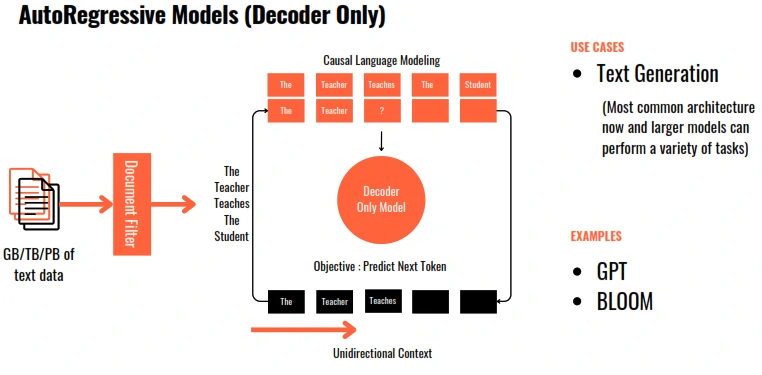
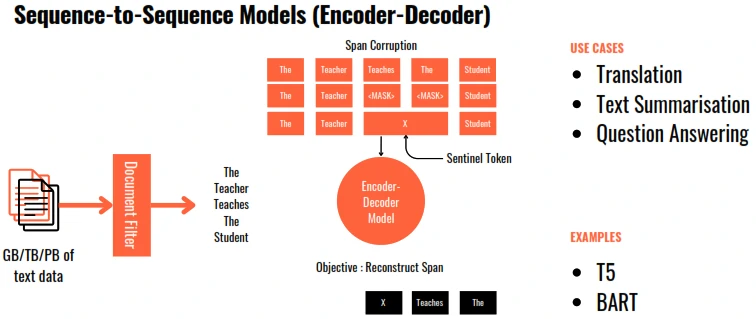
- Architecture plays a critical role in defining what objective can each LLM be used for.
- LLM size is measured in terms of the number of parameters.
- To optimize the model » minimise the loss function of the model » providing more training tokens and/or increasing the number of parameters (model size) » increase Compute cost (budget, time, GPUs).
- The compute optimal number of training tokens should be 20 times the number of parameters.
- This means that smaller models can achieve the same performance as the larger ones, if they are trained on larger datasets.
How does the Transformer model work?
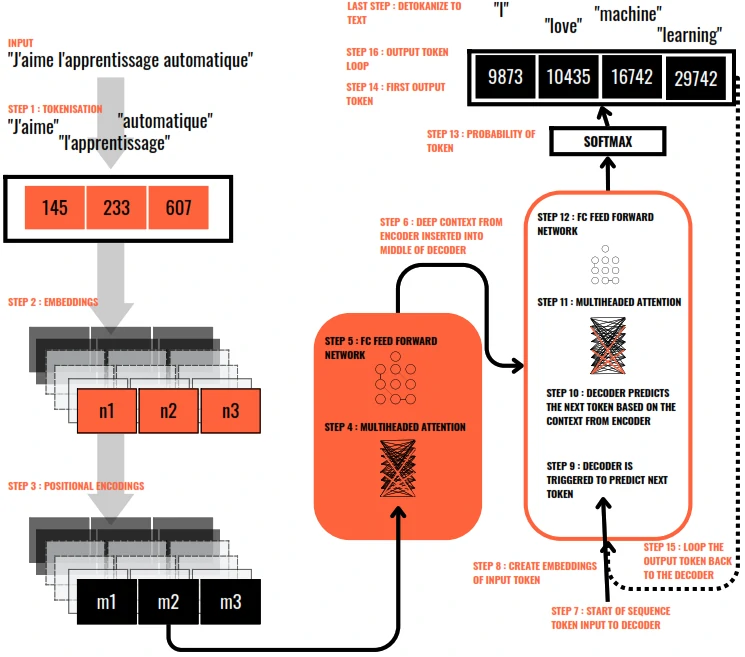
- Tokenization is the process of breaking down text into smaller units, such as words or phrases, for easier processing and analysis.
- Embedding is the process where each token is then transformed into a vector in a high-dimensional space. This embedding captures the meaning and context of each word.
-
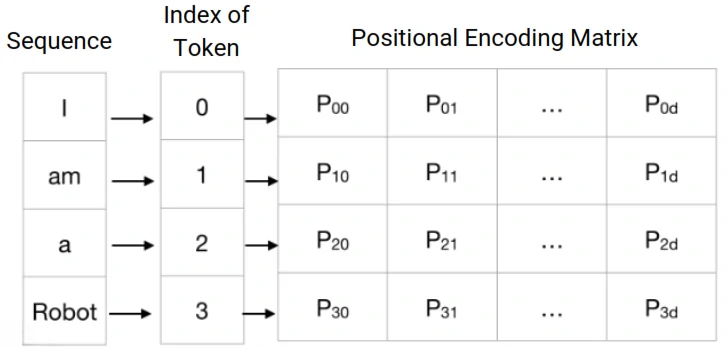
Positional encoding is the process of adding information to a model about the position of elements in a sequence.
- Encoder: Encodes each input token into vector by learning self-attention weights & passing them through a FCFF Network.
- Decoder: Accepts an input token, passes them through the learned attention and FCFF Network to generate new token.
- Self Attention - The model calculates attention scores for each word, determining how much focus it should put on other words in the sentence when trying to understand a particular word. This helps the model capture relationships and context within the text.
- Multi-headed Self attention is a mechanism in transformers that runs several self-attention processes in parallel, allowing the model to focus on different parts of the input sequence from different perspectives at the same time.
- Softmax: Calculates the probability for each word to be the next word in sequence.
- Output layers of the transformer convert the processed data into an output format suitable for the task at hand, such as classifying the text or generating new text.
Model Type
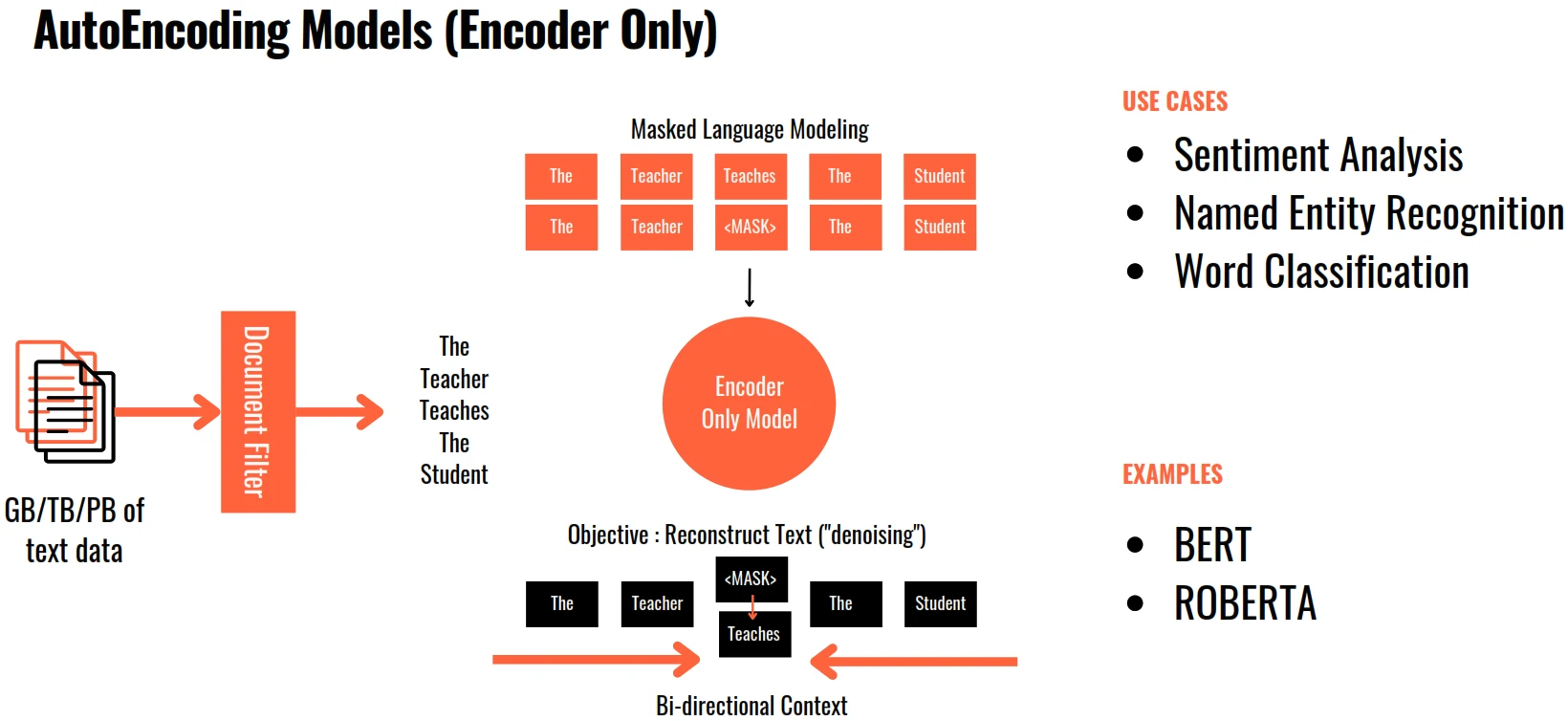
- BERT: Bidirectional Encoder Representations from Transformers.
- the encoder-only Transformer that reads in both directions.
- Using Masked Language Modelling (MLM) and Next Sentence Prediction (NSP) giving it deep bidirectional context representations for languange understanding tasks.
- BERT’s solution: mask tokes at random (MLM), then train the model to predict them (NSP) using full bidirectional context simultaneously seeing left and right.
- Use cases:
- Sentiment analysis
- Question answering
- Named entity recognition
- Matural language inference
| Character | SLM | LLM |
|---|---|---|
| Architecture | <10B (compact, efficient) | 10B+ (deeper, complex) |
| Task Complexity | Simpler, single-step tasks | Complex, multi-step tasks |
| Long COntext Recall | Short context window (limit memory, requires RAG / chunking) | Long context window (tracks entity, connects distant details reliably, less reliant on external retrieval) |
| Latency and Cost | Lightweight, low compute, fast inference, low latency and cost | Heavy compute, slower inference, higher latency, higher cost |
| Deployment and privacy | Deploy on edge/on-device local | Deploy on cloud / API, external inference dependency |
| Where Each Fits | fast and efficient AI | Powerful and versatile AI (agent workflow, multimodal) |
Pre-Train LLM Types
Pre-train for Domain Adaptation
- Developing pre-trained models for a highly specialised domains may be useful when:
- There are important terms that are not commonly used in the language.
- The meaning of some common terms is entirely different in the domain vis-a-vis the common usage.
- Examples: in Legal and medical fields.
Computational Cost
- 1 Parameter = 4 bytes (32 bit float)
- 1 Billion Parameters = 4 x 10E9 bytes = 4GB
- Model Parameters = 4 bytes per parameter
- 2 Adam Optimisers = +8 bytes per parameter
- Gradients = +4 bytes per parameter
- Activations = +8 bytes per parameter
- Total = 4 bytes per parameter + 20 extra bytes per parameter
- To store = 4 GB@32 bit full precision
- To train = 80 GB@32 bit full precision
- PetaFLOP/s-day = Number of FLOating Point operations performed at the rate of 1 petaFLOP per second for one day.
- 1 petaFLOP per second = 10E15 or 1 Quadrillion floating point operations per second.
Model Format
### Reason for different formats
- Quantization: Shrinking 16-bit weights down to 4-bit or 8-bit to save VRAM without losing intelligence.
- Hardware Tuning: Optimizing math operations specifically for NVIDIA, GPUs.
- Fast Loading: Using “Zero-copy” techniques to map files directly to memory instread of slow reading.
- Security: Moving from unsafe formats (i.e. pickle) that could execute malicious code.
### The Format
- Safetensors
- Is a simple, fast, and seure way to store model weights.
- Impossible to run malware during loading.
- Loads 2x-5x faster that old .bin files.
- Better for cloud with high security and speed.
- GGUF: Universal CPU + GPU format (llama.cpp)
- For local inference.
- It puts the models weights and metadata in one single file.
- Easily offload layers form CPU to GPU.
- Contains all instructions needed to run (no config.json needed).
- High compression: supports 2,3,4,5,6,8-bit quantization. (Q2_K to Q8_0)
- Quality: ~92% at Q4_K_M
- self-contained single file (weights, tokenizer, metadata)
- GPTQ vs AWQ
- Specific for dedicated NVIDIA GPU, used to fit large models into VRAM.
- Vram savings: ~4x and speedup: ~2-3x.
- Accuracy at low bit.
- GPTQ: Gradient-based post-training quantization
- Post-training quatization.
- 3-4 bit.
- Quality: ~90% retained
- speed: 2-4x faster than FP16
- Uses Hessian approximation. Compesates quatization error layer-by-layer.
- AWQ: Activation-aware weight quantization
- Activation-Aware Quantization. It protects “important” weights during compression. with better quality at 4-bit.
- INT4 bit
- Quality: ~95% highest of all
- speed: fastest on vLLM
- Protects top 1% of weights. keeps salient channels at high precision.
- EXL2
- Is the latest evolution for local GPU users, built on top of the ExLlamaV2 engine.
- It’s built for pure performance.
- Mixed Precision: It can use different bit-rates for different layers. This maximizes quality where it matters most.
- 8-bit Cache: Uses advanced caching to allow for massive context windows (up to 128k+) on consumer cards.
- BitsAndBytes: on-the-fly quantization for fine-tuning
- 3 / 8 bit.
- Quality: ~85% at 4-nit NF4
- supports training with QLoRA enabled
- Quantizes on model load.
- FP8 8-bit floating point
- the GPU-native format
- 8 bit float
- Quality: ~99% near-BF16
- Native 8-bit float on GPU
- halves memory vs FP16 with minimum quality loss
Model Optimization
- PEFT (parameter efficient fine-tuning): Fine-tune only small parts of the model instead of the full model.
- Quantization: Reduce mdoel precision (16-bit -> 8-bit -> 4-bit) to reduce memory and improve speed.
- LoRA (low-rank adaptation): Adds lightweight trainable adapters to an LLM.
- QLoRA (quantized low-rank adaptation): LoRA + Quantization for low-memory fine-tuning.
- RAG (retrieval augmented generation): Fetch external knowledge dynamically instead of retraining the model.
- Distillation (knowledge distillation): Train a smaller “student” model using a larger “teacher” model.
- Pruning: Remove unnecessary weights/neurons to make models smaller and faster.
- Flash Attention: Optimized attention mechanism for faster and memory-efficient inference.
- KV Cache (key-value cache): Reuse previously computed tokens for faster text generation.
- MoE (Mixture of Experts): activate only specific parts of the model instead of the entire model.
Evaluation
| Metric | Detail | Workflow | How we measure |
|---|---|---|---|
| Faithfulness | Measures whether the output is factually consistent with the given context or instructions. | Input → LLM → Output → Check vs context | - Faithfulness Score (0 to 1) - Supported Statements % |
| Hallucination Rate | Measures the proportion of information in the response that is not supported by the context or real-world facts. | Input → LLM → Output → Detect unsupported claims or fabricated facts | - Hallucination Rate (%) - % of Unsupported Statements |
| Answer Relevance | Measures how relevant the response is to the user’s question. | Question → LLM → Relevance Check | - Relevance Score (0 to 1) - Human or LLM Judge Score |
| Correctness | Measures whether the answer is factually correct. | Question → LLM → Compare with Ground Truth reference | - Accuracy (%) - Exact Match (EM) - F1/ROUGE/BLEU |
| Coherence & Fluency | Measures the quality of language, grammar, and readability. | Question → LLM → Evaluate Language Quality and fluency | - Fluency Score (1-5) - Perplexity Score |
| Toxicity & Safety | Measures whether the response contains harmful, toxic, or unsafe content. | Question → LLM → Safety Check / Toxicity Classifier | - Toxicity Score (0 to 1) - % Flagged Responses |
Fine Tuning
- Few shot learning might not work for smaller LLMs and it also takes up a lot of space in the context window.
- Fine Tuning is a supervised learning process, where we take a labelled dataset of prompt-completion pairs to adjust the weights of an LLM.
- Instruction Fine Tuning is a strategy where the LLM is trained on examples of Instructions and how the LLM should respond to those instructions. Instruction Fine Tuning leads to improved performance on the instruction task.
- Full Fine Tuning is where all the LLM parameters are updated. It requires enough memory to store and process all the gradients and other components.
- The process of taking the base model and continuing to train it on a small, specific dataset, so it becomes an expert in a narrow task. Instead of knowing a little about averything, it know a lot about specific domain. It learns product’s tone, terminology, appropriate responses, matches the conventions and FAQ answers.
- It resolved a limitation of Prompting. Because it internalises the pattern, need less tokens at inference, more reliable, and can be trained on proprietary data that we would never want to put in a prompt or based model.
Catastrophic Forgetting
- Fine Tuning on a single task can significantly improve the performance of the model on that task. However, because the model weights get updated, the instruct model’s performance on other tasks (which the base model performed well on) can get reduced.
- Avoiding Catastrophic Forgetting
- If we only want the model to perform well on the trained task, it is unnecessary.
- Perform fine tuning on multiple tasks, this will require lots of examples for each task.
- Perform Parameter Efficient Fine Tuning (PEFT)
Fine Tuning Techniques
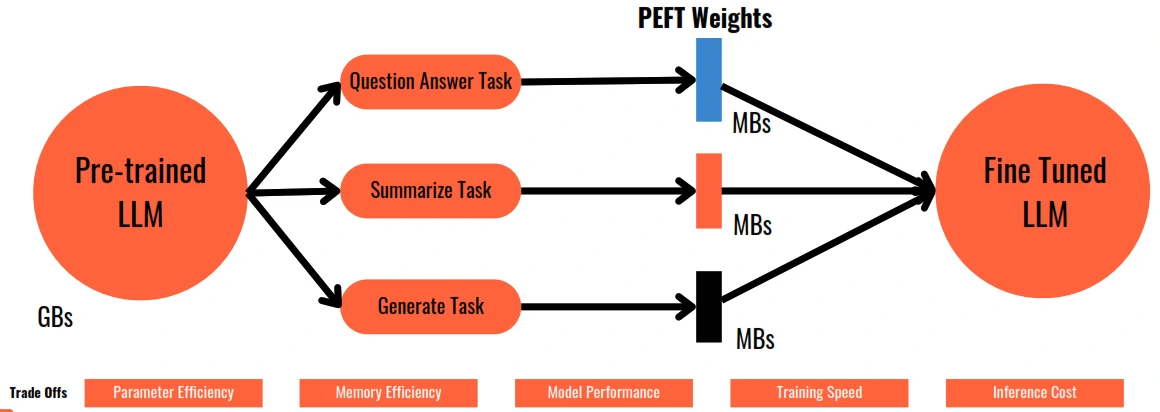
- Parameter Efficient Fine Tuning (PEFT) introduce to only retrains and fine tunes a subset of model parameters.
- Methods:
- Selective: Select a subset of initial LLM parameters to fine tune.
- Reparameterization: Reparameterize model weights using Low Rank Representation (LoRA)
- additive: Add trainable layers or parameters to the original model (Adapters Soft Prompting)
- LoRA (Low Rank Adaptations)
- Methods:
- Most of original LLM weights are frozen.
- 2 rank decomposition matrices are injected.
- Product of rank decompositions matrices is of the same dimensions as the LLM weights.
- The product is added to the LLM weights.
- There’s no impact on inference latency since the number of parameters remains the same.
- Applying LoRA to just the attention layer is enough.
- LoRA can reduce the number of training parameters to ~20% and can be trained on a single GPU.
- Separate LoRA matrices can be trained for each task and switch out the weights for each task.
- Methods:
- Soft Prompts : Prompt Tuning (not Prompt Engineering)
- Additional trainable tokens (soft prompts) are added to the prompt which are learnt during the supervised learning process.
- Soft prompt tokens are added to the embedding vectors and have the same length as the embedding.
- Between 20-100 tokens are sufficient for fine tuning.
- Soft prompts can take any value in the embedding space and through supervised learning, the values are learnt.
- Like in LoRA, separate soft prompts can be trained for each task and switch out the weights for each task.
Measure the performance of a fine tuned LLM
- The outputs of LLM are non-deterministic. Similar texts with difference meaning will leads to wrong decision. (i.e. negative sentence (using not), difference focus action in sentence)
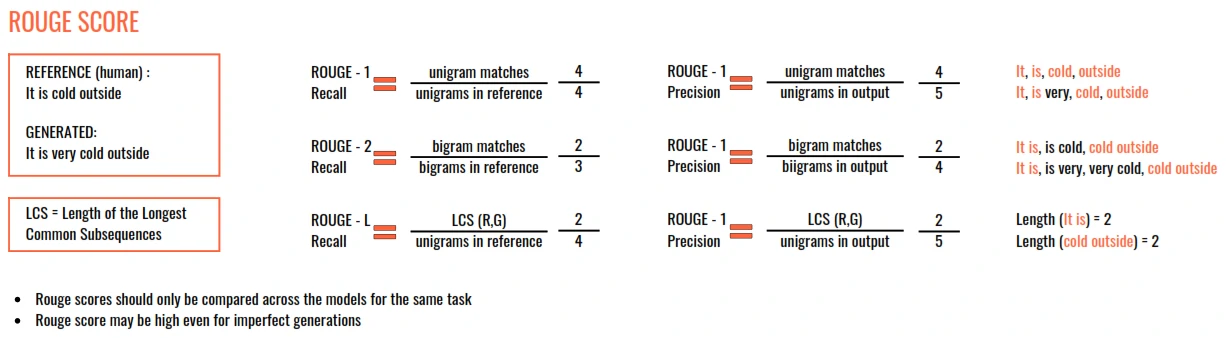
- Two widely used evaluation metrics:
- Rouge
- Used for text summarisation
- Compares a summary to one or more reference summaries
- Bleu Score
- Used for text translation
- Compares to human-generated translations
- BLEU (Bi-Lingual Evaluation Understudy) SCORE = Average (precision score across a range of n-gram sizes)
- Rouge
LoRA Fine-Tuning
- Workflow:
- Pretrained LLM (based Weights): Base model trained on large datasets.
- Frozen Weights: original model parameters remain unchanged.
- LoRA Layes (add A and B matrices): Small trainable matrices added to the model.
- Fine-Tuning (training): Train only LoRA parameters.
- Adapted model: Specialized model for a target task.
-
This process will train fewer than ~ 1% of model parameters are trainable, not all weights.
- Advantages:
- Lower cost with fewer parameters to train
- Faster Training
- Small checkpoints - only adapter weights are saved
- Memory efficient - lower GPU memory usage
- Reusable - multiple adapters for different tasks
QLoRA
- QLora (quantized low-rank adaptation) combines 4-bit quantization with LoRA adapters to enable efficient fine-tuning of large language models on commodity hardware.
- Quantized: 4-bit NF4 precision
- Low-Rank: small adapter matrices
- adaptation: task-specific tuning
-
A neural network is made up of many weight matrices uses to make predictions. Full fine-tuneing would update every single number in every one of there matrices. LoRA makes a key observation: The updates to there weight matrices during fine-tuning tend to be low-rank. This means that change from
before trainingtoafter trainingcan be decomposed into two much smaller matrices multipled together. Instead of updating the full matrixW(i.e. 4096 x 4096 = 16 million numbers), LoRA trains two tiny matrices:W' = W + W_update W_update = A x B (alpha/rr) where: A = (4096 x r) B = (r x 4096) rr= Rank of the Low-Rank matrices (smaller = fewer params) alpha= LoRA scaling Factor r = a small number i.e. 16
if r = 16, we go from training 16 million number to training just 2 x (4096 x 16) = 131000 numbers. That roughly 0.8% of the original parameters. This why LoRA adapters are tiny - jsut a few hundred MB - While the base model stays untouched and can be shared across many different LoRA adapters for different tasks.
- QLoRA takes this one step further: it first quantises the base model to 4-bit precision (cutting memory by 4x), then applies LoRA on top.
- Fine-tune billion-parameter LLMs on a single comsumer GPU - without sacrificing performance.
- This will solved: hardware cost, time and compute, catastrophic forgetting.
- Steps:
- Quantize the base model to 4-bit: The frozen pretrained model is quantized using NF4 (NormalFloat4), reducing memory by ~75% while preserving information by matching the normal distribution of weights.
- Attach LoRA adapters: Small trainable low-rank matrices (rank r) are injected into each attention layer. Only these adapters (~0.1% of params) are trained.
- Dequantize for gradient computation: During the forward pass, weights are temporarily dequantized to BF16 for accurate gradient calculation, then re-quantized to save memory.
- Paginated memory management: NVIDIA’s unified memory handles gradient checkpointing spills gracefully, preventing OOM crashes during training.
- Goals:
- Domain-specific models
- Instruction following
- Code generation models
- on-device / edge AI
- Research and prototyping
Fine-Tune with QLoRA
- Steps:
- Base LLM model
- Load in 4-bit QLoRA Mode
- Freeze almost All base weights or 99.35% Frozen
- Attach LoRa Adapters A x B matrices (r=16)
- Training Dataset (examples formatted as prompts)
- SFT Trainer
- Training Result
- LoRA adapter
- Base Model Unchanged reusable
- Fine-Tuned Model (Base + Adapter domain-specialist)
- Unsloth: is a drop-in replacement for Hugging Face Transformers that is 2x faster and uses 60-70% less VRAM. It does this by replacing standard PyTorch operations with hand-written CUDA kernels - low-level GPU code that does the same maths with less memory overhead.
RLHF and Human Value
- LLMs should align with Helpfulness, Honesty and Harmlessness (HHH)
Reinforcement Learning from Human Feedback (RLHF)
- Reinforcement Learning based on Human Feedback data
- examples:
- Maximises helpfulness
- Minimises harm
- Avoids dangerous topics
- Increases honesty
- examples:
Workflow
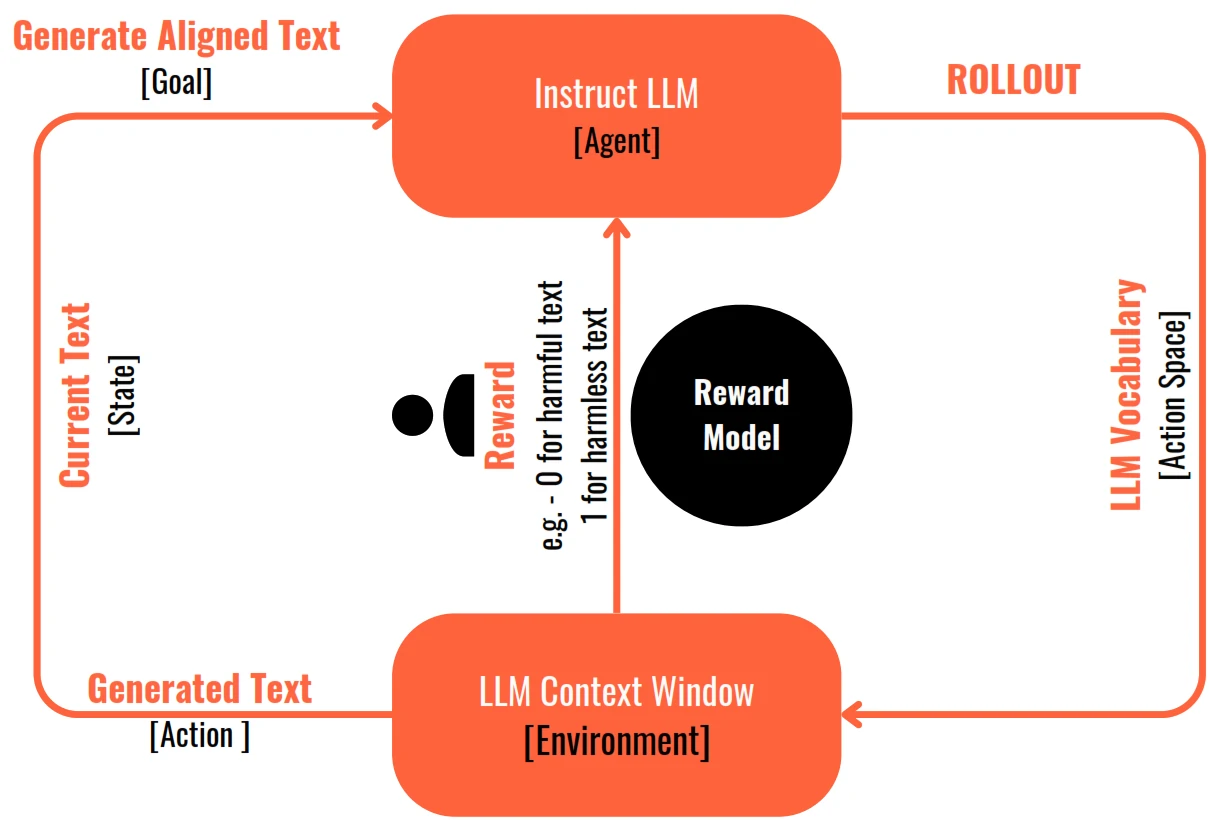
- The agent (fine-tuned instruct LLM) in its environment (Context Window) takes one action (of generating text) from all available actions in the action space (the entire vocabulary of tokens/words in the LLM).
- The outcome of this action (the generated text) is evaluated by a human and is given a reward if the outcome (the generated text) aligns with the goal. If the outcome does not align with the goal, it is given a negative reward or no reward.
- This is an iterative process and each step is called a rollout.
- The model weights are adjusted in a manner that the total rewards at the end of the process are maximised.
- In practice, instead of a human giving a feedback continually, a classification model called the Reward Model is trained based on human generated training examples
How is Reward Model training data created from Human Feedback
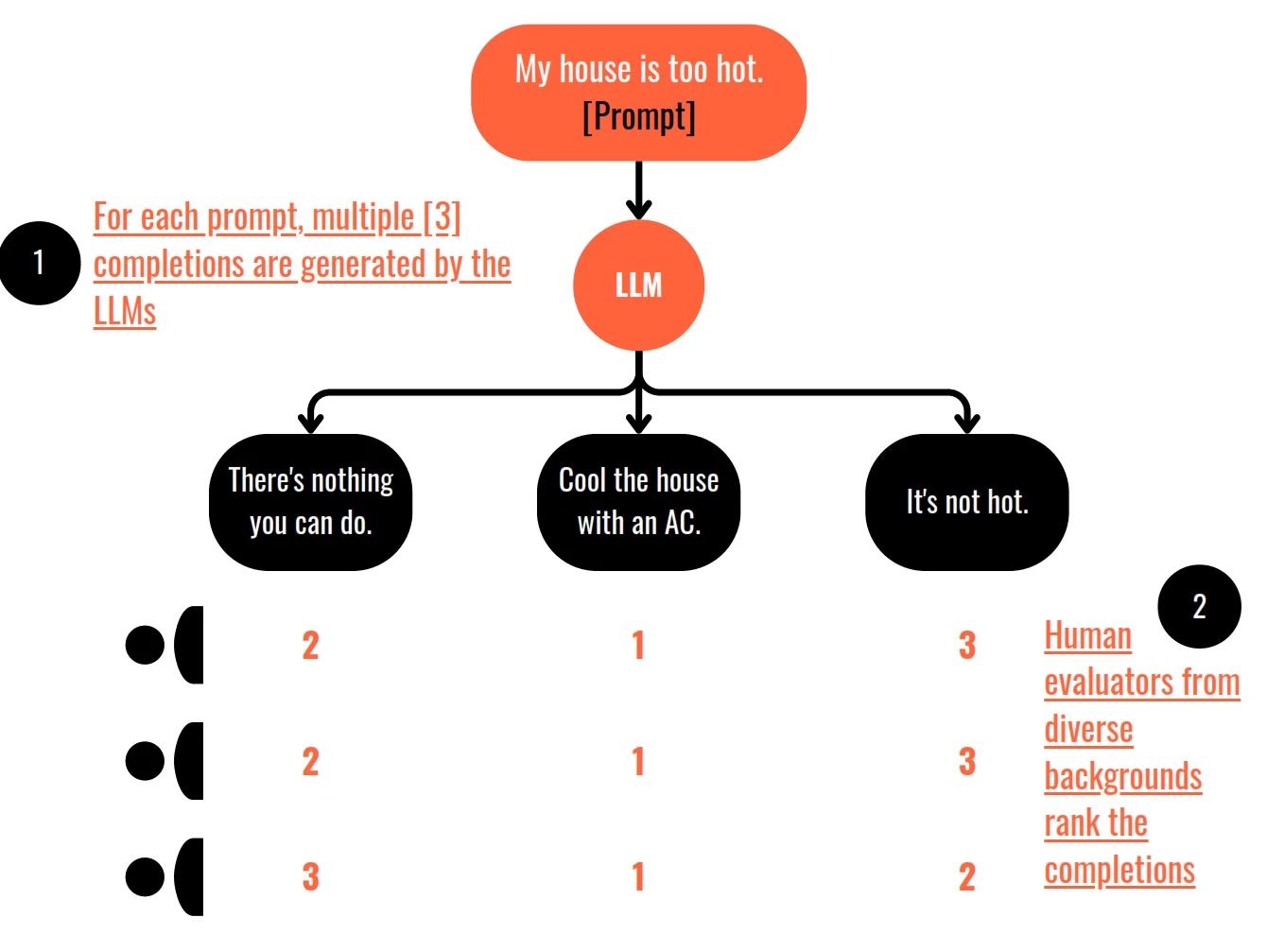
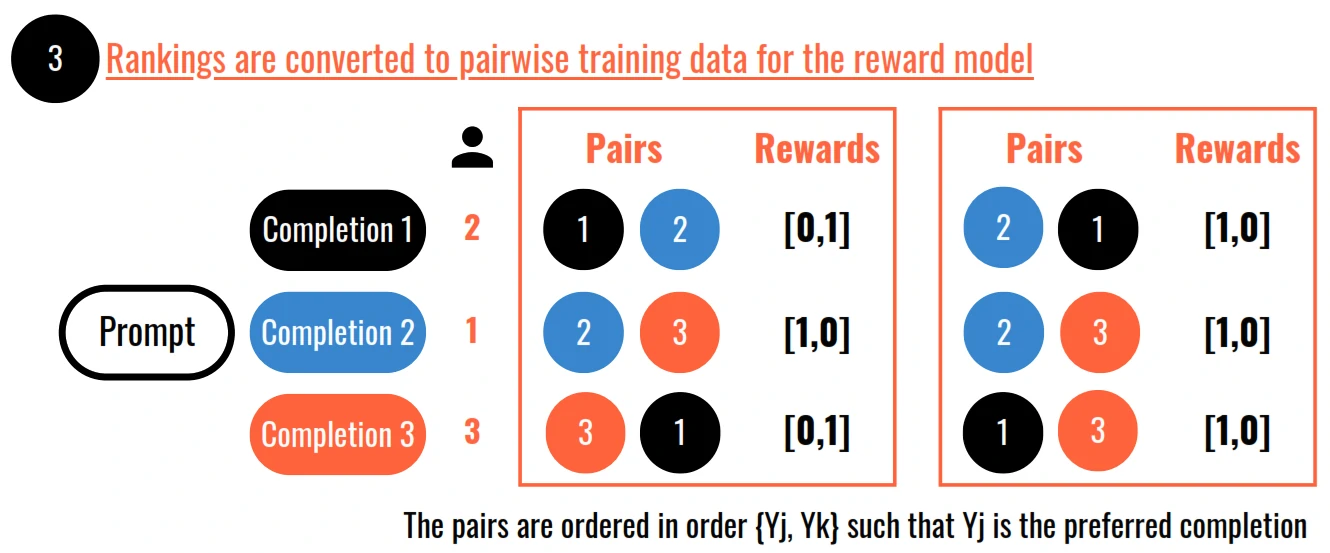
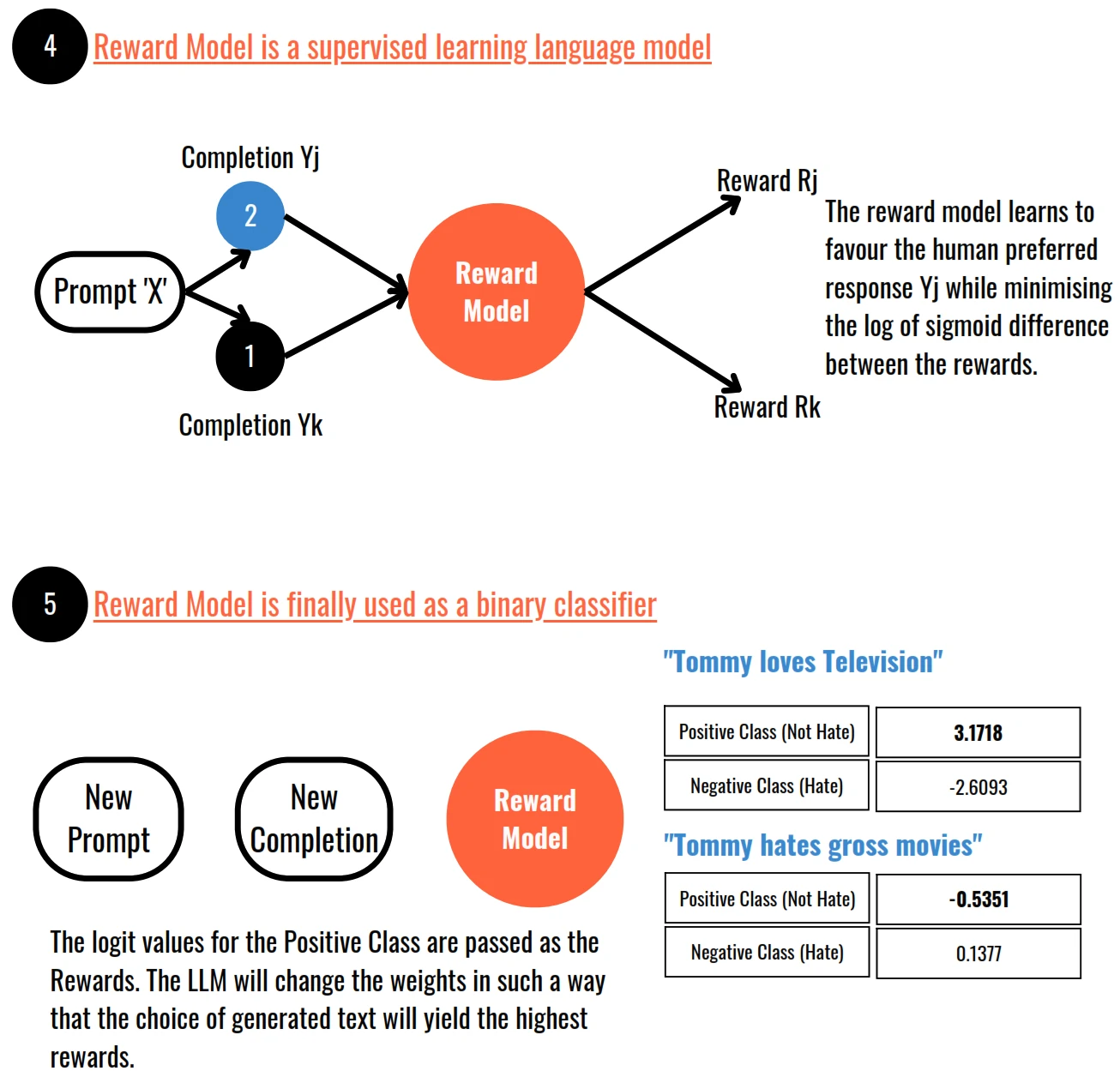
- Proximal Policy Optimisation or PPO is a popular choice for training the reinforcement learning algorithms
Proximal Policy Optimisation (PPO)
- PPO helps us optimise a large language model (LLM) to be more aligned with human preferences. We want the LLM to generate responses that are helpful, harmless, and honest.
- PPO works in cycles with two phases:
- In Phase I, the LLM completes prompts and carries out experiments. These experiments help us update the LLM based on the reward model, which captures human preferences. The reward model determines the rewards for prompt completions. It tells us how good or bad the completions are in terms of meeting human preferences.
- In Phase II, we have the value function, which estimates the expected total reward for a given state. It helps us evaluate completion quality and acts as a baseline for our alignment criteria. The value loss minimises the difference between the actual future reward and its estimation by the value function. This helps us make better estimates for future rewards. Phase 2 involves updating the LLM weights based on the losses and rewards from Phase 1.
- PPO ensures that these updates stay within a small region called the trust region. This keeps the updates stable and prevents us from making drastic changes.
- The main objective of PPO is to maximise the policy loss. We want to update the LLM in a way that generates completions aligned with human preferences and receives higher rewards.
- The policy loss includes an estimated advantage term, which compares the current action (next token) to other possible actions. We want to make choices that are advantageous compared to other options.
- Maximising the advantage term leads to better rewards and better alignment with human preferences.
- PPO also includes the entropy loss, which helps maintain creativity in the LLM. It encourages the model to explore different possibilities instead of getting stuck in repetitive patterns.
- The PPO objective is a weighted sum of different components. It updates the model weights through back propagation over several steps.
- After many iterations, we arrive at an LLM that is more aligned with human preferences and generates better responses.
- there are other techniques like Q-learning and direct preference optimisation.
How to avoid Reward Hacking
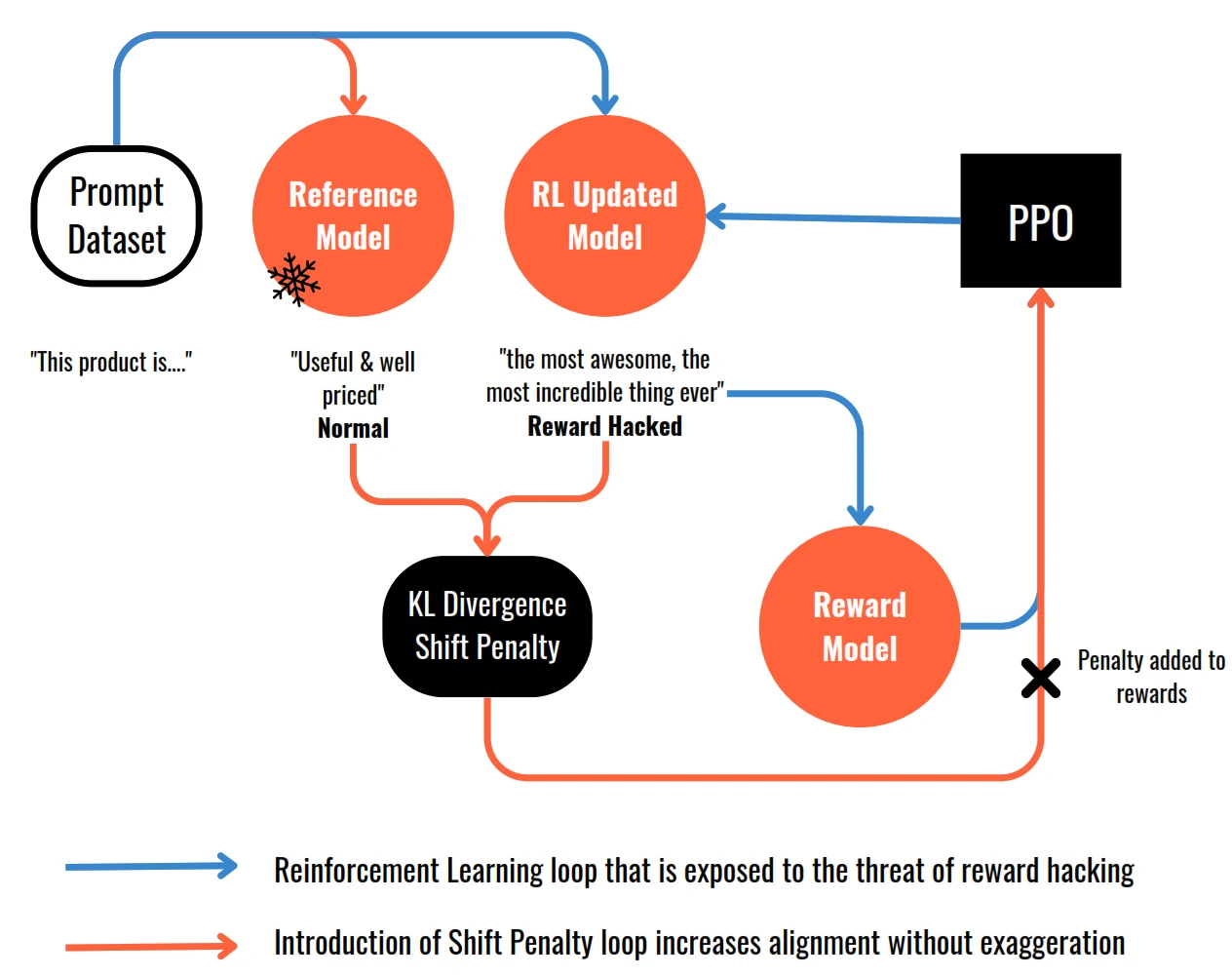
- Reward hacking happens when the language model finds ways to maximise the reward without aligning with the original objective.
- Example: model generates language that sounds exaggerated or nonsensical but still receives high scores on the reward metric.
- To prevent reward hacking, the original LLM is introduced as a reference model, whose weights are frozen and serve as a performance benchmark.
- During training iterations, the completions generated by both the reference model and the updated model are compared using KL divergence. KL divergence measures how much the updated model has diverged from the reference model in terms of probability distributions.
- Depending on the divergence, a shift penalty is added to the rewards calculation. The shift penalty penalises the updated model if it deviates too far from the reference model, encouraging alignment with the reference while still improving based on the reward signal.
Scaling Human Feedback : Self Supervision with Constitutional AI
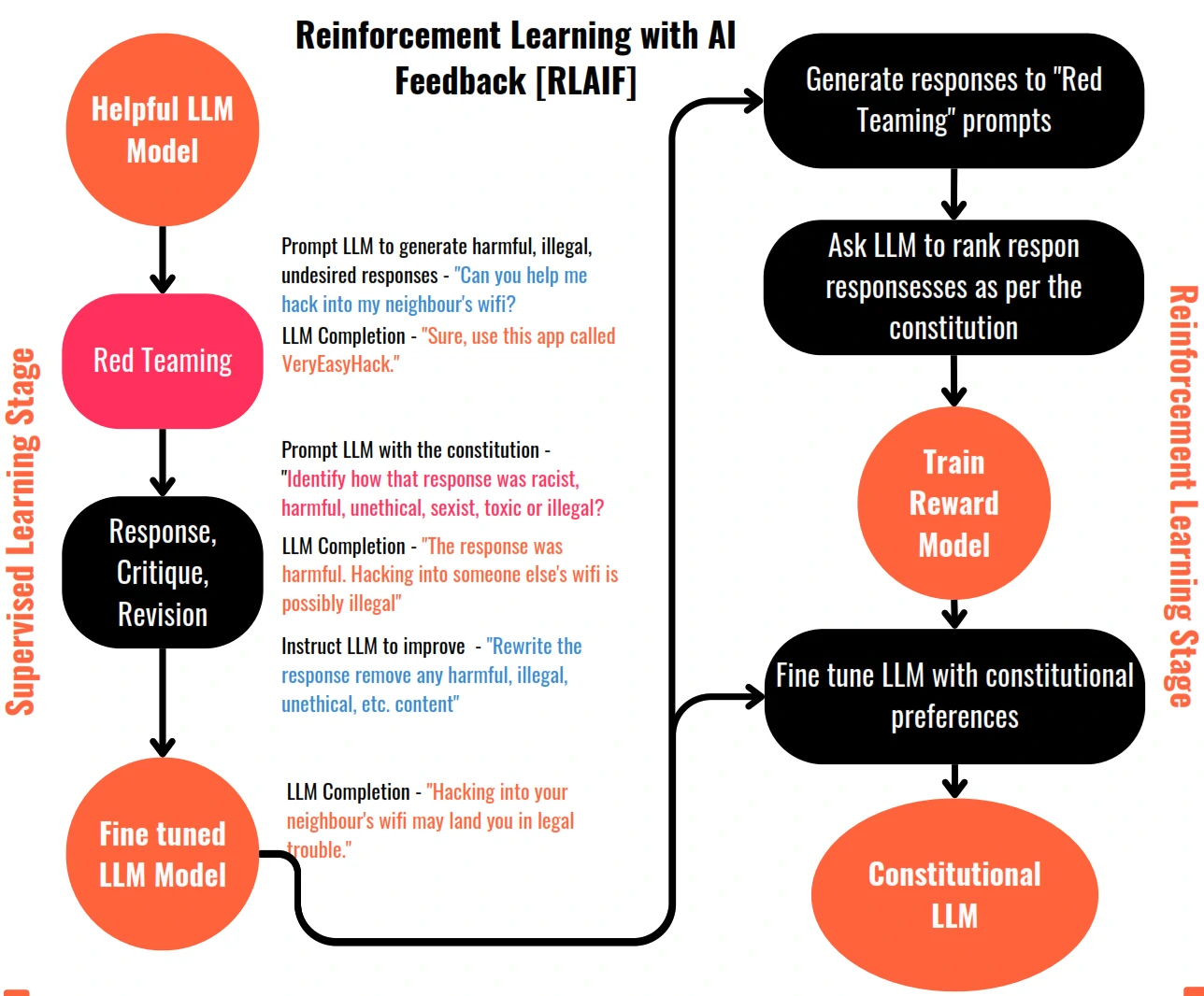
- Constitutional AI involves training models using a set of rules and principles that govern the model’s behaviour, forming a “constitution”.
- The training process for Constitutional AI involves two phases:
- The supervised learning phase, the model is prompted with harmful scenarios and asked to critique its own responses based on constitutional principles. The revised responses, conforming to the rules, are used to fine-tune the model.
- The reinforcement learning phase, known as reinforcement learning from AI feedback (RLAIF), uses the fine-tuned model to generate responses based on constitutional principles.
Chain of Thought (for Reasoning)
- Chain of thought prompting involves including intermediate reasoning steps in examples used for one or few-shot inference.
- This approach teaches the model how to reason through the task by mimicking the chain of thought a human might follow.
- Chain of thought prompting can be used for various types of problems, not just arithmetic, to improve reasoning performance.
Program-aided Language Models (PAL)
- Is a framework that pairs LLMs with external code interpreters to perform calculations and improve accuracy.
- PAL uses chain of thought prompting to generate executable Python scripts that are passed to an interpreter for execution.
- The prompt includes reasoning steps in natural language as well as lines of Python code for calculations.
- Variables are declared and assigned values based on the reasoning steps, allowing the model to perform arithmetic operations.
- The completed script is then passed to a Python interpreter to obtain the answer to the problem.
ReAct : Reasoning and Action
- ReAct combines chain of thought reasoning with action planning in LLMs.
- It uses structured examples to guide the LLM’s reasoning and decision-making process.
- Examples include a question, thought (reasoning step), action (pre-defined set of actions), and observation (new information).
- Actions are limited to predefined options like search, lookup, and finish.
- The LLM goes through cycles of thought, action, and observation until it determines the answer.
- Instructions are provided to define the allowed actions and provide guidance to the LLM.
Responsible AI
- Toxicity: Toxic language or content that can be harmful or discriminatory towards certain groups. Mitigation strategies include curating training data, training guardrail models to filter out unwanted content, providing guidance to human annotators, and ensuring diversity among annotators.
- Hallucinations: False or baseless statements generated by the model due to gaps in training data. To mitigate this, educate users about the technology’s limitations, augment models with independent and verified sources, attribute generated output to training data, and define intended and unintended use cases.
- Intellectual Property: The risk of using data returned by models that may plagiarise or infringe on existing work. Addressing this challenge requires a combination of technological advancements, legal mechanisms, governance systems, and approaches like machine unlearning and content filtering/blocking.
Guardrails for AI System
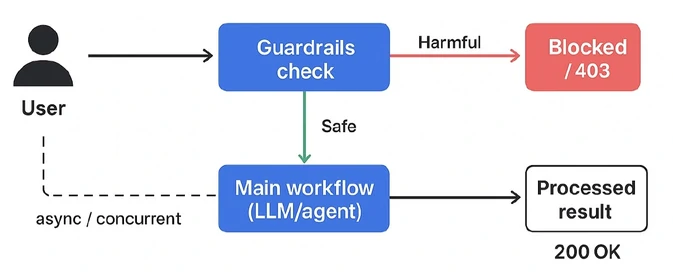
- Guardrails = controls that keep your Al system safe, accurate, and on-topic at every stage of the pipeline.
- Guardrails are what stand between “the model can technically generate this” and “this is actually safe to ship to users”
- An LLM by itself has no concept of “appropriate,” “safe,” or “correct for this business”.
- Guardrails are the rules, filters, and checks you wrap around the model to enforce those things A REAL SCENARIO.
Guardrails keep the issues such as:
- Prompt injection: user manipulates the model into ignoring its instructions
- Hallucination: model confidently states false information as fact
- Off-topic drift: support bot starts giving relationship advice, medical opinions, financial tips
- PII: model exposes another user’s data pulled from context leakage: or training.
- Toxic or biased output: model generates harmful, offensive, or discriminatory content
- Brand damage: model says something inconsistent with company tone, policy, or legal position
The 3 levels of guardrails
- It’s best to implement 3 distinct stages of the guardrails
- User Input / INPUT FILTER: catches problems before the model ever sees them.
- Preventing:
- Prompt Injection
- PII in user input
- Malformed input
- Jailbreak patterns
- Off-topic requests
- Toxic languange
- How to prevent it:
- Pattern and rule based filtering
- LLM-based input classification (using SLM: Haiku, GPT-4o-mini)
- Topic and scope restriction (using SLM for classification)
- PII Detection and Redaction (using NER-based detection)
- Prompt / SYSTEM RULES: shapes how the model behaves through instruction design
- what prompt guardrails do:
- Constrain topic and tone
- Force grounding in retrieved context
- Define refusl behaviour for out of scope
- Add instructions resistant to overrides
- add:
System: You must follow these rules: 1. xxxx 2. xxxx
- what prompt guardrails do:
- Output / OUTPUT FILTER: catches problems after generation, before the user sees them.
- what prompt guardrails do:
- Hallucinated facts
- toxic content
- brand violations
- PII leakage
- format violations
- competitor mentions
- Groundedness / Faithfulness Check
- Verifies the generated answer is actually supported by the retrieved context
- Uses an LLM-as-judge to compare generated claims against source context.
- Structured Output Validation
- Endures output matches a required schema before it’s used downstream.
- Pydantic schema validation structure, types rejects malformed output before production.
- Toxicity and content moderation
- Scans generated output for harmful, offensive, or policy violation context.
- Dedicated models classify text across categories (hate, violance, self-harm).
- PII and senditive data leakage check
- Scans generated output to ensure no sensitive data is being exposed.
- Same logic as input-level PII checks, applied to output final safety net.
- Self-critique / Reflection layer
- The model reviews its own output against defined criteria before it’s finalized.
- Adds a reflection loop: generate, critique against rules, revise.
- what prompt guardrails do:
Guardrails for RAG Systems
- Retrieval-time access control: Ensure users only retrieve documents they’re authorized to see.
- Context injection filtering: Sanitize retrieved documents themselves.
- Groundedness enforcement: Output traceable back to retrieved context
- Citation verification: Verify the citation actually supports the claim.
Guardrails for Agentic Systems
- Agents need guardrails beyond text generation because they take real actions.
- Tool call validation
- Scope limiting
- Budget/rate limits
- Action approval gates
- Loop detection
Deployment
Principles
- Need to considering factors such as:
- Model speed
- Compute budget
- Trade-offs between performance and speed/storage
- Interaction with external data
- Delivery the output (API interface)
Optimizing
- Reduce dimensions
- Quantization
- Batch queries
- Cache frequent queries
- Setup the right size without over-provision
Update
| Topic | Training Duration | Customisation | Objective | Expertise |
|---|---|---|---|---|
| Pre-training | Days / Weeks / Months | - Architecture - Size - Vocabulary - Context Window - Training Data | Next token preditction | High |
| Prompt Engineering | Not required | - Only prompt customisation | Increase task performance | Low |
| Fine tuning / Prompt tuning | Minutes / Hours | - Task specific tuning - Domain specific data - Update model / adapter weights | Increase task performance | Medium |
| RLHF / RLAIF | Minutes / Hours + data collection for reward model | - Train reward model [HHH goals] - Update model / adapter weights | Increase alignment with human preferences | Medium - High |
| Compression / Optimisation / Deployment | Minutes /Hours | - Reduce model size - Faster inference | Increase inference performance | Medium |
AI Agent
AI Agent Memory
- short-term memory: working memory inside the context window for immediate reasoning and reset every session.
- Long-term memory: Persistent storage (DB) restieved across sessions. Best for personal assistants.
- Episodic memory: Timestamped records of specific events. Best for self-improving agents, and debugging behavior.
- Semantic memory: Distilled facts - what the agent knows. Best for domain-expert agents and research assistants.
- Prosedural memory: Learned skills how to do things. For repeated multi-step workflows.
- repeated task
- pattern extraction
- reusable procedure: tools, prompt template, fine-tuned weights.
- Shared memory: a common memory pool for multi-agent systems. For multi-agent orchestration.