Kafka
tools
container
kafka
- Kafka
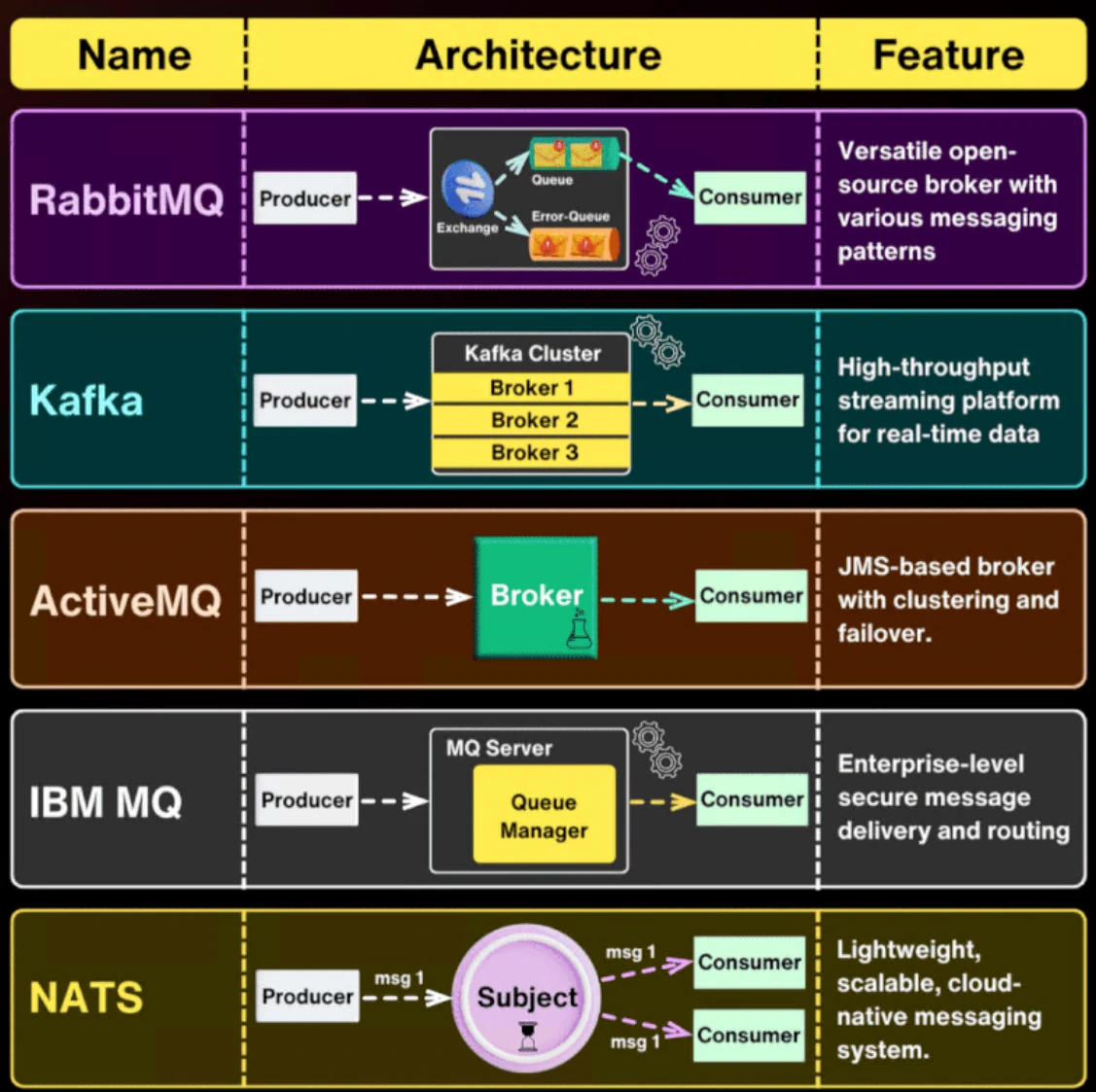
Message Broker
A message broker is a middleware layer that enables systems to communicate by exchanging data asynchronously. It relies on a queue-based architecture to decouple producers and consumers, allowing each to operate independently without requiring real-time interaction.
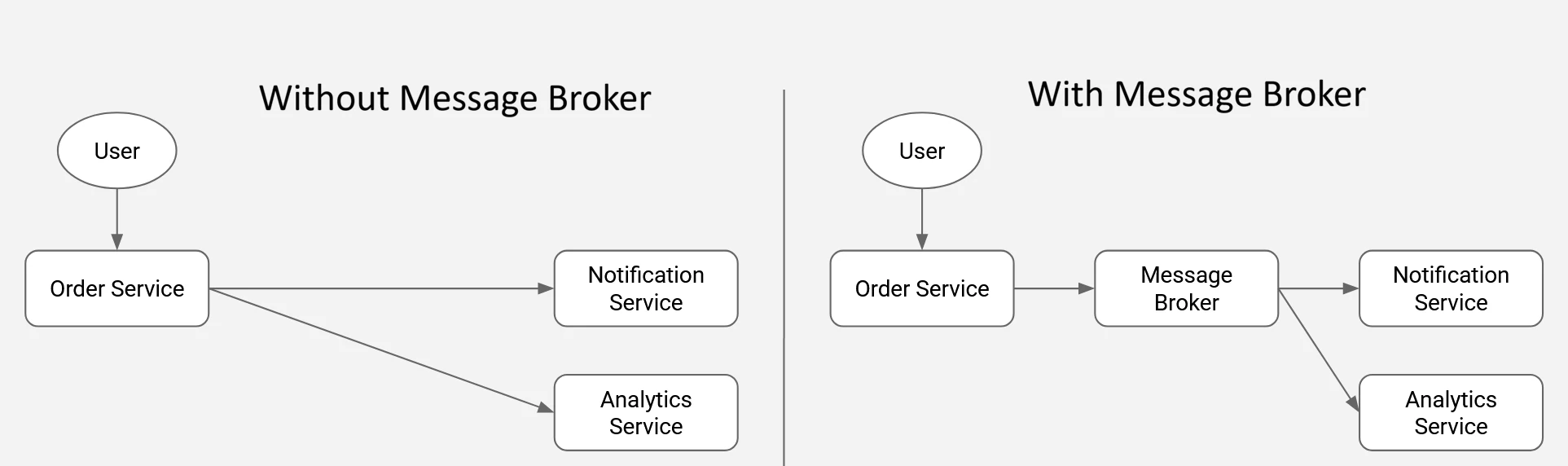
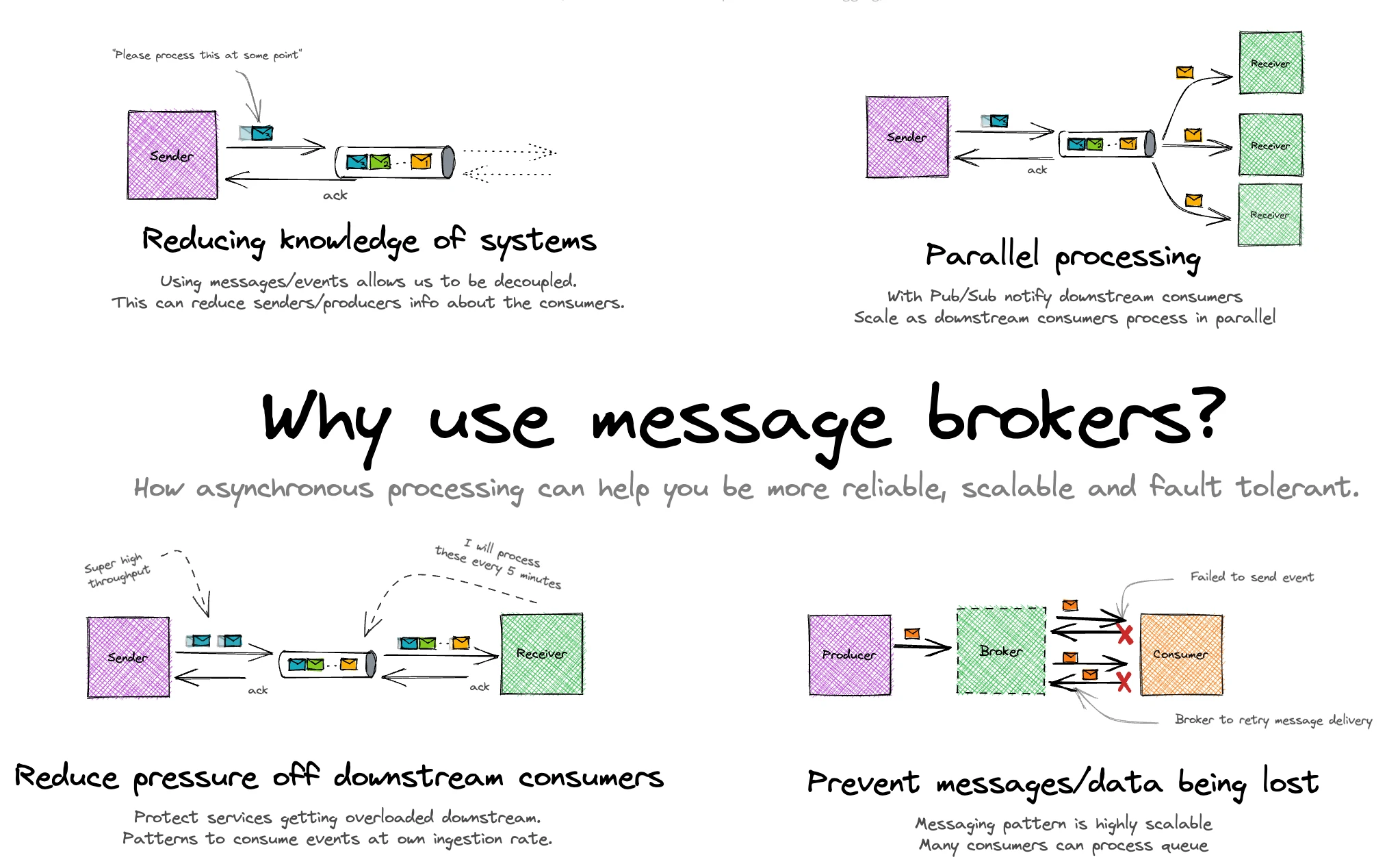
Challenges with a tightly coupled (synchronous) approach:
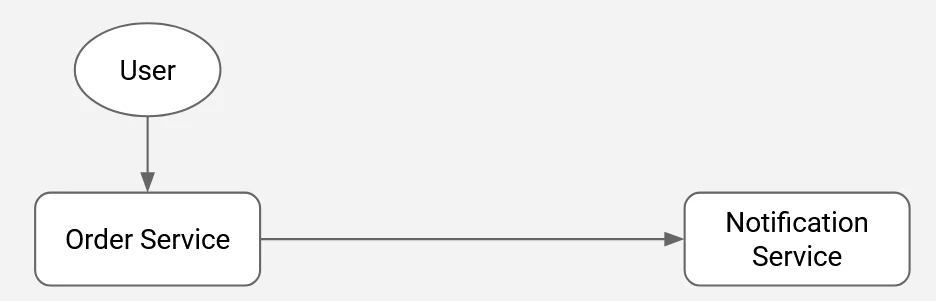
- When the notification service becomes unavailable, errors propagate directly to the order service, potentially disrupting its operation.
- Performance bottlenecks in the notification service can degrade the responsiveness of the order service.
- Introducing a new service that requires the same data from the order service typically necessitates code changes in the order service itself.
- The overall flow is tightly bound to execution order, creating dependencies that limit flexibility and scalability.
Advantages of an asynchronous, decoupled architecture:
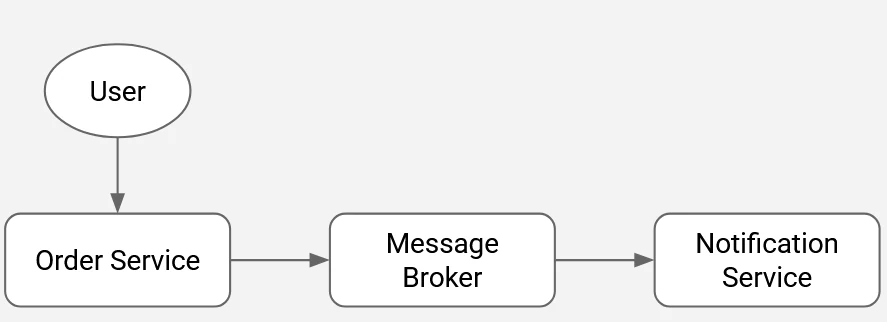
- The order service remains operational even if the notification service is temporarily unavailable.
- Delays or performance issues in downstream services do not impact the order service’s throughput.
- New consumers can be introduced without modifying the order service, reducing engineering overhead and risk.
- Services operate independently, enabling an event-driven flow that removes strict execution dependencies and improves system resilience.
Components
A typical message broker setup consists of three core components:
- Producer: The source system that creates and publishes messages to the broker.
- Message Broker: The intermediary that ingests messages from producers, manages them within queues, and routes them to the appropriate consumers.
- Consumer: The receiving system that pulls messages from the broker and processes them according to its logic.
Distributed Log
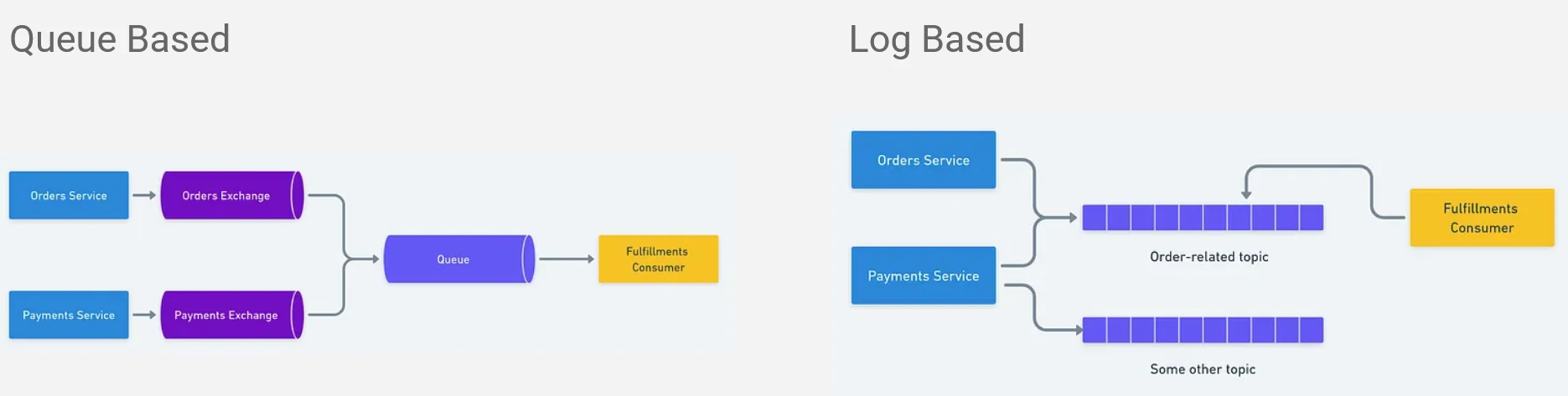
Queue-based approach
- Messages are stored in a queue and processed in FIFO (First In, First Out) order.
- Once a consumer receives and acknowledges a message, it is removed from the queue.
- Memory usage remains relatively low, as only unprocessed messages are retained.
- Each message is consumed by a single consumer, meaning it cannot be re-read or shared across multiple consumers from the same queue.
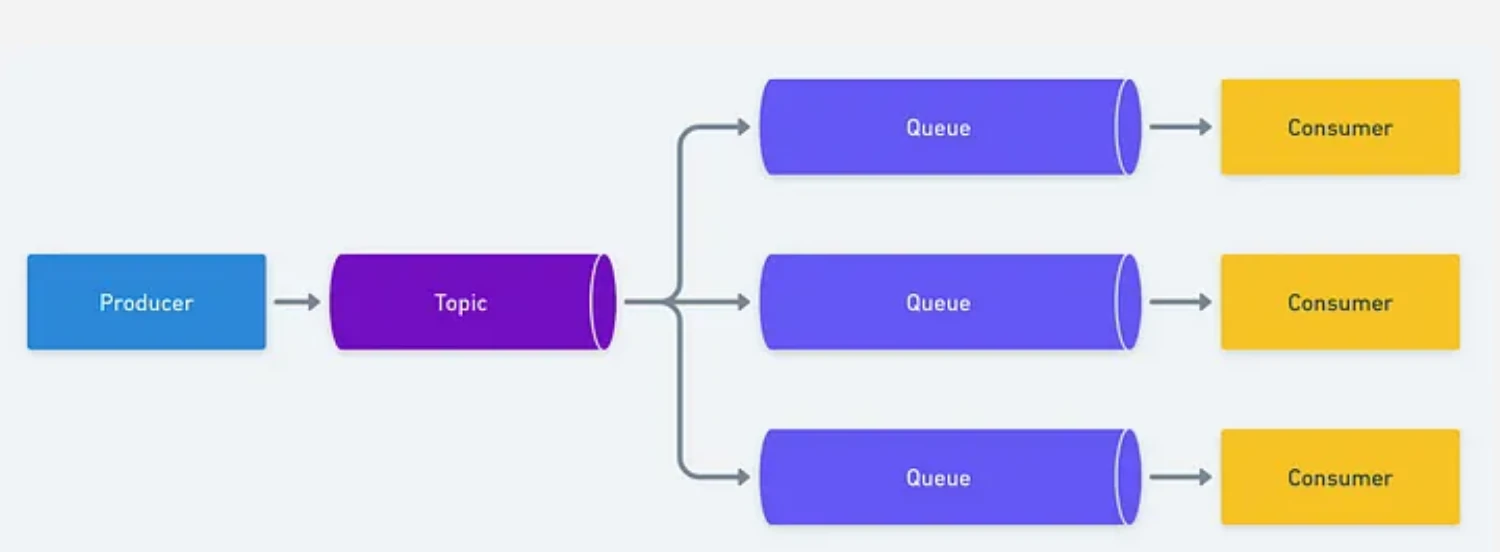
Log-based approach
- Messages are persisted in an append-only, sequential log.
- Each event is tagged with a sequence number or timestamp to preserve ordering.
- Consumers track their position using offsets; acknowledgment advances the offset rather than deleting the message.
- Storage requirements are higher, as the system retains both processed and unprocessed messages for replay and auditability.
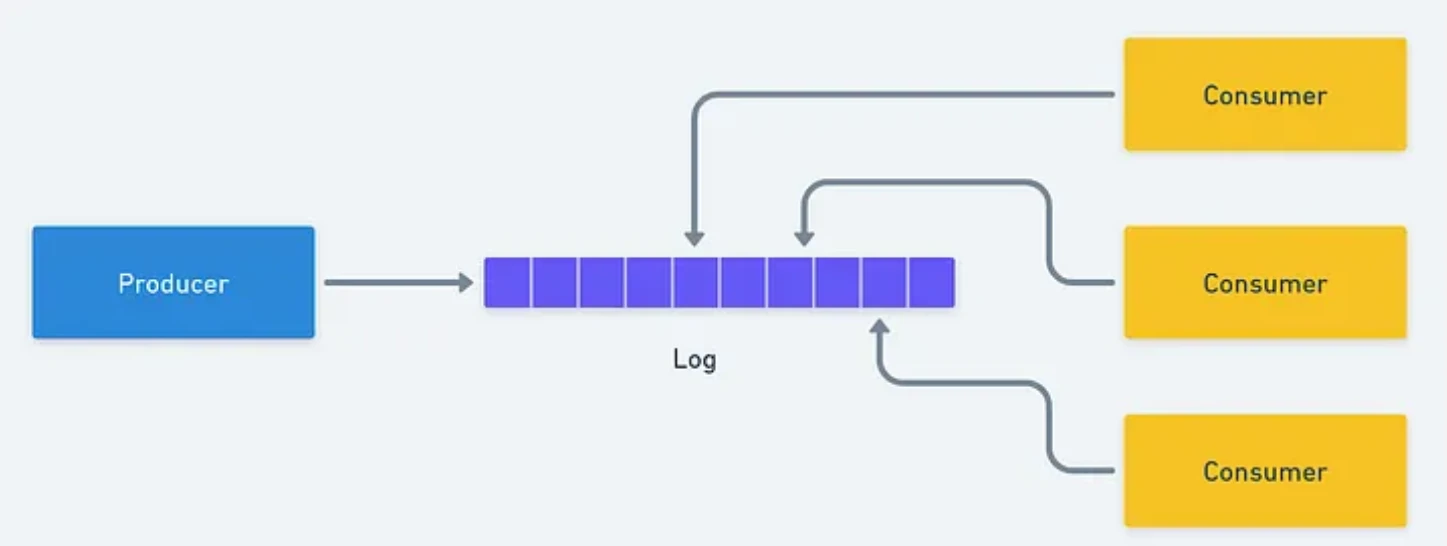
Apache Kafka Overview
Apache Kafka is a widely adopted open-source platform for message brokering and event streaming, designed to handle high-throughput, real-time data pipelines at scale. It is commonly used by large organizations to process and distribute massive volumes of streaming data reliably.
Core Problems
As we discuss above, Tradisional systems struggle when:
- Data needs to be processed in real time
- Multiple services depend on the same data
- High volume events must be handled reliably
Kafka was built to solve:
- Real-time data streaming
- High-throughput messaging (Handles millions of events per second)
- System decoupling (Removes tight coupling between producers and consumers)
- Scalable event processing
- Enables replay of past data
- Works reliably even when systems fail
Kafka is not just a message queue - It is a durable, Scalable event log for real-time systems
Core Architecture
- Producer:
- Publishes messages (events) to Kafka topics.
- Send records to a specific topic
- decides how and where data is written
- an entry point of data into kafka
- Consumer:
- Subscribes to topics and processes incoming messages.
- Reads messages from kafka topics that pulled from leader partitions.
- Processes data in real time.
- Broker: A Kafka server responsible for storing and serving data.
- Store messages
- Handle read and write requests
- Manages partitions
- Cluster: A distributed group of brokers working together for scalability and fault tolerance.
- High availability
- Load distribution
- fault tolerance
- Horizontal scaling
- ZooKeeper: Acts as the coordination layer, managing broker metadata, leader election, and cluster state.
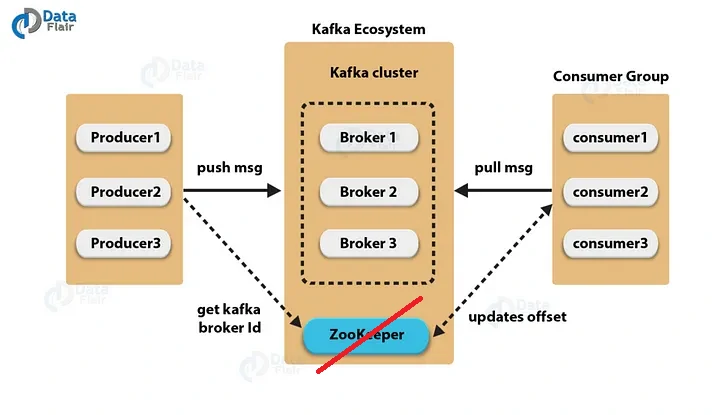
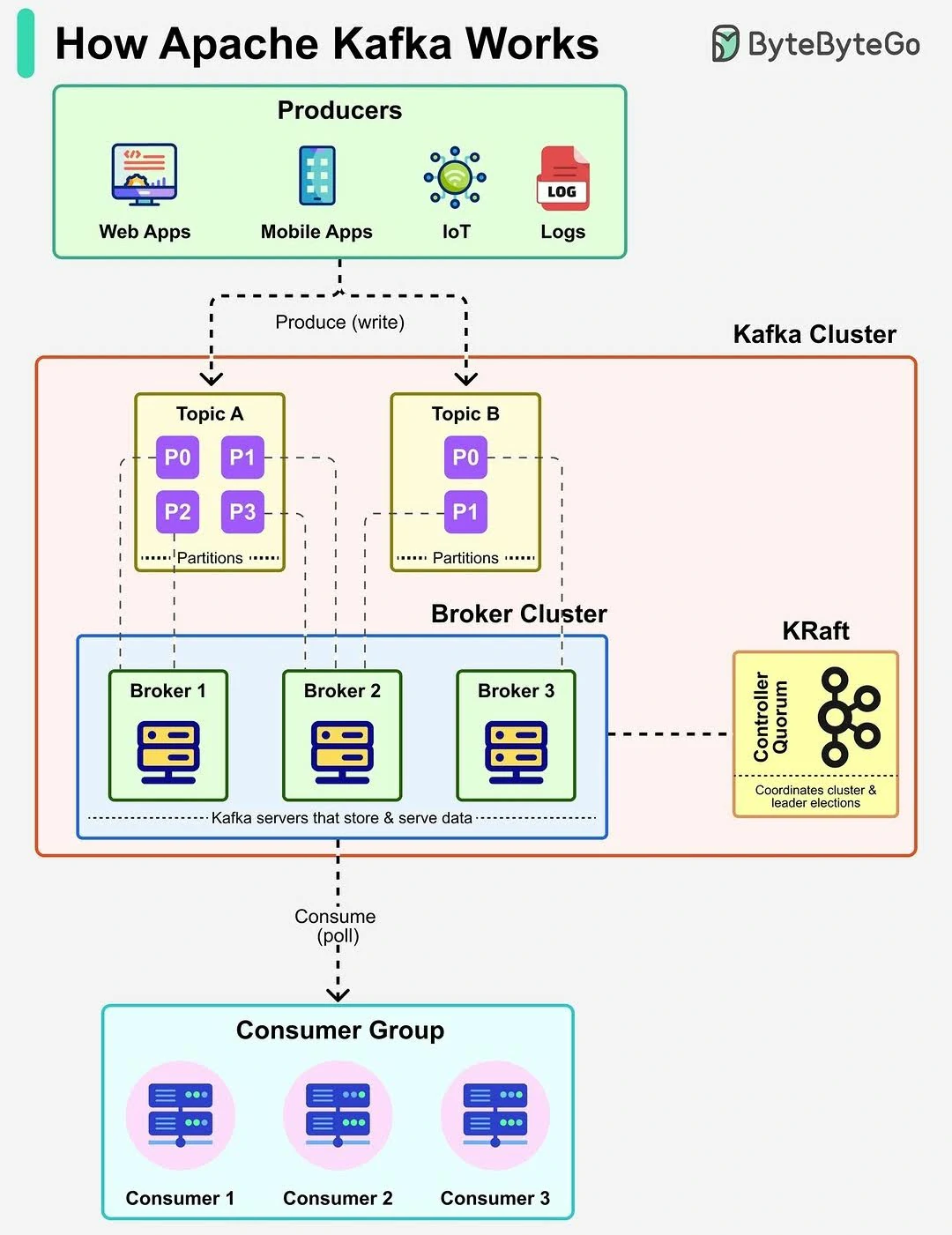
Key Concepts
- Topic:
- A logical channel used to categorize and organize messages. Producers write to topics, and consumers read from them.
- It similar to a table name, but data is immutable.
- Topics do not process data, they only store it.
- Partition:
- A topic is split into multiple partitions, enabling parallel processing and horizontal scalability by distributing data across brokers.
- A topic is divided into multiple partitions
- Each partition stores messages in order.
- Ordering is guaranteed only within a partition
- Improving throughput by applying:
- Parallel writes by producers
- Parallel reads by consumers
- Key-based partitioning
- Messages with the same key always go to a same partition.
- Ensures order for events related to the same entity.
- Replication:
- Partitions are replicated across multiple brokers to ensure durability and high availability, allowing the system to remain operational even if a broker fails. This concept will help to maintain availability, fault tolerance, and zero data loss.
- Example: if the topic has repication factor = 3, its mean that the data will be copied into 3 brokers, with 1 of the broker act as a leader to handle reads and writes, meanwhile others act follower and just replicate data from the leader.
- Leader and follower concept
- Every partition has: 1 leader and multiple follower.
- Producer will writes to leader.
- Consumer will reads from leader by default.
- Followers continuously sync data.
- In-sync Replica (ISR)
- ISR = List of replicas that are fully synced with the leader
- if a follower lags too much, it is removed from ISR and system continues without downtime.
- If leader fails
- Kafka elects a new leader
- New leader must be from ISR
- System continues without downtime.
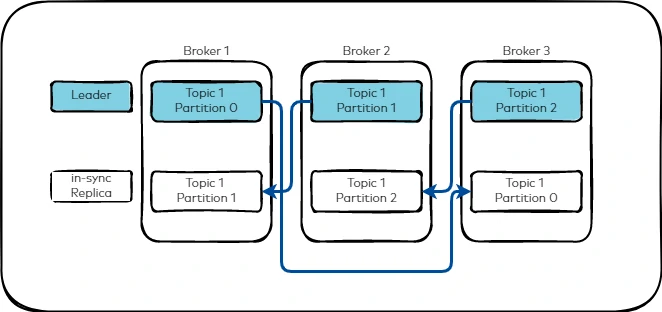
- Message flow
- Selects topic
- Chooses partition
- if key provided -> will be assigned to the partition that has the key
- no key -> round robin / sticky partitioning
- This will manage the ordering guarantee per partition and parallel processing across partitions
- Sends Message (will be send and written only to the leader partition)
- Delivery Semantics:
- The are three delivery modes:
- At-most-once : no retry, possible loss, fastest but least reliable. Example: Logs, metrics, non-critical data.
- At-least-once : retry enabled, duplicate possible.
- Exactly-once : processed only once, retry enabled, overwritten possible (idempotent), requres kafka transactions. Example: Data pipelines, analytics ingestion.
- Kafka Transactions
- it’s ensure:
- Atomic writes across multiple partitions.
- Safe producer retries.
- Exactly-once delivery between producer -> kafka -> consumer.
- Key components:
- Idempotent producer
- Transactional ID
- Transaction Coordinator
- Committed offset management
- it’s ensure:
- The are three delivery modes:
- Producer Acknowledgments
- producer durability control:
- acks = 0 -> fast, unsafe
- acks = 1 -> Leader confirms write
- acks = all -> All ISR replicas confirm
- rule of thumb
Higher acks = more safety, slightly more latency
- producer durability control:
- Consumer Group
- is a set of consumers working together to create parallel processing, scalability and load balancing.
- Each partition is consumed by only one consumer per group.
- rule of thumb
one group = one logical application
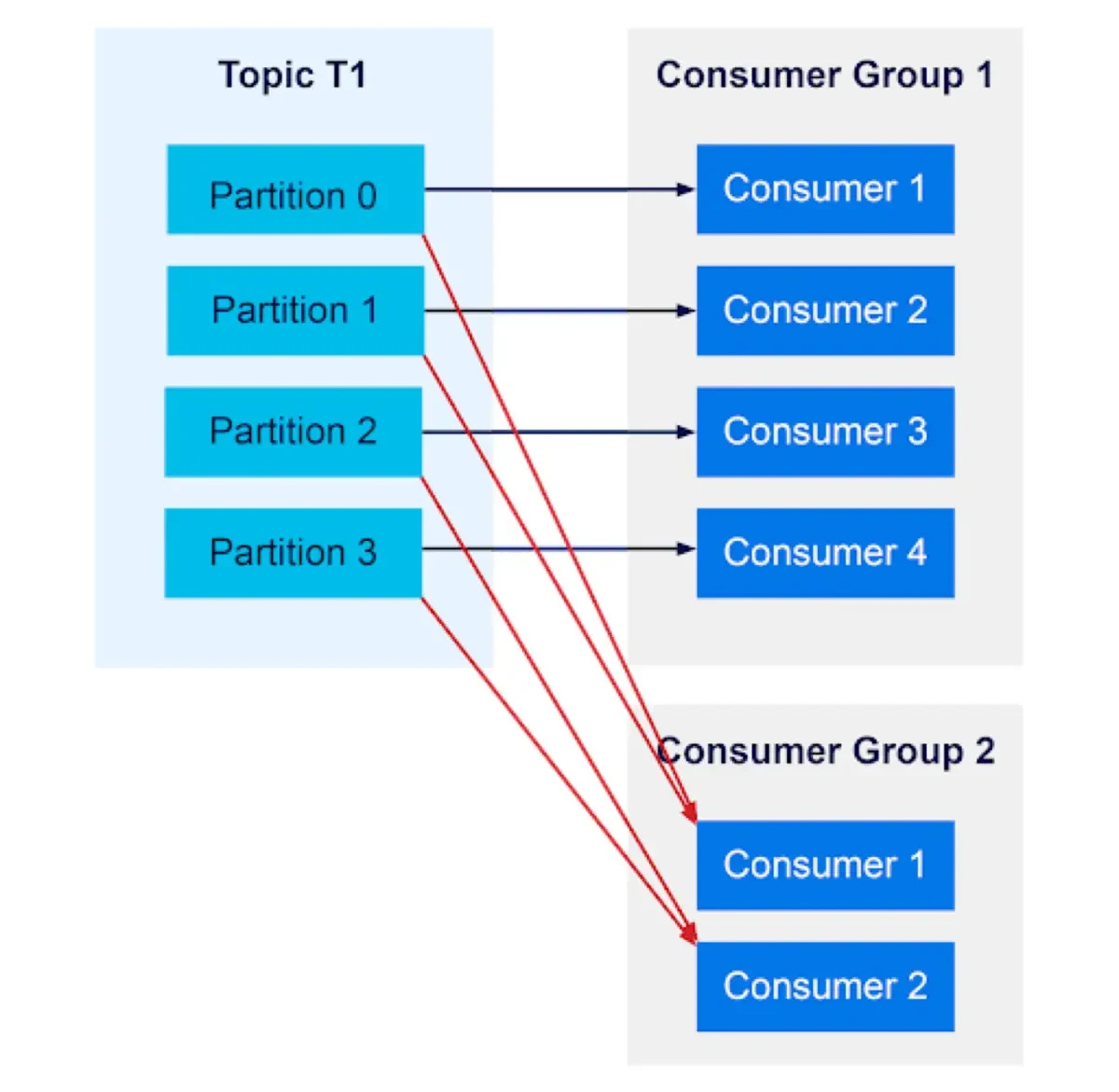
- Partition assignment rule
- if topic has 3 partitions and consumer group has 2 consumers, the distribution is as follow:
- Consumer A -> partition 0 and 1
- Consumer B -> Partition 2
- if consumers > partitions, extra consumers stay idle.
- if partition > consumers, some consumers handle multiple partitions.
- if topic has 3 partitions and consumer group has 2 consumers, the distribution is as follow:
- Offset
- Position of a message inside a partition.
- Offsets track the last processed message.
- Kafka stores offset in:
consumer_offsettopic - Offset commit type:
- auto commit: commit automatically at intervals. Risk with message loss or duplication.
- manual commit: commit only after processing. Safer for critical pipelines.
- Rebalance
- Its happens when:
- new consumer joins
- consumer crash
- topic partitions change
- During rebalance, partitions are reassigned and consumers briefly pause.
- Its happens when:
Use Cases
- Real-time Data Ingestion & Processing
- Collects and streams large volumes of data from various sources (e.g., databases, logs, IoT devices, APIs).
- Supports event-driven architectures by enabling real-time data processing with tools like Flink, Spark Streaming, and ksqlDB.
- Decoupling Microservices
- Acts as a message broker between producers (data sources) and consumers (data processors).
- Improves scalability by allowing services to communicate asynchronously without direct dependencies.
- Data Pipeline Orchestration
- Works as a backbone for ETL pipelines, allowing ingestion, transformation, and movement of data between systems.
- Integrates with Kafka Connect to stream data into databases, data lakes (e.g., S3, HDFS), or analytics platforms (e.g., Snowflake, Redshift).
- Log Aggregation, Monitoring and Alerting
- Captures logs from distributed systems and forwards them for real-time analytics and monitoring (e.g., ELK stack).
- Streaming Analytics
- Supports real-time analytics by processing event streams and enabling anomaly detection, fraud detection, and personalization.
- Change Data Capture
- Data Relication
- Log Aggregation
Kafka vs Airflow
Kafka is designed for real-time data streaming and messaging. Airflow is a workflow scheduler and orchestrator for batch data pipelines.
Kafka vs Airflow: When to Use What?
| Feature | Kafka 🟠 (Streaming) | Airflow 🔵 (Batch Scheduling) |
|---|---|---|
| Processing Model | Real-time, event-driven | Batch, scheduled |
| Best for | Data streaming, log aggregation | Workflow automation, ETL orchestration |
| Scalability | High (distributed brokers) | Scales well but limited to batch jobs |
| State Management | Low (event-driven, stateless) | High (dependency tracking, task retries) |
| Latency | Low latency (milliseconds) | High latency (minutes to hours) |
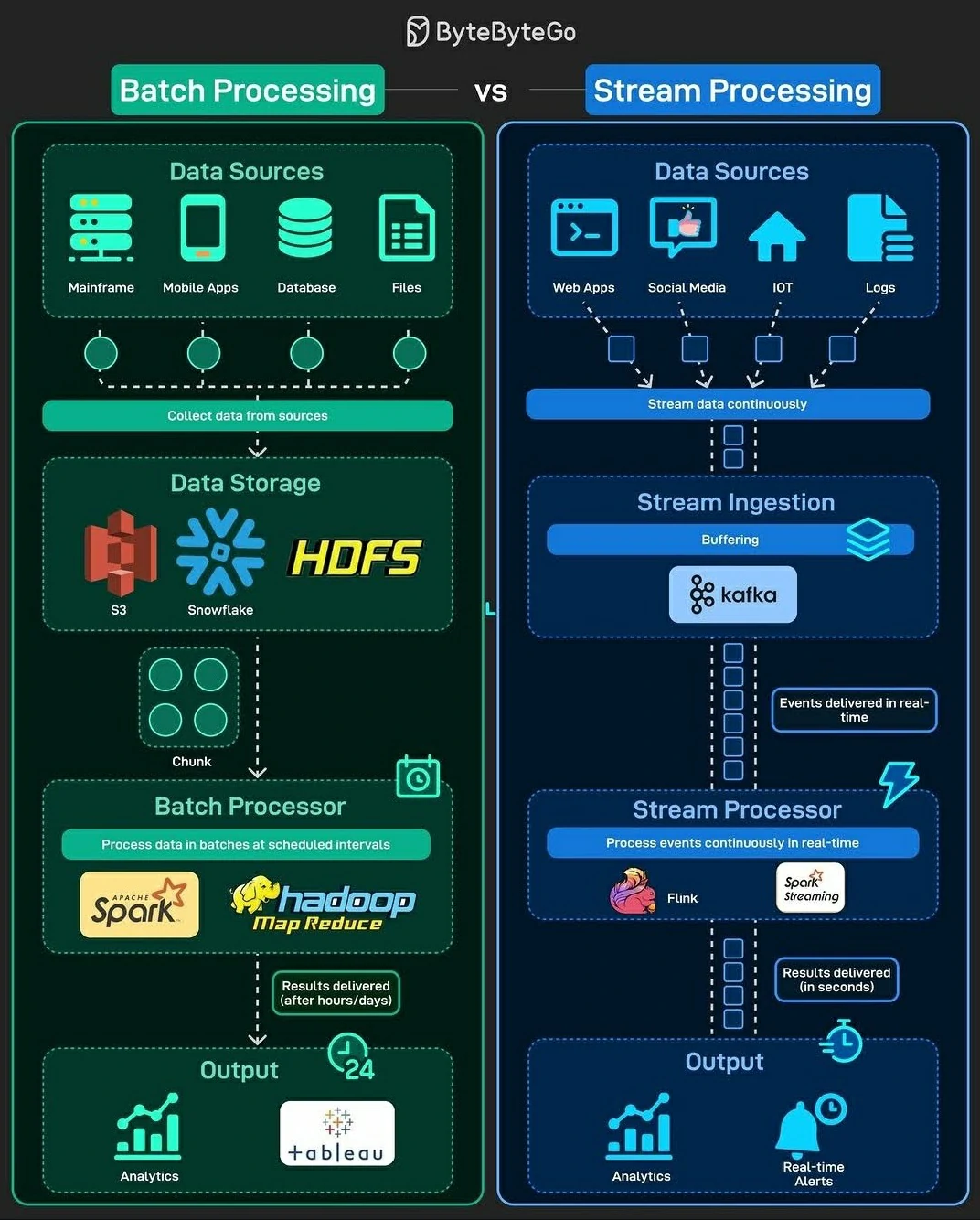
Work Together?
Airflow can trigger and monitor Kafka-based pipelines:
- Kafka for Data Streaming: Stream raw data in real time.
- Airflow for Batch Processing: Schedule downstream batch jobs to process stored Kafka data.
- Integration: Use Airflow’s
KafkaSensorto trigger workflows when new Kafka events arrive.
How to install kafka
Using Docker containers to develop and run Kafka—along with its supporting components—can significantly simplify maintenance and scaling. Containerization standardizes the environment, reduces setup complexity, and makes it easier to replicate or extend the system as needed.
The minimum requirements to set up Kafka are as follows:
This example will integrate some tools such as:
- zookeeper: Acts as the coordination layer, managing broker metadata, leader election, and cluster state.
- kafka1: Acts as Broker no.1
- kafka2: Acts as Broker no.2
- kafka3: Acts as Broker no.3
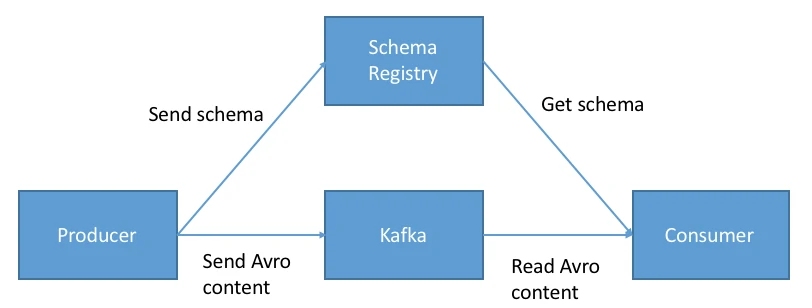
- kafka-schema-registry: Acts as centralized repository for managing and validating schemas for topic message data, and for serialization and deserialization of the data over the network.
- kafka-connect: Acts as connector to others tools or database
- ksqldb-server: Acts as event streaming database for Apache Kafka.
- akhq: Acts as GUI or Kafka-UI for controling and monitoring kafka process.
- etl: Acts as placeholder or CLI commander to run any scripts that needed kafka tool
Tweaking Kafka
- Cleanup Policy
- A cleanup policy defines how a topic manages messages that are no longer required, whether they are deleted or retained in a more compact form. This mechanism is essential for controlling storage usage and maintaining data relevance over time.
- Types of cleanup policies:
- Delete: Messages are automatically removed once they exceed defined retention thresholds, such as time or storage size (
cleanup.policy=delete). - Compact: Messages are retained based on their key, with older records being compacted so that only the latest value for each key is preserved (
cleanup.policy=compact).
- Delete: Messages are automatically removed once they exceed defined retention thresholds, such as time or storage size (
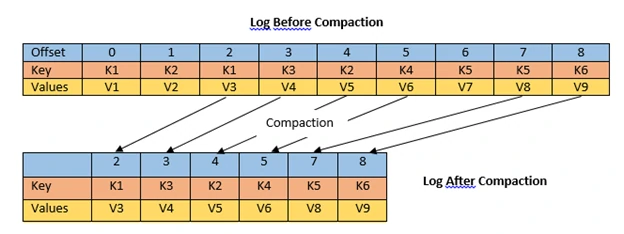
- Retention
- Retention defines how long messages remain available within a topic before they are eligible for deletion. It provides control over data lifecycle, ensuring storage is managed efficiently while preserving data for an appropriate duration.
- Retention types:
- Time-based retention: Messages are removed once they exceed a specified time window (e.g., retention.ms=604800000, which corresponds to 7 days).
- Size-based retention: Messages are deleted when the total size of the topic surpasses a defined limit (e.g., retention.bytes=1073741824, or 1 GB).
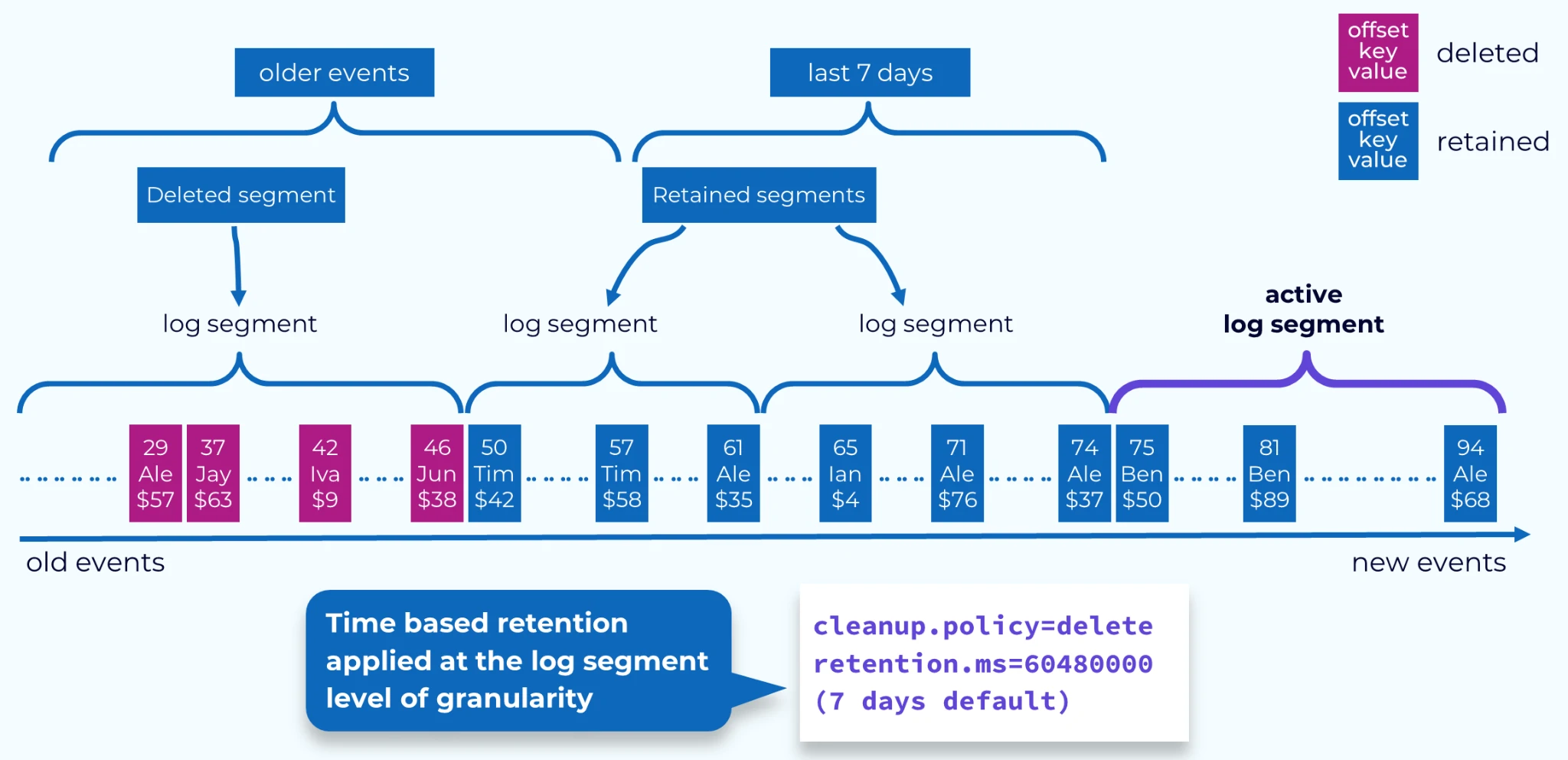
- Schema Registry
- A Schema Registry is a centralized service used to manage and enforce data schemas shared between producers and consumers within a topic. It enables teams to register, store, and validate schemas, ensuring consistent data structures across a distributed system.
- Key benefits:
- Data compatibility: Ensures producers and consumers adhere to the same schema, enabling reliable and consistent data exchange.
- Operational efficiency: Centralizing schema management reduces redundancy and streamlines both data production and consumption workflows.
- Flexibility: Supports multiple schema formats and compatibility modes, allowing teams to evolve schemas safely while accommodating different application requirements.