Infrastructure Decision
data Strategic
on-premise
cloud
- Infrastructure Decision
- How to decise to move between on-premises vs cloud
How to decise to move between on-premises vs cloud
The decision to move between on-premises, cloud, or hybrid cloud is fundamentally a business architecture decision, not merely an infrastructure decision.
The primary drivers are:
- Business agility
- Workload characteristics
- Regulatory requirements
- Cost structure (CapEx vs OpEx)
- Security and data sovereignty
- Operational maturity
- Disaster recovery objectives
- Application architecture
According to guidance from the NIST, Cloud Security Alliance, Gartner, and the Well-Architected Framework, there is no universal “cloud-first” or “on-premises-first” rule. Modern enterprise architecture is increasingly hybrid, placing each workload where it delivers the best balance of performance, governance, resilience, and cost.
Evolution of Infrastructure
Most organizations follow a predictable evolution.
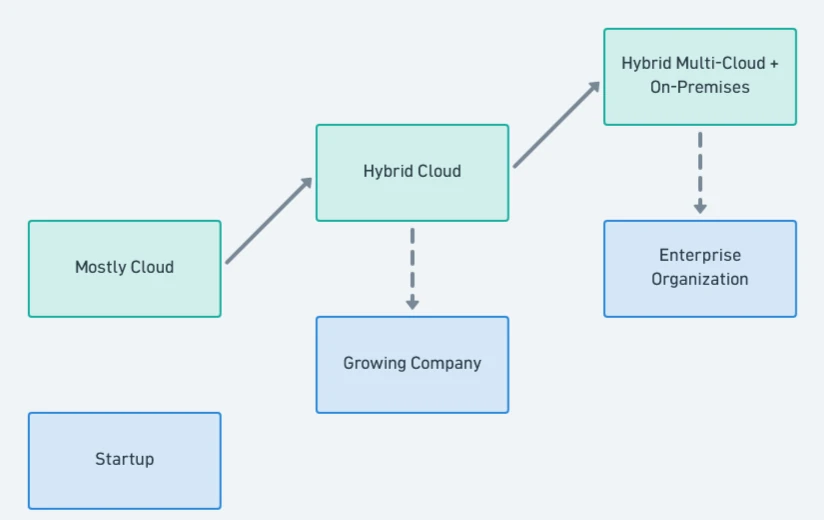
Very few enterprises operate entirely on-premises. Likewise, Very few enterprises operate entirely in the public cloud.
| Company Maturity | Software Stack | Infrastructure |
|---|---|---|
| Startup | Mostly Open Source | Public Cloud |
| Scale-up | Open Source + Some Commercial SaaS | Public Cloud |
| Mid-size Enterprise | Hybrid OSS + Enterprise Software | Hybrid Cloud |
| Large Enterprise | Hybrid OSS + Enterprise Platforms | Hybrid Multi-Cloud + On-Premises |
| Global Enterprise | Enterprise + OSS + Specialized Platforms | Hybrid Multi-Cloud + Edge + On-Premises |
This alignment reflects common enterprise modernization patterns described by NIST cloud reference architectures, Gartner infrastructure research, and CNCF/Linux Foundation cloud-native adoption studies.
Cloud Is the Best Choice When
- Has these characteristics:
- Application
- web application
- mobile backend
- API
- SaaS platform
- AI services
- Traffic
- unpredictable
- seasonal
- rapidly growing
- Engineering
- Small DevOps team
- Business
- Rapid feature delivery
- Application
Stage 1 — Cloud-First
- Primary goal:
Deliver products quickly without investing in infrastructure. - Typical organization:
- Startup
- SaaS company
- Digital product
- Small engineering team
- Benefits:
- Zero hardware procurement
- Minutes to provision infrastructure
- Automatic backups
- High availability services
- Managed security updates
- Global deployment
- Elastic scaling
- No need for:
- Data center
- Storage arrays
- UPS
- Networking teams
- Hardware lifecycle management
Stage 1.1 — Mostly On-Premises (Traditional Enterprise)
This is traditional enterprise expecially develop around 1990 to 2010.Whit characteristics such as:
- Physical servers
- SAN
- VMware
- Local Active Directory
- Enterprise data center
NIST Cloud Computing Reference Architecture explains this as the pre-cloud enterprise environment from which organizations transition. NIST Cloud Computing Reference Architecture, NIST Cloud Computing Program - NCCP
Decision Trigger 1 — Unpredictable Changes
- Example:
- Difference day has difference user activity that leads to unpredictable changing usage of infrastructure.
- While Cloud has more advantages:
- Auto Scaling
- Load Balancer
- Elastic Database
- Serverless
- No needs to buy more servers, installation, and configuration that consume several weeks.
Decision Trigger 2 — Fast Time-to-Market
- In Cloud resources, provision VM need almost in Minutes.
- While on-premises needs:
- Budget approval
- Purchase
- Shipping
- Rack
- Install
- Network
- Organizations prioritizing rapid delivery benefit from cloud infrastructure.
Decision Trigger 3 — CapEx vs OpEx
Capital Expenditure vs Operational Expenditure
- On-Premises requires upfront investment, This is CapEx (Capital Expenditure):
- Servers
- Storage
- Networking
- Power
- Cooling
- Rack space
- Disaster recovery site
- Maintenance contracts
- Cloud infrastructure is rented and paid based on consumption. This is OpEx (Operational Expenditure).
- Cloud is advantageous when organizations prefer preserving capital and aligning costs with usage.
Stage 2 — Cloud Costs Become Significant
- As organizations grow, cloud spending often increases substantially.
- Typical environment:
- Hundreds of virtual machines
- Large databases
- Petabytes of storage
- Thousands of Kubernetes pods
- High outbound network traffic
- Cloud bills commonly become one of the largest IT operating expenses.
- At this stage, FinOps practices become essential:
- Rightsizing compute
- Reserved instances
- Savings plans
- Storage tiering
- Idle resource elimination
- Cost allocation by business unit
- The question shifts from Can we run in the cloud? to Which workloads should remain in the cloud?
Decision Trigger 4 — Stable
With stable operation and predictable workloads will move from cloud to on-premise. Example:
- 24 hours/day
- 365 days/year
- Constant CPU
- Constant Memory
-
Constant Storage
- Cloud: You continue paying for always-on resources.
- On-premises: A server purchased once can be fully utilized for several years.
For long-lived, predictable workloads with high utilization, on-premises infrastructure can provide a lower long-term total cost of ownership, assuming the organization can efficiently operate the environment.
Decision Trigger 5 — Data volumes
Challenges:
- Storage costs
- Network egress charges
- Backup costs
- Replication costs
Frequently process data locally while using cloud services for analytics, collaboration, or disaster recovery.
Decision Trigger 6 — Latency
Latency or response requirements become a main concern. Round trips to a public cloud may introduce unnecessary latency.
Decision Trigger 7 — Regulation
Data Sovereignty and Regulation. Organizations may keep regulated data on-premises or in approved sovereign cloud regions while using cloud platforms for less sensitive workloads.
- Some workloads are constrained by:
- Government regulations
- Financial regulations
- Healthcare regulations
- National security requirements
- Contractual obligations
- Requirements may include:
- Data residency
- Encryption
- Controlled administrative access
- Auditable infrastructure
- Restricted cross-border transfers
Stage 3 — Hybrid Cloud
In hybrid cloud, it separate and combine between cloud and on-promise. Operational systems remain local. Analytics and AI run in the cloud.

Supported by:
- NIST explicitly defines Hybrid Cloud as a deployment model.
- Cloud Security Alliance also recommends workload placement based on security, compliance, and business requirements.
- Gartner similarly recommends hybrid infrastructure because many critical workloads remain outside centralized public cloud environments.
Stage 4 — Multi-Cloud
Large enterprises often use multiple cloud providers. With separate difference functions and purposes for difference cloud providers. Example for:
- Customer-facing Applications
- Office Ecosystem
- Analytics
- Manufacturing using On-Premises
Reasons:
- Avoid vendor lock-in
- Best-of-breed services
- Geographic coverage
- Business continuity
- Compliance requirements
Supported by:
- The CNCF Annual Survey found that multi-cloud and hybrid cloud are the norm rather than single-cloud deployments, especially in larger organizations. Gartner also identifies hybrid capabilities as a long-term requirement for enterprise infrastructure. Gartner Says 50% of Critical Enterprise Applications Will Reside Outside of Centralized Public Cloud Locations Through 2027
Decision Matrix
| Factor | On-Premises | Cloud | Hybrid |
|---|---|---|---|
| Initial investment | High | Low | Medium |
| Operational flexibility | Medium | High | High |
| Elastic scaling | Limited | Excellent | Excellent |
| Procurement speed | Slow | Fast | Fast |
| Hardware ownership | Yes | No | Partial |
| Predictable workloads | Excellent | Good | Excellent |
| Variable workloads | Fair | Excellent | Excellent |
| Data sovereignty | Excellent | Good (region-dependent) | Excellent |
| Disaster recovery | Higher implementation effort | Built-in services available | Excellent |
| AI and advanced managed services | Limited unless self-managed | Excellent | Excellent |
| Industrial/real-time systems | Excellent | Poor for control loops | Excellent |
| Global deployment | Complex | Excellent | Excellent |
Tips
- Cloud reduces infrastructure ownership and accelerates delivery, but continuous compute, storage, and network consumption can make long-running workloads more expensive than efficiently utilized on-premises infrastructure. Cost optimization requires active governance and FinOps practices.
- Security depends on architecture, configuration, identity management, monitoring, and operational discipline—not deployment location. Major cloud providers implement extensive physical and infrastructure security controls, while customers remain responsible for securing their workloads under the shared responsibility model.
- Large enterprises typically classify workloads based on latency, regulatory requirements, integration needs, and economics. Mission-critical manufacturing systems, operational technology (OT), and certain databases often remain on-premises, while collaboration platforms, analytics, AI, disaster recovery, and customer-facing applications leverage cloud services.
- Deploy customer-facing applications, APIs, analytics, AI, collaboration platforms, and elastic workloads in the public cloud.
- Keep manufacturing control systems, operational technology, low-latency applications, and highly regulated datasets on-premises or in private cloud environments.
- Connect environments using secure networking, identity federation, API gateways, event streaming, and centralized observability.
- Govern infrastructure with Infrastructure as Code (IaC), automated CI/CD pipelines, zero-trust security principles, and FinOps cost management.
- Reassess workload placement periodically based on business value, compliance, performance, resilience, and total cost of ownership.