Chrome DB 101
tools
container
chromedb
- Chrome DB 101
What Is ChromaDB?
ChromaDB is an open-source vector database designed specifically for AI applications.
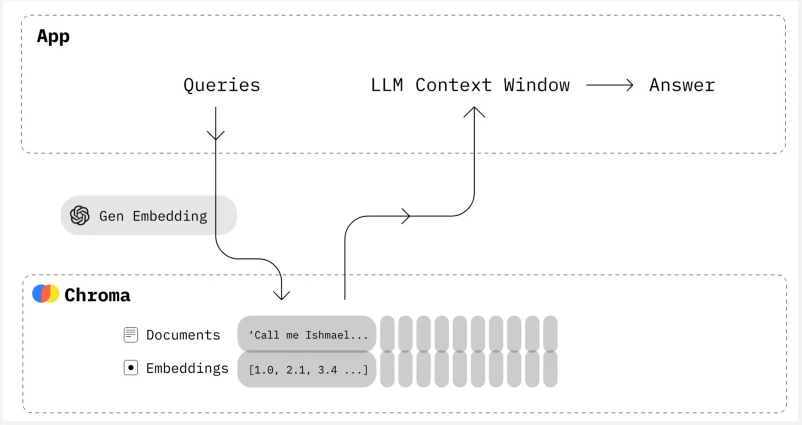
Unlike traditional databases that store rows and columns, ChromaDB stores embedding vectors together with the original documents and additional information called metadata.
One of the biggest advantages of ChromaDB is that it is extremely easy to set up.
There is no separate database server to install.
Your Python application can create and use a ChromaDB database directly.
That makes it an excellent choice for development, experimentation, and local applications.
Framework
  flowchart TD;
      A[Document]-->B[Splitting];
      B-->C[Embeddings];
      C-->D[ChromaDB];
      D-->E[Semantic Search];
Library
  import os
  import chromadb
  from pathlib import Path
  from chromadb.utils.embedding_functions import ONNXMiniLM_L6_V2

  DB_PATH = Path(r"F:\temp\chromadb").resolve()
  os.environ["CHROMA_CACHE_DIR"] = r"F:\temp\chromadb\cache"
  embedding_function = ONNXMiniLM_L6_V2()
Creating a ChromaDB Client
Every database starts with a client. The client is responsible for communicating with the database.
chromadb.Client() creates an in-memory (ephemeral) database. This creates an in-memory database. Everything exists only while the program is running. Once the program ends, all data disappears. That is useful for testing but not for real applications. We’ll solve this later using persistent storage.
client = chromadb.PersistentClient(path=str(DB_PATH))
Collections
A collection is one of the most important concepts in ChromaDB. Think of a collection as being similar to a table in a relational database.
  Database
    |
    +-- Books
    +-- Articles
    +-- Product Manuals
Each collection stores related documents together. For example:
- Product manuals
- Company policies
- Books
- Research papers
Separating data into collections keeps everything organized.
collection = client.get_or_create_collection(name="course_documents", embedding_function=embedding_function)
Or for full text with iteration we could use this scripts
  for index, chunk in enumerate(chunks):
      response = client.embeddings.create(
          model="text-embedding-3-small",
          input=chunk
      )
      embedding = response.data[0].embedding
      collection.add(
          ids=[f"chunk_{index}"],
          documents=[chunk],
          embeddings=[embedding],
          metadatas=[
              {
                  "file": "sample.pdf",
                  "chunk": index
              }
          ]
      )
Since we are not supplying embeddings ourselves, ChromaDB automatically generates them using its default built-in embedding model (a small local sentence-transformer model called all-MiniLM-L6-v2).
Or we could supply the embedding using pre-define from chromedb such as text-embedding-3-small.
What Does a Collection Store?
Every item stored inside a collection contains several pieces of information.
Typically, each record consists of:
- A unique ID
- The document text
- An embedding vector
- Metadata
Conceptually, it looks like this:
ID -> Document -> Embedding -> Metadata
These four parts work together to make semantic search possible.
Document: one chunk of a larger document rather than an entire PDF or book.
Metadata: additional information. it describes the document.
Examples metadata include:
- File name
- Author
- Page number
- Chapter
- Category
- Source URL
- Creation date
Metadata becomes extremely useful when searching large collections.
ChromaDB document IDs must be unique within a collection. If you try to add() an ID that already exists, you’ll get an error. delete_collection() wipes the collection so we can start over — in your own projects, prefer collection.update() (covered later in this lecture) when you just want to change existing documents instead of re-inserting everything.
Add
  collection.add(
      ids=["doc11", "doc21", "doc31"],
      documents=[
          "Python is popular for AI.",
          "Vector databases store embeddings.",
          "ChromaDB is an open-source vector database."
      ],
      metadatas=[
          {
              "category": "python",
              "chapter": 1,
              "author": "Sudip"
          },
          {
              "category": "python",
              "chapter": 2,
              "author": "Sudip"
          },
          {
              "category": "python",
              "chapter": 3,
              "author": "Sudip"
          }
      ]
  )
Update
  collection.update(
      ids=["doc11"],
      documents=["Python is widely used for AI and Machine Learning."]
  )
Delete
  collection.delete(
      ids=["doc2"]
  )
upsert
  collection.upsert(
      ids=["doc2"],
      documents=["Python is widely used for AI and Machine Learning."]
  )
View and count
  print("Count:", collection.count())

  print(
      collection.get(
          include=["documents"]
      )
  )
with output
  Count: 3
  {'ids': ['doc11', 'doc21', 'doc31'], 'embeddings': None, 'documents': ['Python is widely used for AI and Machine Learning.', 'Vector databases store embeddings.', 'ChromaDB is an open-source vector database.'], 'uris': None, 'included': ['documents'], 'data': None, 'metadatas': None}
What Happens During Insertion?
ChromaDB performs several operations automatically.
  flowchart TD;
      A[Document]-->B[Generate Embedding];
      B-->C[Store Vector];
      C-->D[Store Document];
      D-->E[Store Metadata];
Once complete, the document becomes searchable.
Default embedding function
  from chromadb.utils import embedding_functions

  default_ef = embedding_functions.DefaultEmbeddingFunc

  emb = default_ef("input text")
Why Persistent Storage Matters
Persistent storage is essential because it allows us to:
- Save embeddings permanently
- Avoid regenerating embeddings every time
- Reduce API costs
- Speed up application startup
- Build real-world AI applications
Without persistence, every application restart would require rebuilding the entire vector database.
As you begin working with ChromaDB, keep these recommendations in mind:
- Create separate collections for different types of data.
- Store document chunks rather than entire documents.
- Give every document a unique ID.
- Store useful metadata with every document.
- Use persistent storage for real projects.
- Keep your database folder inside your project directory.
- Prefer get_or_create_collection() over create_collection() so re-running your script doesn’t raise an error.
- Avoid recreating collections every time your application starts unless necessary.
Similarity Search
  results = collection.query(
      query_texts=[
          "How do vector databases work?"
      ],
      n_results=2
  )
with output
  {'ids': [['doc21', 'doc31']],
  'embeddings': None,
  'documents': [['Vector databases store embeddings.',
    'ChromaDB is an open-source vector database.']],
  'uris': None,
  'included': ['metadatas', 'documents', 'distances'],
  'data': None,
  'metadatas': [[{'chapter': 2, 'author': 'Sudip', 'category': 'python'},
    {'chapter': 3, 'category': 'python', 'author': 'Sudip'}]],
  'distances': [[0.27875733375549316, 0.37161165475845337]]}
Instead of searching for the exact words “meaning” or “documents”, ChromaDB compares embedding vectors.
It finds the vectors that are closest to the query embedding and returns the most semantically similar documents.
This is the key idea behind vector search
Understanding distances: A smaller distance means the document is more similar to your query. The first result in the list always has the smallest distance (the best match), and results get progressively less similar as you move down the list. You don’t need to interpret the exact numbers — just remember: lower is better.
Top-K Search
Top-K Search is a fast data-retrieval and AI method that finds the K best or most relevant results, such as the top 5 matching documents or the 10 most likely next words. Instead of looking at every single option, it picks only the highest-scoring items and throws away the rest.
How It Works:
- Scoring: The system grades all options based on a match or a probability score.
- Filtering: It sorts the scores from highest to lowest.
- Cutting: It keeps only the top K items (where K is a number you choose, like 3, 10, or 50) and ignores everything else.
  results = collection.query(
      query_texts=[
          "Artificial Intelligence"
      ],
      n_results=5
  )

  results
  {'ids': [['doc11', 'doc31', 'doc21']],
  'embeddings': None,
  'documents': [['Python is widely used for AI and Machine Learning.',
    'ChromaDB is an open-source vector database.',
    'Vector databases store embeddings.']],
  'uris': None,
  'included': ['metadatas', 'documents', 'distances'],
  'data': None,
  'metadatas': [[{'chapter': 1, 'author': 'Sudip', 'category': 'python'},
    {'category': 'python', 'chapter': 3, 'author': 'Sudip'},
    {'category': 'python', 'author': 'Sudip', 'chapter': 2}]],
  'distances': [[0.5072453022003174, 0.8110436201095581, 0.8169772028923035]]}
Rule of thumb for Top-k
| Application | Typical K |
|---|---|
| Simple search | 3 |
| AI chatbot | 5 |
| RAG system | 5–10 |
| Large knowledge base | 10–20 |
- Using a very large value may return unrelated documents.
- Using a very small value may miss useful information.
- Choosing the right value often requires experimentation.
Metadata Filtering
  results = collection.query(
    query_texts=["semantic search"],
    where={"category": "python"},
    n_results=2
  )
  {'ids': [['doc21', 'doc31']],
  'embeddings': None,
  'documents': [['Vector databases store embeddings.',
    'ChromaDB is an open-source vector database.']],
  'uris': None,
  'included': ['metadatas', 'documents', 'distances'],
  'data': None,
  'metadatas': [[{'chapter': 2, 'author': 'Sudip', 'category': 'python'},
    {'chapter': 3, 'author': 'Sudip', 'category': 'python'}]],
  'distances': [[0.6605756878852844, 0.719544529914856]]}
Improving Search Quality
- Increase Top-K
- Better chunking
- Better metadata
- Better embedding models
- Handling Empty or Irrelevant Queries