Milvus 101
tools
container
milvus
- Milvus 101
Introduction
Milvus is a vector database designed to store, index, and search large amounts of vector data together with structured metadata. It is commonly used for semantic search, Retrieval-Augmented Generation (RAG), recommendation systems, image search, and other AI applications.
It stands out as a vector database with its scalable architecture and diverse capabilities designed to accelerate and unify search experiences across various applications.
How does Milvus work in a nutshell?
Here’s a simplified overview of its architecture:
- Access Layer: This layer serves as the initial point of contact for external requests, utilizing stateless proxies for client connection management, static verification, and dynamic checks.
- Coordinator Service: Acting as the central command, this service orchestrates load balancing and data management through four coordinators, which ensure efficient data, query, and index management.
- Worker Nodes: Responsible for the actual execution of tasks, worker nodes are scalable pods that carry out commands from coordinators.
- Object Storage Layer: Fundamental for data persistence, this layer consists of Meta store, log broker, and object storage.
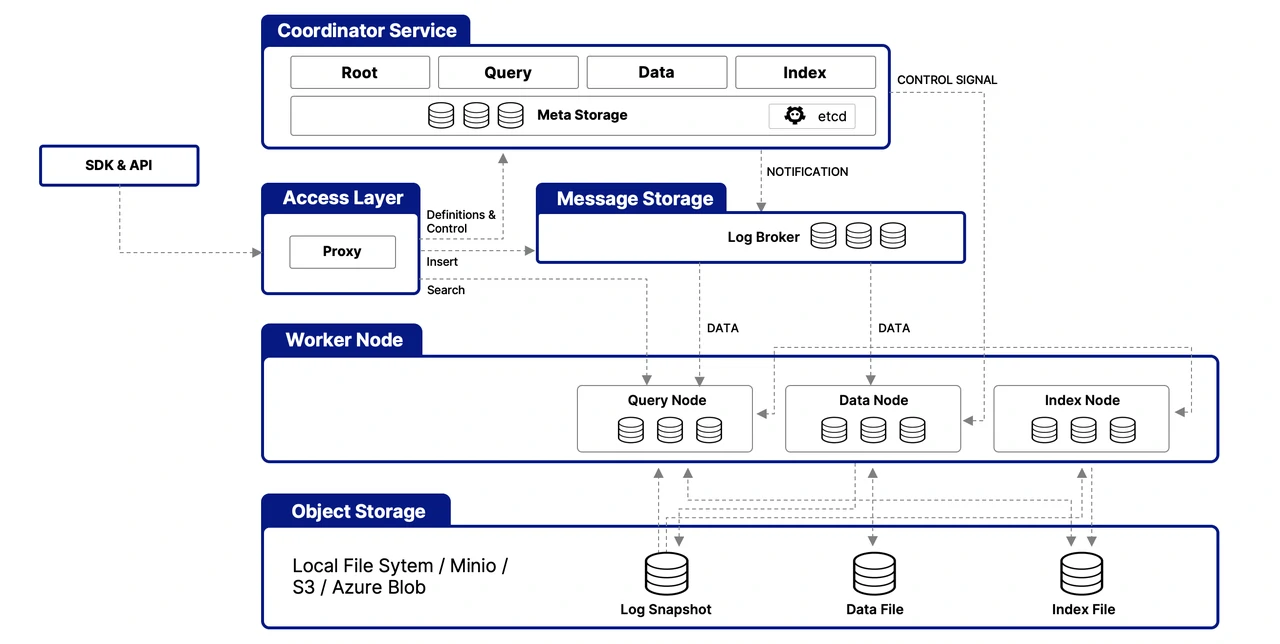
Components
- Database
- A Milvus deployment can contain multiple databases. A database provides a logical namespace for organizing collections and their data.
- Collection = Table
- A collection is the primary data container in Milvus. Conceptually, it is similar to a table in a relational database. A collection contains a defined schema, fields, indexes, and entities.
- Column = Field
- A field represents an attribute of an entity. Fields can contain scalar data such as VARCHAR, INT64, FLOAT, or vector data such as FLOAT_VECTOR and SPARSE_FLOAT_VECTOR.
- Row = Entity
- An entity is one complete record in a collection. The values across all fields belonging to the same record form one entity.
-
Conceptually:
Database └── Collection ├── Field / Column ├── Field / Column └── Entity / Row - Milvus describes collections and entities as being similar to tables and records in relational databases.
Installation
Milvus can be deployed locally or in a distributed environment. For development and testing, Docker Compose is one of the simplest deployment methods. Kubernetes is more appropriate for production deployments that require scalability and operational management.
Typical local deployment:
  Application
      │
      ▼
  Milvus
      │
      ├── Metadata (milvus-etcd)
      ├── Object Storage (milvus-minio)
      ├── GUI (milvus-attu)
      └── Query / Data Processing (milvus-standalone)
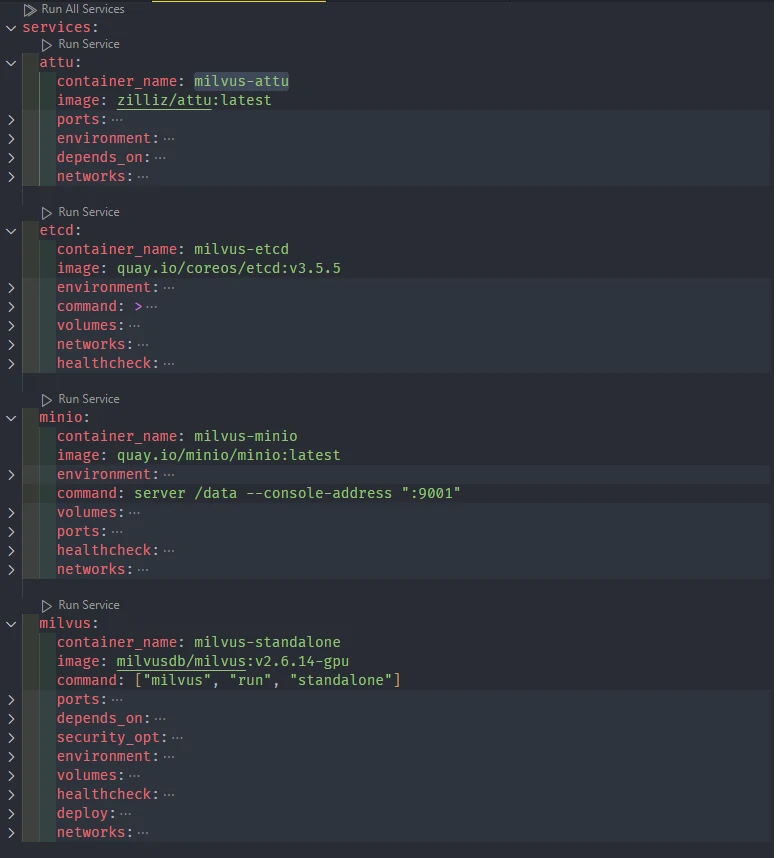
The official documentation provides installation procedures. E.G. above diagram tell us about what a standard services that we could create for Docker Compose or Kubernetes.
Connecting with Milvus
Applications communicate with Milvus through its client APIs. For Python applications, the commonly used SDK is pymilvus.
Example connection:
  from pymilvus import MilvusClient

  client = MilvusClient(
      uri="http://localhost:19530"
  )
The connection requires the Milvus server address and, when authentication is enabled, appropriate credentials. Once connected, the client can manage databases, collections, schemas, data, indexes, and searches.
Create and Store Data
The basic Milvus data lifecycle is:
  Define Database
        ↓
  Define Schema
        ↓
  Create Collection
        ↓
  Create Index
        ↓
  Insert / Upsert Data
        ↓
  Load Collection
        ↓
  Search / Query
Milvus stores both structured metadata and vector representations. For example:
  id
  title
  category
  content
  embedding
  created_at
The embedding field represents the semantic characteristics of the content, while the other fields provide information that can be returned, filtered, or used for ranking.
Database
A database provides a logical namespace for organizing collections. For example:
  Milvus
  ├── database: production
  │   ├── documents
  │   ├── products
  │   └── customers
  │
  └── database: development
      ├── documents
      └── test_products
Create Database
Create a database when collections need to be logically separated.
  client.create_database(
      db_name="production",
      properties={"database.replica.number": 3}
  )
View Databases
Use the database management API to list available databases.
client.list_databases()
Alter Database
Database properties can be modified when supported by the deployed Milvus version.
  client.alter_database_properties(
      db_name="production",
      properties={"database.max.collections": 10}
  )
Drop Database
Dropping a database removes the database namespace and its associated collections. This should be treated as a destructive administrative operation.
  client.drop_database(
      db_name="production"
  )
  client.drop_database_properties(
      db_name="production",
      property_keys=[
          "database.max.collections"
      ]
  )
Switch Database
A client can operate against a specific database by specifying the database name when creating the connection or client configuration.
client.use_database(db_name="milvus")
The database concept is particularly useful when separating development, testing, and production workloads.
Schema
A schema defines the structure of a collection. It determines which fields exist, their data types, primary key behavior, and vector dimensions.
A collection normally contains:
  Primary Key
      +
  Scalar Fields
      +
  Vector Fields
A well-designed schema is important because every entity inserted into the collection must conform to the collection structure.
Create Schema
  schema = client.create_schema(
      auto_id=False,
      enable_dynamic_field=False
  )
The schema can then be populated with field definitions.
Add Field Schema
A field definition describes an individual attribute.
  schema.add_field(
      field_name="my_id",
      datatype=DataType.INT64,
      is_primary=True,
      auto_id=True,
  )

  schema.add_field(
      field_name="my_vector",
      datatype=DataType.FLOAT_VECTOR,
      dim=5
  ) # the vector field holds a list of 32-bit floating numbers with 5 dims

  schema.add_field(
      field_name="my_varchar",
      datatype=DataType.VARCHAR,
      max_length=512,
      enable_analyzer=True,
      enable_match=True,
  )

  schema.add_field(
      field_name="my_int64",
      datatype=DataType.INT64,
      description="publish date",
  )

  schema.add_field(
      field_name="my_bool",
      datatype=DataType.BOOL,
  )

  schema.add_field( field_name="my_json", datatype=DataType.JSON,)

  schema.add_field(
      field_name="my_array",
      datatype=DataType.ARRAY,
      element_type=DataType.VARCHAR,
      max_capacity=5,
      max_length=512,
  )

  # A sparse vector is a special high-dimensional vector where most elements are zero, and only a few dimensions have non-zero values.
  schema.add_field(field_name="sparse_vector", datatype=DataType.SPARSE_FLOAT_VECTOR)

  # https://milvus.io/docs/geometry-field.md
  schema.add_field("geo", DataType.GEOMETRY, nullable=True)

  schema.add_field("tsz", DataType.TIMESTAMPTZ, nullable=True)
  for idx, down in enumerate (schema.fields):
    display(down.dtype)
with output
  <DataType.INT64: 5>
  <DataType.FLOAT_VECTOR: 101>
  <DataType.VARCHAR: 21>
  <DataType.INT64: 5>
  <DataType.BOOL: 1>
  <DataType.JSON: 23>
  <DataType.ARRAY: 22>
  <DataType.SPARSE_FLOAT_VECTOR: 104>
  <DataType.GEOMETRY: 24>
  <DataType.TIMESTAMPTZ: 26>
Milvus supports scalar fields and several vector field types, including dense, sparse, and binary vectors.
Collection
A collection is the main container where Milvus stores entities.
Create Collection
A collection is created using a schema and, for vector search, appropriate index configuration.
  if client.has_collection(collection_name="demo_collection"):
    client.drop_collection(collection_name="demo_collection")

  client.create_collection(
      collection_name="demo_collection",
      dimension=768,  # The vectors we will use in this demo has 768 dimensions
  )
  # Init schema with auto_id disabled
  schema = client.create_schema(auto_id=False)

  # Add fields to schema
  schema.add_field(field_name="id", datatype=DataType.INT64, is_primary=True, description="product id")
  schema.add_field(field_name="text", datatype=DataType.VARCHAR, max_length=1000, enable_analyzer=True, enable_match =True, description="raw text of product description")
  schema.add_field(field_name="text_dense", datatype=DataType.FLOAT_VECTOR, dim=768, description="text dense embedding")
  schema.add_field(field_name="text_sparse", datatype=DataType.SPARSE_FLOAT_VECTOR, description="text sparse embedding auto-generated by the built-in BM25 function")
  schema.add_field(field_name="image_dense", datatype=DataType.FLOAT_VECTOR, dim=512, description="image dense embedding")

  client.create_collection(
      collection_name="documents",
      schema=schema
  )
A collection should be designed around the application’s retrieval requirements rather than simply mirroring the source database.
Delete Collection
Delete a collection when its data is no longer required.
client.drop_collection(collection_name="documents")
This is destructive and should not be used as a routine data-cleaning mechanism.
Load Existing Collection
Before similarity search or query operations, a collection generally needs to be loaded so its required data and indexes are available for search.
client.load_collection("documents")
Milvus documentation identifies loading as a prerequisite for similarity searches and queries.
alter Fields
  client.alter_collection_field(
      collection_name="demo_collection",
      field_name="varchar",
      field_params={
          "max_length": 1024
      }
  )
Add Fields to an Existing Collection
Milvus supports schema evolution for supported field types. We can add scalar fields (INT64, VARCHAR, FLOAT, DOUBLE, etc.). Vector fields cannot be added to existing collections. New fields must be nullable (nullable=True).
For example, a new metadata field can be added:
  client.add_collection_field(
    collection_name="demo_collection",
    field_name="created_timestamp",  # Name of the new field to add
    data_type=DataType.INT64,        # Data type must be a scalar type
    nullable=True,                   # Must be True for added fields
    # Allows NULL values for existing entities
    default_value="standard"         # Value assigned to existing entities
  )
New user-defined fields must generally be nullable to accommodate existing entities that were inserted before the field existed. Support for adding vector fields depends on the Milvus version.
Insert Data
Insert adds new entities to a collection.
  data=[
    {"id": 0, "vector": [0.3580376395471989, -0.6023495712049978,
    0.18414012509913835, -0.26286205330961354, 0.9029438446296592],
    "color": "pink_8682"}]

  client.insert(collection_name="milvus",
                data=data,
                # partition_name="partitionA",
                )
The inserted data must conform to the collection schema. If auto_id is enabled for the primary key, Milvus generates the primary key automatically.
Upsert Data
Upsert combines insert and update behavior.
If an entity with the same primary key does not exist, Milvus inserts it. If it already exists, the entity can be updated according to the upsert semantics.
  res = client.upsert(
    collection_name='milvus',
    data=data,
    partial_update=True,
    # partition_name="partitionA",
  )
Upsert is useful for synchronization pipelines where the source system may repeatedly send the same entity.
Delete Entities
Entities can be deleted using their primary key or a filtering expression.
  client.delete(
      collection_name="documents",
      ids=[1, 2, 3],
      # filter="color in ['red_7025', 'purple_4976]",
  )
  # Delete entities by a filter expression
  res = client.delete(
      collection_name="demo_collection",
      filter="subject == 'history'",
  )
Deletion can also be based on conditions, for example: category == "temporary".
Delete operations should be designed carefully because they affect the searchable dataset and may interact with Milvus’s background data management and compaction processes.
Analyzer
An analyzer converts raw text into tokens (a structured, searchable format) that Milvus can use for text retrieval. A typical process is:
Each analyzer typically consists of two core elements: tokenizer and filter.
- Tokenizer: The tokenizer breaks input text into discrete units called tokens. These tokens could be words or phrases, depending on the tokenizer type.
- Filters: Filters can be applied to tokens to further refine them, for example, by making them lowercase or removing common words.
  Raw Text
    ↓
  Tokenizer
    ↓
  Filters
    ↓
  Tokens
    ↓
  Text Index
  # Built-in analyzer configuration for English text processing
  analyzer_params_built_in = {
      "type": "english",
      "tokenizer": "standard",
      # "tokenizer": "whitespace",
      # "tokenizer": "icu",
      "filter": [
          "lowercase",
          # "removepunct",
          # "asciifolding",
          # "alphanumonly",
          # "cnalphanumonly",
          {
              "type": "length",
              "max": 40,
          },
          {
              "type": "stemmer",
              "language": "english",
          },
          # {
          #     "type": "regex",
          #     "expr": "^(?!test)" # keep tokens that do NOT start with "test"
          # },
          {
              "type": "stop",
              "stop_words": ["of", "for", "a", "an", "the", "_english_"]
          }
      ]
  }

  # Verification only
  sample_text = "Milvus simplifies text analysis for search."
  result = client.run_analyzer(sample_text, analyzer_params_built_in)
  print("Built-in analyzer output:", result)


  schema = client.create_schema(auto_id=True, enable_dynamic_field=False)
  # Add VARCHAR field 'title_en' using the built-in analyzer configuration
  schema.add_field(
      field_name='title_en',
      datatype=DataType.VARCHAR,
      max_length=1000,
      enable_analyzer=True,
      analyzer_params=analyzer_params_built_in,
      enable_match=True,
  )

  # Add VARCHAR field 'title' using the custom analyzer configuration
  schema.add_field(
      field_name='title',
      datatype=DataType.VARCHAR,
      max_length=1000,
      enable_analyzer=True,
      analyzer_params=analyzer_params_custom,
      enable_match=True,
  )
Analyzers can tokenize text, remove stop words, normalize text, and apply other processing. They are important for:
- Full-text search
- Text match
- Phrase match
- BM25-based sparse retrieval
Milvus analyzers consist primarily of tokenizers and filters. Analyzer configuration is associated with text fields and affects how text is indexed and searched. reference
Indexing
An index is an additional data structure that accelerates retrieval.
For vector search, indexes allow Milvus to efficiently perform Approximate Nearest Neighbor (ANN) searches rather than comparing a query vector against every vector individually.
Common vector index approaches include:
- FLAT
- IVF
- HNSW
- DiskANN
- GPU-based indexes
For scalar and text fields, Milvus also supports indexes such as:
- INVERTED
- BITMAP
- Trie
- Sparse inverted indexes
  schema = client.create_schema(auto_id=True, enable_dynamic_field=False)

  # Set up index parameters for the vector field
  index_params = client.prepare_index_params()
  index_params.add_index(field_name="embedding",
                          metric_type="COSINE",
                          index_name="vector_index",
                          index_type="AUTOINDEX")

  # Create the collection with the defined schema and index parameters
  client.create_collection(
      collection_name="demo_collection",
      schema=schema,
      index_params=index_params
  )
Index selection affects search speed, memory consumption, storage requirements, and recall. reference
Searching Entities
Milvus provides several retrieval mechanisms. The appropriate method depends on whether the requirement is exact retrieval, metadata filtering, keyword matching, semantic retrieval, or a combination.
  # This will exclude any text in "history" subject despite close to the query vector.
  res = client.search(
      collection_name="milvus",
      data=query_vectors,
      anns_field="vector_field", # Vector field name
      filter="subject == 'history'", # ='color like "red%" and likes > 50',
      limit=2,
      output_fields=["text", "subject"],
      # search_params={ "params": {"radius": 0.4, "range_filter": 0.6}}
      # ids=[551, 296, 43],
      # group_by_field="docId",
      # group_size=2, # p to 2 entities to return from each group
      # strict_group_size=True, # return exact 2 entities from each group
  )

  print(res)
Query
Query retrieves entities using scalar conditions.
Example: category == "GIS".
It is appropriate when the application already knows which entities it wants to retrieve.
What the difference between get, query and queryinterator:
Get | Query | QueryIterator | |
|---|---|---|---|
Applicable scenarios | To find entities that hold the specified primary keys. | To find all or a specified number of entities that meet the custom filtering conditions | To find all entities that meet the custom filtering conditions in paginated queries. |
Filtering method | By primary keys | By filtering expressions. | By filtering expressions. |
Mandatory parameters |
|
|
|
Optional parameters |
|
|
|
Returns | Returns entities that hold the specified primary keys in the specified collection or partition. | Returns all or a specified number of entities that meet the custom filtering conditions in the specified collection or partition. | Returns all entities that meet the custom filtering conditions in the specified collection or partition through paginated queries. |
-
GETres = client.get( collection_name="bm25_collection", ids=[0, 1, 2], # output_fields=["vector", "color"] ) for hits in res: print(hits){'id': 0, 'text': 'Red cotton t-shirt with round neck', 'text_dense': [0.5385886430740356, 0.33316734433174133, 0.5065264701843262, ...]} {'id': 1, 'text': 'Wireless noise-cancelling over-ear headphones', 'text_dense': [0.47980189323425293, 0.2664969265460968, 0.07602941244840622, ...]} {'id': 2, 'text': 'Stainless steel water bottle, 500ml', 'text_dense': [0.18780812621116638, 0.7097065448760986, 0.10151955485343933, ...]} -
QUERYres = client.query( collection_name="bm25_collection", filter="text like \"Red%\"", # filter="RANDOM_SAMPLE(0.01)", # filter="color like \"red%\" AND RANDOM_SAMPLE(0.005)", # output_fields=["vector", "color"], limit=3 ) print(res)data: ["{'id': 0, 'text': 'Red cotton t-shirt with round neck', 'text_dense': [0.5385886430740356, 0.33316734433174133, 0.5065264701843262, ...]}"]res = client.query( collection_name="demo_collection", filter="subject == 'history'", output_fields=["text", "subject"], )data: ["{'id': 0, 'text': 'Artificial intelligence was founded as an academic discipline in 1956.', 'subject': 'history'}", "{'id': 1, 'text': 'Alan Turing was the first person to conduct substantial research in AI.', 'subject': 'history'}", "{'id': 2, 'text': 'Born in Maida Vale, London, Turing was raised in southern England.', 'subject': 'history'}"], extra_info: {}res = client.query( collection_name="demo_collection", ids=[0, 2], output_fields=["vector", "text", "subject"], )data: ["{'vector': [0.3882775604724884, -0.7781623005867004, -0.258905291557312, ... ], 'id': 2, 'text': 'Born in Maida Vale, London, Turing was raised in southern England.', 'subject': 'history'}"], extra_info: {} -
QUERY ITERATORconnections.connect(uri="http://localhost:19530") collection = Collection("my_collection") iterator = collection.query_iterator( batch_size=10, expr="text like \"Red%\"", output_fields=["color"] ) results = [] while True: result = iterator.next() if not result: iterator.close() break print(result) results += result
Filtering
Filtering restricts search results using scalar metadata.
Example: category == "GIS" AND year >= 2025
Filtering can be combined with vector search to reduce irrelevant results.
Milvus supports several basic operators for filtering data:
- Comparison Operators:
==, !=, >, <, >=, and <=allow filtering based on numeric or text fields. - Range Filters:
IN and LIKEhelp match specific value ranges or sets. - Arithmetic Operators:
+, -, *, /, %, and **are used for calculations involving numeric fields. - Logical Operators:
AND, OR, and NOTcombine multiple conditions into complex expressions. IS NULLandIS NOT NULLOperators: The IS NULL and IS NOT NULL operators are used to filter fields based on whether they contain a null value (absence of data). For details, refer to Basic Operators.
  filter = "age > {age} AND city in {city}",
  filter_params = {"age": 25, "city": ["Jakarta", "Bandung"]}

  # JSON data: {"tags": ["electronics", "sale", "new"]}
  filter='json_contains(tags, "sale")'

  # JSON data: {"tags": ["electronics", "sale", "new", "discount"]}
  filter='json_contains_all(tags, ["electronics", "sale", "new"])'
Text Match
Text Match performs term-based matching against analyzed text.
  TEXT_MATCH(text, "machine learning")

  result = client.query(
    collection_name="bm25_collection",
    filter=filter,
    output_fields=["id", "text"]
  )
data: ["{'id': 0, 'text': 'Red cotton t-shirt with round neck'}"], extra_info: {}
  result = client.search(
    collection_name="bm25_collection", # Your collection name
    anns_field="text_dense", # Vector field name
    data=['red'], # Query vector
    filter=filter,
    search_params={"params": {"nprobe": 10}},
    limit=10, # Max. number of results to return
    output_fields=["id", "text"] # Fields to return
  )

  result
Set enable_analyzer and enable_match to True to active the text match at collection.
It is useful when the presence of specific terms matters more than semantic similarity. TEXT_MATCH is a Boolean matching operation rather than a relevance-scoring mechanism.
Semantic Search — Vector Search
Semantic search converts a query into an embedding vector and searches for vectors that are mathematically similar.
  User Query
      ↓
  Embedding Model
      ↓
  Query Vector
      ↓
  Milvus Vector Search
      ↓
  Top-K Similar Entities
This allows the system to find content with similar meaning even when the exact query words do not appear in the document.
  res = client.search(
    collection_name="demo_collection",  # target collection
    data=query_vectors,  # query vectors
    limit=2,  # number of returned entities
    output_fields=["text", "subject"],  # specifies fields to be returned
  )

  print(res)
data: [[{'id': 2, 'distance': 0.056754108518362045, 'entity': {'text': 'Born in Maida Vale, London, Turing was raised in southern England.', 'subject': 'history'}}, {'id': 0, 'distance': 0.02500058524310589, 'entity': {'text': 'Artificial intelligence was founded as an academic discipline in 1956.', 'subject': 'history'}}]]
Semantic Search — Vector Search + Metadata Filtering
Vector search can be combined with metadata filtering. Example:
  Semantic similarity
          +
  category == "technical"
          +
  year >= 2025
This approach is useful when semantic relevance must be constrained by business or application rules. Milvus supports metadata filtering as part of search and query operations.
  # This will exclude any text in "history" subject despite close to the query vector.
  res = client.search(
      collection_name="demo_collection",
      data=query_vectors,
      anns_field="vector_field", # Vector field name
      filter="subject == 'history'", # ='color like "red%" and likes > 50',
      limit=2,
      output_fields=["text", "subject"],
      # search_params={"params": {}},
      # ids=[551, 296, 43],
  )
data: [[{'id': 2, 'distance': 0.056754108518362045, 'entity': {'text': 'Born in Maida Vale, London, Turing was raised in southern England.', 'subject': 'history'}}, {'id': 0, 'distance': 0.02500058524310589, 'entity': {'text': 'Artificial intelligence was founded as an academic discipline in 1956.', 'subject': 'history'}}]]
Highlighter
The Highlighter identifies matched terms and annotates them in returned text. For example:
Milvus supports <em>vector search</em>
It is useful for search interfaces because users can see why a document matched their query.
Highlighting is a post-processing operation and does not change retrieval, filtering, ranking, or scoring. The current feature is documented as compatible with Milvus 2.6.8+.
  highlighter = LexicalHighlighter(
    pre_tags=["{"],              # Tag inserted before each highlighted term
    post_tags=["}"],             # Tag inserted after each highlighted term
    highlight_search_text=True,   # Enable search term highlighting for BM25 full text search
    highlight_query=[{
        "type": "TextMatch",     # Text filtering type
        "field": "text",         # Target text field
        "text": "text filtering" # Terms to highlight
    }]
  )

  filter = "TEXT_MATCH(text, 'red')"
  result = client.query(
    collection_name="bm25_collection",
    filter=filter,
    # output_fields=["id", "text"],
    highlighter=highlighter
  )

  result[0].keys()
dict_keys(['image_dense', 'id', 'text', 'text_dense'])
Phrase Match
Phrase Match searches for terms appearing as a phrase.
For example: machine learning can match: machine learning improves search but not necessarily: machine based deep learning
A slop value can be used to allow a controlled amount of positional variation between terms.
slop: An integer specifying the maximum number of positions allowed in matching tokens.
- 0: Matches exact phrases only.
- 1: Allows minor variation, such as one extra term or minor shift in position.
- 2: Allows more flexibility, including reversed term order or up to two tokens in between.
  # Match documents containing exactly "machine learning"
  filter = "PHRASE_MATCH(text, 'Stainless water ', 0)"

  result = client.query(
      collection_name="bm25_collection",
      filter=filter,
      output_fields=["id", "text"]
  )
Embedding
An embedding is a numerical representation of data such as text, images, audio, or other content.
For text:
  "Milvus is a vector database."
                ↓
        Embedding Model
                ↓
  [0.12, -0.43, 0.88, ...]
The resulting vector is stored in a vector field in Milvus. Milvus itself is primarily responsible for storing, indexing, and searching vectors. The embedding model can be provided by an external service or application, depending on the architecture.
Typical architecture:
  Document
    ↓
  Embedding Model
    ↓
  Vector
    ↓
  Milvus
The vector dimension in the collection schema must match the dimension produced by the embedding model.
  # Init schema with auto_id disabled
  schema = client.create_schema(auto_id=False)

  # Add fields to schema
  schema.add_field(field_name="id", datatype=DataType.INT64, is_primary=True, description="product id",auto_id=True)
  schema.add_field(field_name="text", datatype=DataType.VARCHAR, max_length=1000, enable_analyzer=True, enable_match =True, description="raw text of product description")
  schema.add_field(field_name="text_dense", datatype=DataType.FLOAT_VECTOR, dim=1024, description="text dense embedding")

  text_embedding_function = Function(
      name="tei_func",                            # Unique identifier for this embedding function
      function_type=FunctionType.TEXTEMBEDDING,   # Indicates a text embedding function
      input_field_names=["text"],             # Scalar field(s) containing text data to embed
      output_field_names=["text_dense"],        # Vector field(s) for storing embeddings
      params={                                    # TEI specific parameters (function-level)
          "provider": "TEI",                      # Must be set to "TEI"
          "endpoint": "http://host.docker.internal:8080", # Required: Points to your TEI service address
          # Optional parameters:
          # "truncate": "true",                   # Optional: Whether to truncate long input (default false)
          # "truncation_direction": "right",      # Optional: Truncation direction (default right)
          # "max_client_batch_size": 64,          # Optional: Client max batch size (default 32)
          # "ingestion_prompt": "passage: ",      # Optional: (Advanced) Ingestion phase prompt
          # "search_prompt": "query: "            # Optional: (Advanced) Search phase prompt
      }
  )

  schema.add_function(text_embedding_function)

  client.create_collection(
    collection_name="bm25_collection",
    schema=schema,
    index_params=index_params
  )
Reranking
Reranking is a second-stage process that improves the ordering of retrieved candidates. A typical retrieval pipeline is:
  Query
    ↓
  Initial Retrieval
    ↓
  Top-N Candidates
    ↓
  Reranking
    ↓
  Final Top-K Results
Reranking is particularly useful when multiple retrieval strategies need to be combined or when additional business and semantic relevance needs to influence the final order.
Weighted Ranker
Weighted Ranker combines scores from multiple search results using predefined weights. It is useful when one retrieval signal should have greater influence than another.
Example:
- Text relevance = 70%
-
Image relevance = 30%
- Workflow:
- Collect Search Scores
- Score Normalization (apply
arctanfunction is applied to transform the scores into a range between [0, 1]) - Assign Weights - Based on the importance assigned to different vector fields, weights (wi) are allocated to the normalized scores
- Merge Scores - The weighted scores are ranked from highest to lowest to produce a final set of scores.
- it is necessary to input weight values
-
The input weight values should fall in the range of [0,1], with values closer to 1 indicating greater importance.
- Application:
- E-commerce search
- Media content search
- Document retrieval
RRF Ranker
Reciprocal Rank Fusion (RRF) combines results according to their rankings positions rather than directly comparing raw similarity scores. It is useful when different retrieval methods produce scores that are not directly comparable.
Milvus supports both Weighted Ranker and RRF Ranker for multi-vector hybrid search.
- Workflow:
- Collect Search Rankings - Collect the rankings of results from each path of vector search.
- Merge Rankings - Convert the rankings from each path.
- Aggregate Ranking - Re-rank the search results based on the combined rankings to produce the final results.
-
K is a smoothing parameter that can effectively alter the relative weights of full-text search versus vector search. The default value of this parameter is 60.
- Application:
- Multimodal search with equal importance
- Ensemble vector search
- Cross-lingual search
- Expert recommendations
Boost Ranker
Boost Ranker modifies result scores using metadata-driven rules allow us to influence search results in a meaningful way. It is ideal for quickly adjusting search results using metadata filtering.
For example:
  Semantic similarity
          +
  Premium product → boost
This is useful when business rules need to influence ranking without replacing semantic retrieval. Boost Ranker is documented as compatible with Milvus 2.6.2+ and cannot be used as the main reranker for multi-vector hybrid search, although it can be used within sub-requests.
- Application:
- Business-driven content prioritization
- Strategic content downranking
  ranker = Function(
    name="boost",
    input_field_names=[], # Must be an empty list
    function_type=FunctionType.RERANK,
    params={
        "reranker": "boost",
        "filter": "doctype == 'abstract'",
        "random_score": {
            "seed": 126,
            "field": "id"
        },
        "weight": 0.5
    }
  )
Decay Ranker
In real-world applications, to rank the thing is not solely using vector similarity but also need balancing with other numeric factors like:
- Time - freshness
- Distance - nearness
- Popularity - fameness
- Recency
Milvus provides three decay functions:
- gauss: gradual, smooth decay
- exp: stronger initial decay
-
linear: predictable linear decline
- Workflow:
- Calculate normalized similarity scores
- L2 and JACCARD distance metrics
normalized_score = 1.0 - (2 × arctan(score))/π - IP, COSINE, and BM25 metrics
Scores are used directly without normalization.
- L2 and JACCARD distance metrics
- Calculate decay scores - based on the numeric field value (like timestamp or distance)
- Each decay ranker transforms raw numeric values into normalized relevance scores between 0-1.
- The decay score represents how relevant an item is based on its “distance” from the ideal point.
- Compute final scores
final_score = normalized_similarity_score × decay_score- for hybrid search
final_score = max([normalized_score₁ normalized_score₂, ..., normalized_scoreₙ]) × decay_score
- Calculate normalized similarity scores
-
Decay Ranker Model
Decay Ranker Characteristics Ideal Use Cases Example Scenario Examples Gaussian (gauss) - Natural-feeling gradual decline that extends moderately
- provides a more balanced, intuitive approach that feels natural to users.- General searches requiring balanced results
- Applications where users have an intuitive sense of distance
- When moderate distance shouldn’t severely penalize resultsIn a restaurant search, quality venues 3 km away remain discoverable, though ranked lower than nearby options - Location-based searches
- Content recommendations
- Product listings
- Expertise matchingExponential (exp) - Rapidly decreases at first but maintains a long tail
- uniquely “frontloads” the penalty, applying most of the relevance reduction early while maintaining a long tail of minimal but non-zero relevance.- News feeds where recency is critical
- Social media where fresh content should dominate
- When proximity is strongly preferred but exceptional distant items should remain visible
- Users expect very recent or nearby items to strongly dominate results
- Older or more distant items should still be discoverable if they’re exceptionally relevantIn a news app, yesterday’s stories rank much higher than week-old content, but highly relevant older articles can still appear - News feeds
- Social media timelines
- Notification systems
- Flash salesLinear (linear) - Consistent, predictable decline with a clear cutoff
- uniquely creates a definitive endpoint, making it particularly effective for applications with natural boundaries or deadlines.- Applications with natural boundaries
- Services with distance limits
- Content with expiration dates or clear thresholds
- application has a natural boundary, deadline, or threshold
- Items beyond a certain point should be completely excluded from results
- You need a predictable, consistent rate of decline in relevance
- Users should see a clear demarcation between relevant and irrelevant itemsIn an event finder, events beyond a two-week future window simply don’t appear at allr - Event listings
- Limited-time offers
- Delivery radius
- Age-restricted content
Model Ranker
Model Ranker uses an external model service to perform semantic reranking. Instead of relying only on vector distance:
  Query + Candidate Document
            ↓
      Reranking Model
            ↓
      Relevance Score
This can provide more precise relevance judgments for the final candidates. Milvus supports model-based reranking through external model services.
- Workflow:
- Initial query
- Vector search
- Candidate retrieval
- Model Reranker Function
- Score query-document pairs
- Compute relevance score
- Intelligent reranking
- Enhanced results
-
Models
Provider
Best For
Characteristics
Example Use Case
vLLM
Complex applications requiring deep semantic understanding and customization
Supports various large language models
Flexible deployment options
Higher computational requirements
Greater customization potential
Legal research platform deploying domain-specific models that understand legal terminology and case law relationships
TEI
Quick implementation with efficient resource usage
Lightweight service optimized for text operations
Easier deployment with lower resource requirements
Pre-optimized reranking models
Minimal infrastructure overhead
Content management system needing efficient reranking capabilities with standard requirements
Cohere
Enterprise applications prioritizing reliability and ease of integration
Enterprise-grade reliability and scalability
Managed service with no infrastructure maintenance
Multilingual reranking capabilities
Built-in rate limiting and error handling
E-commerce platform requiring high-availability search with consistent API performance and multilingual product catalogs
Voyage AI
RAG applications with specific performance and context requirements
Models specifically trained for reranking tasks
Granular truncation controls for diverse document lengths
Optimized inference for production workloads
Multiple model variants (rerank-2, rerank-lite, etc.)
Research database with varying document lengths requiring fine-tuned performance control and specialized semantic understanding
SiliconFlow
Applications processing long documents with cost-effectiveness priorities
Advanced document chunking with configurable overlap
Chunk-based scoring (highest-scoring chunk represents document)
Support for diverse reranking models
Cost-effective with standard and pro model variants
Technical documentation search system processing lengthy manuals and papers that need intelligent segmentation and overlap control
TEI Ranker
TEI Ranker uses Hugging Face Text Embeddings Inference (TEI) as the external reranking service.
-
The architecture:
Milvus
  ↓
Candidate Documents
  ↓
TEI Reranker
  ↓
Relevance Scores
  ↓
Final Ranking
  # Create a model ranker function
  model_ranker = Function(
      name="semantic_ranker",  # Function identifier
      input_field_names=["text"],  # VARCHAR field to use for reranking
      function_type=FunctionType.RERANK,  # Must be set to RERANK
      params={
          "reranker": "model",  # Specify model reranker. Must be "model"
          "provider": "tei",  # Choose provider: "tei", "vllm", etc.
          "queries": ["machine learning for time series"],  # Query text
          "endpoint": "http://host.docker.internal:8080/rerank",  # Model service endpoint
          # "maxBatch": 32  # Optional: batch size for processing
      }
  )

  url = "http://127.0.0.1:8080/embed"
  payload = {"inputs": "what is milvus"}
  response = requests.post(url, json=payload)

  for hit in results[0]:
    print(hit)
with output
  {'id': 466148201020455298, 'distance': -4.077731132507324, 'entity': {'text': 'TEI generates embeddings', 'id': 466148201020455298}}
  {'id': 466148201020455299, 'distance': -6.120373725891113, 'entity': {'text': 'Hybrid search combines sparse and dense retrieval', 'id': 466148201020455299}}
  {'id': 466148201020455297, 'distance': -7.86702823638916, 'entity': {'text': 'Milvus is a vector database', 'id': 466148201020455297}}
vLLM Ranker
vLLM Ranker uses a vLLM service to perform semantic reranking. This is useful when an organization already operates models through vLLM and wants to integrate model-based reranking into a Milvus search pipeline.
-
The architecture:
Milvus
  ↓
Candidate Documents
  ↓
vLLM Reranker
  ↓
Relevance Scores
  ↓
Final Results
  # Create a vLLM Ranker function
  vllm_ranker = Function(
      name="vllm_semantic_ranker",    # Choose a descriptive name
      input_field_names=["text"],  # Field containing text to rerank
      function_type=FunctionType.RERANK,  # Must be RERANK
      params={
          "reranker": "model",        # Specifies model-based reranking
          "provider": "vllm",         # Specifies vLLM service
          "queries": ["machine learning for time series"],  # Query text
          "endpoint": "http://host.docker.internal:8000",  # vLLM service address
          "max_client_batch_size": 32,              # Optional: batch size
          "truncate_prompt_tokens": 256,  # Optional: Use last 256 tokens
      }
  )

  url = "http://127.0.0.1:8080/embed"
  payload = {"inputs": "what is milvus"}
  response = requests.post(url, json=payload)

  # Use the model ranker in standard vector search
  results = client.search(
      collection_name='bm25_collection',
      data=response.json(), # Number of query vectors must match that specified in model_ranker.params["queries"]
      anns_field="text_dense",
      limit=10,
      output_fields=["id", "text"],  # Include the text field in outputs
      ranker=vllm_ranker,  # Apply the model ranker here
      consistency_level="Bounded"
  )

  for hit in results[0]:
    print(hit)
  {'id': 466148201020455298, 'distance': -11.399572372436523, 'entity': {'text': 'TEI generates embeddings', 'id': 466148201020455298}}
  {'id': 466148201020455299, 'distance': -11.418840408325195, 'entity': {'text': 'Hybrid search combines sparse and dense retrieval', 'id': 466148201020455299}}
  {'id': 466148201020455297, 'distance': -11.428474426269531, 'entity': {'text': 'Milvus is a vector database', 'id': 466148201020455297}}
Searching
Multi-Vector Hybrid Search
Multi-vector hybrid search combines multiple vector representations of the same entity.
For example, one document can contain:
```
Document
├── text
├── dense_vector
├── sparse_vector
└── metadata
```
The dense vector can represent semantic meaning, while the sparse vector can represent lexical or keyword relevance.
- Sparse-Dense Vector Search
- Dense Vector - are excellent for capturing semantic relationships
- Semantic Text Search (e.i. BERT, Transformers)
- Sparse Vector - are highly effective for precise keyword matching
- Full-Text Search (e.i. BM25, BGE-M3, SPLADE)
- Dense Vector - are excellent for capturing semantic relationships
Milvus supports multiple vector fields in a collection and combines their search results through reranking strategies such as Weighted Ranker and RRF Ranker.
Full-Text Search
Full-text search retrieves documents based on textual relevance rather than only semantic similarity.
A typical pipeline is:
```
Text
↓
Analyzer
↓
Tokens
↓
BM25
↓
Sparse Vector
↓
Search
```
This is useful for queries where exact terminology, names, technical terms, or keywords are important.
Full text search in Milvus follows the workflow below:
- Raw text input: You insert text documents or provide a query using plain text, no embedding models required.
- Text analysis: Milvus uses an analyzer to process your text into meaningful terms that can be indexed and searched.
- BM25 function processing: A built-in function transforms these terms into sparse vector representations optimized for BM25 scoring.
- Collection store: Milvus stores the resulting sparse embeddings in a collection for fast retrieval and ranking.
- BM25 relevance scoring: At search time, Milvus applies the BM25 scoring function to compute document relevance and return ranked results that best match the query terms.
Our collection schema must include at least three required fields:
- Primary field
- Text field (VARCHAR) - Must set enable_analyzer=True
- Sparse vector field (SPARSE_FLOAT_VECTOR)
Create BM25 for Sparse Text Search
Milvus can use a built-in BM25 Function to generate sparse vectors from text. The typical schema contains:
  id
  text
  sparse_vector
The text field is analyzed, while the BM25 function generates the sparse representation used for retrieval.
  # Add function to schema
  bm25_function = Function(
      name="text_bm25_emb",
      input_field_names=["text"],
      output_field_names=["text_sparse"],
      function_type=FunctionType.BM25,
  )

  schema.add_function(bm25_function)
Perform Full-Text Search
A natural-language query can be passed to Milvus and matched against the BM25 representation.
```
User Query
    ↓
Analyzer
    ↓
BM25
    ↓
Sparse Retrieval
    ↓
Ranked Documents
```
Full-text search is a traditional method for retrieving documents by matching specific keywords or phrases in the text. It ranks results based on relevance scores calculated from factors like term frequency. While semantic search is better at understanding meaning and context, full-text search excels at precise keyword matching, making it a useful complement to semantic search.
This approach is particularly effective when keyword relevance is important.
  res = client.search(
    collection_name='bm25_collection',
    data=["white headphones, quiet and comfortable"],
    anns_field='text_sparse',
    output_fields=['text'], # Fields to return in search results; sparse field cannot be output
    limit=3,
  )

  for hits in res:
      for hit in hits:
          print(hit)
{'id': 1, 'distance': 0.9808292388916016, 'entity': {'text': 'Wireless noise-cancelling over-ear headphones'}}
using client.search we could:
- dense search -> using data = [query_dense_embedding]
- sparse search -> using data = [query_sparse_embedding]
Perform Vector + Full-Text Search (BM25)
BM25-based full-text search provides lexical relevance, while dense vector search provides semantic relevance. Combining both creates a hybrid retrieval system:
                   ┌── Dense Vector Search
  User Query ──────┤
                   └── BM25 Sparse Search
                              │
                              ▼
                          Reranking
                              │
                              ▼
                        Final Results
- Workflow
- add function for BM25
- add that function to schema
- add sparse field into collection
- indexing sparse field
- index_type=”SPARSE_INVERTED_INDEX”
- metric_type=”BM25”
- add params
- search data with
.search(),anns_field='sparse'.AnnSearchRequest()
Architecture
  flowchart TD
      A[Source Data] --> B[Text Processing / Analyzer]

      B --> D[Dense Embedding Model]
      B --> C[BM25 / Sparse Representation]

      B --> SF

      D --> DV
      C --> SV

      subgraph CollectionBox["Milvus Collection"]
          SF["Scalar Fields"]
          DV["Dense Vector"]
          SV["Sparse Vector"]
          IX["Indexes"]
      end

      SF --> IX
      DV --> IX
      SV --> IX

      CollectionBox --> E[Search / Query]
      E --> Collection

      Collection["Reranking<br/><br/>
            ├── Scalar Fields<br/>
            ├── Dense Vector<br/>
            ├── Sparse Vector<br/>
            └── Indexes"]

      Collection --> F[Final Results]
The key design principle is to treat Milvus not simply as a place to store embeddings, but as a retrieval engine combining vectors, structured metadata, text processing, indexing, filtering, hybrid search, and reranking. Its schema and index design should therefore be driven by the application’s search requirements.